Get Fabric certified for FREE!
Don't miss your chance to take the Fabric Data Engineer (DP-700) exam on us!
Learn more- Power BI forums
- Get Help with Power BI
- Desktop
- Service
- Report Server
- Power Query
- Mobile Apps
- Developer
- DAX Commands and Tips
- Custom Visuals Development Discussion
- Health and Life Sciences
- Power BI Spanish forums
- Translated Spanish Desktop
- Training and Consulting
- Instructor Led Training
- Dashboard in a Day for Women, by Women
- Galleries
- Data Stories Gallery
- Themes Gallery
- Contests Gallery
- QuickViz Gallery
- Quick Measures Gallery
- Visual Calculations Gallery
- Notebook Gallery
- Translytical Task Flow Gallery
- TMDL Gallery
- R Script Showcase
- Webinars and Video Gallery
- Ideas
- Custom Visuals Ideas (read-only)
- Issues
- Issues
- Events
- Upcoming Events
We've captured the moments from FabCon & SQLCon that everyone is talking about, and we are bringing them to the community, live and on-demand. Starts on April 14th. Register now
- Power BI forums
- Forums
- Get Help with Power BI
- Desktop
- Re: Dynamic column selection for matrix visual
- Subscribe to RSS Feed
- Mark Topic as New
- Mark Topic as Read
- Float this Topic for Current User
- Bookmark
- Subscribe
- Printer Friendly Page

- Mark as New
- Bookmark
- Subscribe
- Mute
- Subscribe to RSS Feed
- Permalink
- Report Inappropriate Content
Dynamic column selection for matrix visual
hi
i have the columns along with calculated measures in the matrix visual . currently everything is static and matrix visual as a scroll and it is becoming hard for the users to come up with the analysis on columns list . On adhoc basis they want to remove and add the columns in matrix visual similar power pivot functionality . Is this possible to acheive along with calculated as measure of this
Solved! Go to Solution.


- Mark as New
- Bookmark
- Subscribe
- Mute
- Subscribe to RSS Feed
- Permalink
- Report Inappropriate Content
Hi @Anonymous ,
To what I can understand you want to have an option for users to select columns that they see on the matrix table that is not an option you have on PBI by default however you can create a workaround.
Create an unrelated table with all your Columns Names that you want to have as on off on your matrix.
In my case I created a table named Selector:
Columns selection
| Quantity |
| Value |
Then add the following measures:
Column selection = MAX(Selector[Columns selection])

Totals Columns = SWITCH([Column selection];"Quantity";[Quantity total];"Value";[Value total])
On the second measure you should add all the related measure that you have for each column you want to show.
Now create your matrix in the following way:
Rows: Category (this are the columns that you want to have the details (keep the ones you have)
Columns: Selector[Columns Selection]
Values: [Totals Columns]
Should give the result below:

See attach PBIX.
Regards,
MFelix
Regards
Miguel Félix
Did I answer your question? Mark my post as a solution!
Proud to be a Super User!
Check out my blog: Power BI em Português
- Mark as New
- Bookmark
- Subscribe
- Mute
- Subscribe to RSS Feed
- Permalink
- Report Inappropriate Content
Hi @Anonymous ,
Are you abble to share a sample file?
You need to use a onedrive, google drive, we transfer or similar link.
Regards
Miguel Félix
Did I answer your question? Mark my post as a solution!
Proud to be a Super User!
Check out my blog: Power BI em Português- Mark as New
- Bookmark
- Subscribe
- Mute
- Subscribe to RSS Feed
- Permalink
- Report Inappropriate Content
- Mark as New
- Bookmark
- Subscribe
- Mute
- Subscribe to RSS Feed
- Permalink
- Report Inappropriate Content
Hi @Anonymous ,
The question here is the way you have made the Totals column measure syntax.
You have:
Totals Columns = SWITCH([Column selection];"Volume";[A_CM_Vol];"C3";[A_CM_C3])But your column selection table does not have any value that specifically is Volume. What the funcion switch is doing is:
Totals Columns = IF([Column selection] = "Volume";[A_CM_Vol];IF([Column selection] = "C3";[A_CM_C3]))Instead of making the nested IFs you used the switch.
You need to redo your measure to:
Totals Columns = SWITCH([Column selection];"A_CM_Vol";[A_CM_Vol];"A_CM_C3";[A_CM_C3])Then you will get the correct values:
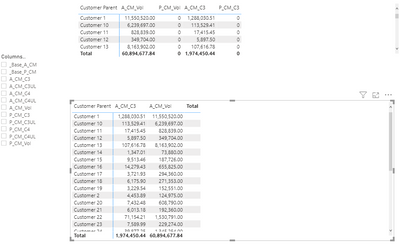

Check PBIX file attach.
Regards
Miguel Félix
Did I answer your question? Mark my post as a solution!
Proud to be a Super User!
Check out my blog: Power BI em Português- Mark as New
- Bookmark
- Subscribe
- Mute
- Subscribe to RSS Feed
- Permalink
- Report Inappropriate Content
Woah, i did not know that. Thanks a lot! Just one more query, Can i group all those into say some specific fields?
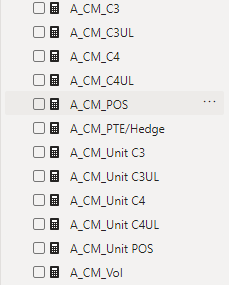
As you can see in the attached image I have around 12 measures for Actual values, I have another 12 for Plan & Previous Year (Total 35).
For Eg: Right now I have a matrix view with 40 columns. Say i just want to see C3, C4 & Volume, instead of selecting, A_CM_C3, P_CM_C3 and other 4 measures, is there a way i can just have one field called C3, C4, Volume and it selects/deselects the respective fields automatically?
- Mark as New
- Bookmark
- Subscribe
- Mute
- Subscribe to RSS Feed
- Permalink
- Report Inappropriate Content
Hi @Anonymous ,
Yes you can do it adding an additional level with the Grouping to your measure table and then making adjustment on the formula like this:
Totals Columns Grouping =
SWITCH (
    TRUE ();
    SELECTEDVALUE ( Selector[Grouping] ) = "Volume"
        && [Column selection] = "A_CM_Vol"; [A_CM_Vol];
    SELECTEDVALUE ( Selector[Grouping] ) = "Volume"
        && [Column selection] = "P_CM_Vol"; [P_CM_Vol];
...
)
But having 30/40 columns on your calculation maybe it0's better to unpivot the values by tree columns with volume, C3, c4 and the details below then you would not need to have any switch measure.
So you just need to add the second column to your slicer and the first column to your table.
Regards
Miguel Félix
Did I answer your question? Mark my post as a solution!
Proud to be a Super User!
Check out my blog: Power BI em Português- Mark as New
- Bookmark
- Subscribe
- Mute
- Subscribe to RSS Feed
- Permalink
- Report Inappropriate Content
Hi @Anonymous ,
To what I can understand you want to have an option for users to select columns that they see on the matrix table that is not an option you have on PBI by default however you can create a workaround.
Create an unrelated table with all your Columns Names that you want to have as on off on your matrix.
In my case I created a table named Selector:
Columns selection
| Quantity |
| Value |
Then add the following measures:
Column selection = MAX(Selector[Columns selection])

Totals Columns = SWITCH([Column selection];"Quantity";[Quantity total];"Value";[Value total])
On the second measure you should add all the related measure that you have for each column you want to show.
Now create your matrix in the following way:
Rows: Category (this are the columns that you want to have the details (keep the ones you have)
Columns: Selector[Columns Selection]
Values: [Totals Columns]
Should give the result below:
See attach PBIX.
Regards,
MFelix
Regards
Miguel Félix
Did I answer your question? Mark my post as a solution!
Proud to be a Super User!
Check out my blog: Power BI em Português
Helpful resources

New to Fabric Survey
If you have recently started exploring Fabric, we'd love to hear how it's going. Your feedback can help with product improvements.

Power BI DataViz World Championships - June 2026
A new Power BI DataViz World Championship is coming this June! Don't miss out on submitting your entry.

Join our Fabric User Panel
Share feedback directly with Fabric product managers, participate in targeted research studies and influence the Fabric roadmap.

Power BI Community Update - March 2026
Check out the March 2026 Power BI update to learn about new features.

| User | Count |
|---|---|
| 52 | |
| 38 | |
| 37 | |
| 19 | |
| 18 |


| User | Count |
|---|---|
| 66 | |
| 63 | |
| 34 | |
| 32 | |
| 21 |


