Join us in Barcelona for FabCon and SQLCon, September 28 - October 1, 2026.
This is best Fabric, Power BI, SQL and AI community event. How do we know? The last event sold out! Save €200 with code FABCMTY200.
Register now- Power BI forums
- Get Help with Power BI
- Desktop
- Service
- Report Server
- Power Query
- Mobile Apps
- Developer
- DAX Commands and Tips
- Custom Visuals Development Discussion
- Health and Life Sciences
- Power BI Spanish forums
- Translated Spanish Desktop
- Training and Consulting
- Instructor Led Training
- Dashboard in a Day for Women, by Women
- Galleries
- Data Stories Gallery
- Themes Gallery
- Contests Gallery
- QuickViz Gallery
- Quick Measures Gallery
- Visual Calculations Gallery
- Fabric Apps Gallery
- Notebook Gallery
- Translytical Task Flow Gallery
- TMDL Gallery
- R Script Showcase
- Webinars and Video Gallery
- Ideas
- Custom Visuals Ideas (read-only)
- Issues
- Issues
- Events
- Upcoming Events
The Fabric community is now in read-only for platform upgrade. Learn more
- Power BI forums
- Forums
- Get Help with Power BI
- Desktop
- Re: Dynamic column header in Matrix
- Subscribe to RSS Feed
- Mark Topic as New
- Mark Topic as Read
- Float this Topic for Current User
- Bookmark
- Subscribe
- Printer Friendly Page


- Mark as New
- Bookmark
- Subscribe
- Mute
- Subscribe to RSS Feed
- Permalink
Dynamic column header in Matrix
Hello friends,
I need my matrix columns to show months' names according to the slicer value chosen.
I understand that it is not yet supported and I have voted for an idea on this.
But I am still looking for a workaround, I feel there is one if we think out of the box.
Please help
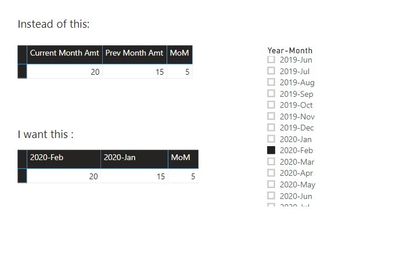
Solved! Go to Solution.


- Mark as New
- Bookmark
- Subscribe
- Mute
- Subscribe to RSS Feed
- Permalink
Hi,
After my test, I think if you do not have column headers, you can not dynamically change measure headings.
And also custom visuals can not reach this.
Best Regards,
Giotto Zhi

- Mark as New
- Bookmark
- Subscribe
- Mute
- Subscribe to RSS Feed
- Permalink
- Mark as New
- Bookmark
- Subscribe
- Mute
- Subscribe to RSS Feed
- Permalink
Hi,
If your data is like my test table as below, i have a workaround:
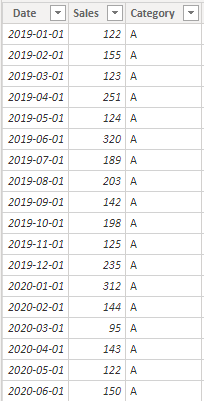
Please create a column to show Year and Month:
Year&Month = FORMAT('Table'[Date],"YYYY-MMM")Then create a calculated table, choose its column as a slicer:
Slicer = SELECTCOLUMNS('Table',"Date",[Date],"Name",[Year&Month])Then create a measure to show the chosen month's data and previous one month's data:
Value in Matrix =
IF (
    SELECTEDVALUE('Table'[Date]) <= MAX('Slicer'[Date]) && SELECTEDVALUE('Table'[Date])  >= DATE(YEAR(MAX('Slicer'[Date])),MONTH(MAX('Slicer'[Date]))-1,1),
    SUM ( 'Table'[Sales] ),
    BLANK ()
)
The result shows:
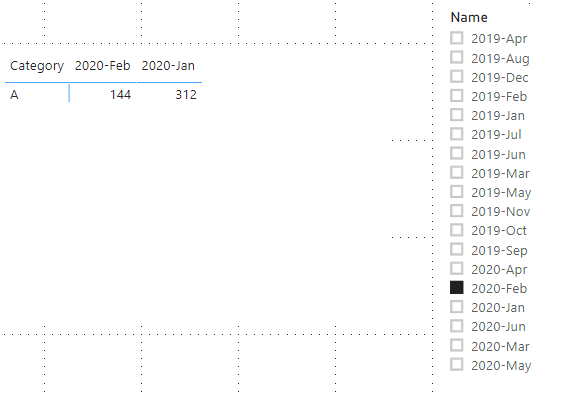
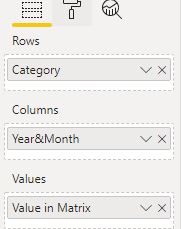
Here is my test pbix file:
Hope this helps.
Best Regards,
Giotto Zhi
- Mark as New
- Bookmark
- Subscribe
- Mute
- Subscribe to RSS Feed
- Permalink
Hi,
Can you reshare pbix file link please.
TKS
- Mark as New
- Bookmark
- Subscribe
- Mute
- Subscribe to RSS Feed
- Permalink
Thank you, @v-gizhi-msft
Your approach is very nice, thank you for sharing.
I was thinking more towards dynamic Measure headings.
My matrix has rows, several measures (that I want to be dynamic) and no columns.
Maybe there is a trick for this, too?
Maybe a custom visual?
- Mark as New
- Bookmark
- Subscribe
- Mute
- Subscribe to RSS Feed
- Permalink
Hi,
After my test, I think if you do not have column headers, you can not dynamically change measure headings.
And also custom visuals can not reach this.
Best Regards,
Giotto Zhi


- Mark as New
- Bookmark
- Subscribe
- Mute
- Subscribe to RSS Feed
- Permalink
Is this still not possible? I have the same question, where I need column headers to change dynamically. I need to use a table rather than a matrix visual because I have several non-matrix columns that need to be included.


- Mark as New
- Bookmark
- Subscribe
- Mute
- Subscribe to RSS Feed
- Permalink
Helpful resources

FabCon & SQLCon – Barcelona 2026
Join us in Barcelona for FabCon and SQLCon, the Fabric, Power BI, SQL, and AI community event. Save €200 with code FABCMTY200.

Power BI DataViz World Championships - June 2026
A new Power BI DataViz World Championship is coming this June! Don't miss out on submitting your entry.

| User | Count |
|---|---|
| 23 | |
| 22 | |
| 14 | |
| 14 | |
| 13 |


| User | Count |
|---|---|
| 47 | |
| 39 | |
| 24 | |
| 20 | |
| 20 |


