cancel
Showing results for 
Search instead for 
Did you mean: 

Learn from the best! Meet the four finalists headed to the FINALS of the Power BI Dataviz World Championships! Register now

Reply
Anonymous
Not applicable

Dynamic calculated table or visualization based on two selected dates

Hi,

I've got hourly data being generated for every day, with Date, Hour and a value. What I need is for a user to pick two dates, lets just call them Date A and Date B.  Then I need to create a visualization in my report, which will be the result of subtracing the hourly values of Date B from Date A, showing the difference between the two values per hour.

I also need a column on the resulting table or visualization that shows the average for the values for each row.

If possible, the default selection should be the values for the last day minus the values for the day before.

Looking for possible ways of solving this requirement as I haven't dealt with anything similar before. Assuming two parameters need to be involved, but that's about it.

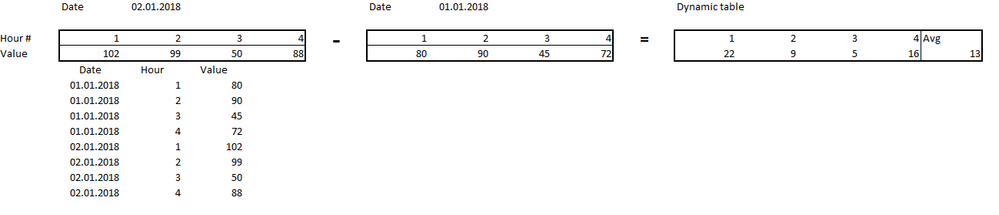
Attached an example of how the data might be structured for 4hours (bottom) and what the result would look like as a table or visualization.

Thanks in advance for any replies!

Data.png

1 ACCEPTED SOLUTION
v-yulgu-msft
Microsoft Employee
Microsoft Employee

Hi @Anonymous,


Create a calendar table which is unrelated to fact data table. Like this:

Date Tab = CALENDAR(DATE(2018,1,1),DATE(2018,1,8)) 

New measures:

value1 =
VAR maxdate =
    CALCULATE ( MAX ( TestData[Date] ), ALL ( TestData[Date] ) )
VAR mindate1 =
    MIN ( 'Date Tab'[Date] )
VAR mindate2 =
    CALCULATE (
        MAX ( TestData[Date] ),
        FILTER ( ALL ( TestData ), TestData[Date] < maxdate )
    )
VAR cal1 =
    CALCULATE (
        SUM ( TestData[Value] ),
        FILTER ( TestData, TestData[Date] = mindate1 )
    )
VAR cal2 =
    CALCULATE (
        SUM ( TestData[Value] ),
        FILTER ( TestData, TestData[Date] = mindate2 )
    )
RETURN
    IF ( ISFILTERED ( 'Date Tab'[Date] ), cal1, cal2 )

value2 =
VAR maxdate1 =
    CALCULATE ( MAX ( TestData[Date] ), ALL ( TestData[Date] ) )
VAR maxdate2 =
    MAX ( 'Date Tab'[Date] )
VAR cal1 =
    CALCULATE (
        SUM ( TestData[Value] ),
        FILTER ( TestData, TestData[Date] = maxdate1 )
    )
VAR cal2 =
    CALCULATE (
        SUM ( TestData[Value] ),
        FILTER ( TestData, TestData[Date] = maxdate2 )
    )
RETURN
    IF ( ISFILTERED ( 'Date Tab'[Date] ), cal2, cal1 )

diff = [value2]-[value1]

Average Diff = AVERAGEX(VALUES(TestData[Hour]),[diff])
1.PNG


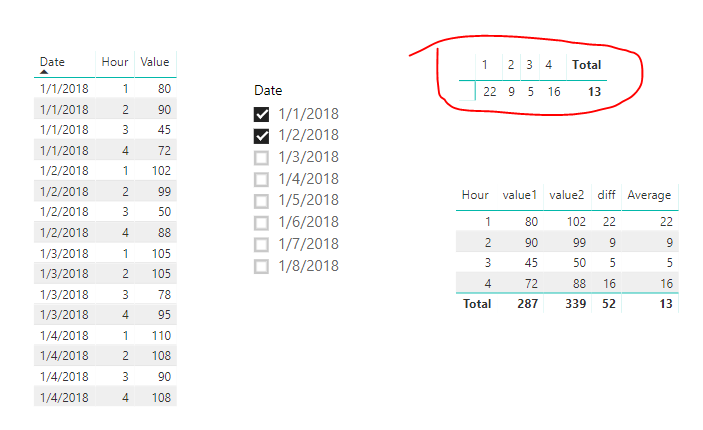
The highlighted Matrix (put [Hours] into Columns section of Matrix, put [Average Diff] into values section) is your desired output. The last column is the default total column by Matrix, it shows the average of values across all hours, but its column name cannot be changed. If you don't want it, you can use a Table visual, as shown in above image, at the bottom the highlighted Matrix.


Best regards,

Yuliana Gu

Community Support Team _ Yuliana Gu
If this post helps, then please consider Accept it as the solution to help the other members find it more quickly.

View solution in original post

2 REPLIES 2
v-yulgu-msft
Microsoft Employee
Microsoft Employee

Hi @Anonymous,


Create a calendar table which is unrelated to fact data table. Like this:

Date Tab = CALENDAR(DATE(2018,1,1),DATE(2018,1,8)) 

New measures:

value1 =
VAR maxdate =
    CALCULATE ( MAX ( TestData[Date] ), ALL ( TestData[Date] ) )
VAR mindate1 =
    MIN ( 'Date Tab'[Date] )
VAR mindate2 =
    CALCULATE (
        MAX ( TestData[Date] ),
        FILTER ( ALL ( TestData ), TestData[Date] < maxdate )
    )
VAR cal1 =
    CALCULATE (
        SUM ( TestData[Value] ),
        FILTER ( TestData, TestData[Date] = mindate1 )
    )
VAR cal2 =
    CALCULATE (
        SUM ( TestData[Value] ),
        FILTER ( TestData, TestData[Date] = mindate2 )
    )
RETURN
    IF ( ISFILTERED ( 'Date Tab'[Date] ), cal1, cal2 )

value2 =
VAR maxdate1 =
    CALCULATE ( MAX ( TestData[Date] ), ALL ( TestData[Date] ) )
VAR maxdate2 =
    MAX ( 'Date Tab'[Date] )
VAR cal1 =
    CALCULATE (
        SUM ( TestData[Value] ),
        FILTER ( TestData, TestData[Date] = maxdate1 )
    )
VAR cal2 =
    CALCULATE (
        SUM ( TestData[Value] ),
        FILTER ( TestData, TestData[Date] = maxdate2 )
    )
RETURN
    IF ( ISFILTERED ( 'Date Tab'[Date] ), cal2, cal1 )

diff = [value2]-[value1]

Average Diff = AVERAGEX(VALUES(TestData[Hour]),[diff])

1.PNG


The highlighted Matrix (put [Hours] into Columns section of Matrix, put [Average Diff] into values section) is your desired output. The last column is the default total column by Matrix, it shows the average of values across all hours, but its column name cannot be changed. If you don't want it, you can use a Table visual, as shown in above image, at the bottom the highlighted Matrix.


Best regards,

Yuliana Gu

Community Support Team _ Yuliana Gu
If this post helps, then please consider Accept it as the solution to help the other members find it more quickly.
Anonymous
Not applicable

Amazing, thank you so much!

Ideally, I would have a region column, then the 24 columns for hours with values for each hour within each region, and finally a column for averaging the rows at the end. Would it be best to go for a matrix setup with a category like that? The regions are also included in the original data tables, with values for each hour of course.
 

Region    | Hour 1 | Hour  2 | Hour 3 | Hour 4 .... | Average
Region 1
Region 2
Region 3

Helpful resources

Announcements
Join our Fabric User Panel

Join our Fabric User Panel

Share feedback directly with Fabric product managers, participate in targeted research studies and influence the Fabric roadmap.

February Power BI Update Carousel

Power BI Monthly Update - February 2026

Check out the February 2026 Power BI update to learn about new features.

FabCon Atlanta 2026 carousel

FabCon Atlanta 2026

Join us at FabCon Atlanta, March 16-20, for the ultimate Fabric, Power BI, AI and SQL community-led event. Save $200 with code FABCOMM.