Join us in Barcelona for FabCon and SQLCon, September 28 - October 1, 2026.
This is best Fabric, Power BI, SQL and AI community event. How do we know? The last event sold out! Save €200 with code FABCMTY200.
Register now- Power BI forums
- Get Help with Power BI
- Desktop
- Service
- Report Server
- Power Query
- Mobile Apps
- Developer
- DAX Commands and Tips
- Custom Visuals Development Discussion
- Health and Life Sciences
- Power BI Spanish forums
- Translated Spanish Desktop
- Training and Consulting
- Instructor Led Training
- Dashboard in a Day for Women, by Women
- Galleries
- Data Stories Gallery
- Themes Gallery
- Contests Gallery
- QuickViz Gallery
- Quick Measures Gallery
- Visual Calculations Gallery
- Fabric Apps Gallery
- Notebook Gallery
- Translytical Task Flow Gallery
- TMDL Gallery
- R Script Showcase
- Webinars and Video Gallery
- Ideas
- Custom Visuals Ideas (read-only)
- Issues
- Issues
- Events
- Upcoming Events
July 28 - August 9 | Final Round of the Power BI Dataviz World Championships. This is your chance. Learn more
- Power BI forums
- Forums
- Get Help with Power BI
- Desktop
- Re: Dynamic axis based on user
- Subscribe to RSS Feed
- Mark Topic as New
- Mark Topic as Read
- Float this Topic for Current User
- Bookmark
- Subscribe
- Printer Friendly Page


- Mark as New
- Bookmark
- Subscribe
- Mute
- Subscribe to RSS Feed
- Permalink
- Report Inappropriate Content
Dynamic axis based on user
Hi people,
I want to create a visualisation of which axis change based on the logged-in user.
In my organisation, there are managers and team leads with the following hierarchy.
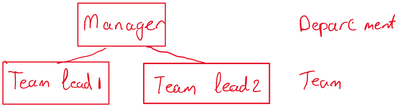
I want to show the same visualisation, with for example the sales vs budget.
In this visualisation should the manager see the department results and the team leads should see the results per team, like the visual below.
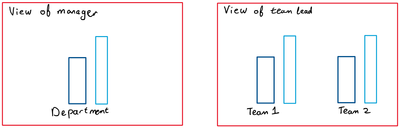
Does somebody know how I could create this graph / model?
Solved! Go to Solution.


- Mark as New
- Bookmark
- Subscribe
- Mute
- Subscribe to RSS Feed
- Permalink
- Report Inappropriate Content
I believe that you need a table like this:
| ID | Category | Category 2 | |
| Project - Team 1 | Project | Team 1 | [email protected] |
| Project - Team 2 | Project | Team 2 | [email protected] |
| Project - Team 3 | Project | Team 3 | [email protected] |
| Maintainance - Team 1 | Maintainance | Team 1 | [email protected] |
| Maintainance - Team 2 | Maintainance | Team 2 | [email protected] |
| Maintainance - Team 3 | Maintainance | Team 3 | [email protected] |
| Project - Team 1 | Team 1 | [email protected] | |
| Maintainance - Team 1 | Team 1 | [email protected] | |
| Project - Team 2 | Team 2 | [email protected] | |
| Maintainance - Team 2 | Team 2 | [email protected] | |
| Project - Team 3 | Team 3 | [email protected] | |
| Maintainance - Team 3 | Team 3 | [email protected] |
You then connect it to a mapping table, with only distict ID's:
| ID |
| Project - Team 1 |
| Project - Team 2 |
| Project - Team 3 |
| Maintainance - Team 1 |
| Maintainance - Team 2 |
| Maintainance - Team 3 |
And then you connect the mapping table to your sales table.
Crossfilter direction "Both" on the relationships. And finally you apply RLS on the E-mail column of the first table.
This should mean that if you use the "Category" column you will only see departments as a DM, and only Teams as a TL.
What do you think?
Br,
J
Connect on LinkedIn
- Mark as New
- Bookmark
- Subscribe
- Mute
- Subscribe to RSS Feed
- Permalink
- Report Inappropriate Content
Hi,
You should be able to accomplish this by applying RLS to your model.
How does the relationships between "Data" - "Person" - "Team/Department" look at the moment?
/ J
Connect on LinkedIn
- Mark as New
- Bookmark
- Subscribe
- Mute
- Subscribe to RSS Feed
- Permalink
- Report Inappropriate Content
I've added the employee table to my last post.
- Mark as New
- Bookmark
- Subscribe
- Mute
- Subscribe to RSS Feed
- Permalink
- Report Inappropriate Content
This is the current model:
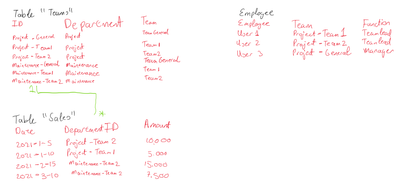
Currently, no relationship is defined between the Teams and the Employee table.
I'm using RLS to define limit the shown data to the users. E.g.:
User 1: Department = "Project" (because the user should also see the results of other teams in de department)
User 2: Department = "Project"
User 3: Department = "Project"
To clarify, one visual should be used and not two.
- Mark as New
- Bookmark
- Subscribe
- Mute
- Subscribe to RSS Feed
- Permalink
- Report Inappropriate Content
RLS in this scenario will mean the following:
Department Managers will only see the departments they manage.
Team Leads will only see the teams they lead.
Team Members will only see the teams they are part of.
Does this work for you business case?
Br,
J
Connect on LinkedIn
- Mark as New
- Bookmark
- Subscribe
- Mute
- Subscribe to RSS Feed
- Permalink
- Report Inappropriate Content
Yes, kind of.
However, the manager's x-axis in the graph should show the department they manage.
The x-axis in the graph of the team leads, should show the teams of the department they are in (so not only their team).
The team member, don't have access to Power BI, so they are out of scope.
- Mark as New
- Bookmark
- Subscribe
- Mute
- Subscribe to RSS Feed
- Permalink
- Report Inappropriate Content
I believe that you need a table like this:
| ID | Category | Category 2 | |
| Project - Team 1 | Project | Team 1 | [email protected] |
| Project - Team 2 | Project | Team 2 | [email protected] |
| Project - Team 3 | Project | Team 3 | [email protected] |
| Maintainance - Team 1 | Maintainance | Team 1 | [email protected] |
| Maintainance - Team 2 | Maintainance | Team 2 | [email protected] |
| Maintainance - Team 3 | Maintainance | Team 3 | [email protected] |
| Project - Team 1 | Team 1 | [email protected] | |
| Maintainance - Team 1 | Team 1 | [email protected] | |
| Project - Team 2 | Team 2 | [email protected] | |
| Maintainance - Team 2 | Team 2 | [email protected] | |
| Project - Team 3 | Team 3 | [email protected] | |
| Maintainance - Team 3 | Team 3 | [email protected] |
You then connect it to a mapping table, with only distict ID's:
| ID |
| Project - Team 1 |
| Project - Team 2 |
| Project - Team 3 |
| Maintainance - Team 1 |
| Maintainance - Team 2 |
| Maintainance - Team 3 |
And then you connect the mapping table to your sales table.
Crossfilter direction "Both" on the relationships. And finally you apply RLS on the E-mail column of the first table.
This should mean that if you use the "Category" column you will only see departments as a DM, and only Teams as a TL.
What do you think?
Br,
J
Connect on LinkedIn

Helpful resources

FabCon & SQLCon – Barcelona 2026
Join us in Barcelona for FabCon and SQLCon, the Fabric, Power BI, SQL, and AI community event. Save €200 with code FABCMTY200.

Fabric Community Sticker Challenge - Barcelona 2026
If you love stickers, then you will definitely want to check out our community sticker challenge, Barcelona edition!

Power BI Monthly Update - July 2026
Check out the July 2026 Power BI update to learn about new features.

Power BI DataViz World Championships - June 2026
A new Power BI DataViz World Championship is coming this June! Don't miss out on submitting your entry.

| User | Count |
|---|---|
| 25 | |
| 23 | |
| 19 | |
| 18 | |
| 14 |


| User | Count |
|---|---|
| 24 | |
| 20 | |
| 20 | |
| 19 | |
| 18 |


