Join us at FabCon Atlanta from March 16 - 20, 2026, for the ultimate Fabric, Power BI, AI and SQL community-led event. Save $200 with code FABCOMM.
Register now!The Power BI Data Visualization World Championships is back! It's time to submit your entry. Live now!
Hey guys,
I'm creating a PowerBi report, where i want to show the different composition of different elements depending on a slicer.
i have a Table where my materials are listed with the material number and the different elements:
Dim Material:
| Material | C | Si | Mn | P | S | Al | N | Ti |
| 123456 | 0,168 | 0,215 | 1,48 | 0,013 | 0,0043 | 0,034 | ||
| 987654 | 0,036 | 0,14 | 0,422 | 0,006 | 0,0044 | 0,032 | 0,0041 | |
| 123456 | 0,169 | 0,210 | 1,52 | 0,006 | 0,0044 | 0,032 | ||
| 987654 | 0,035 | 0,08 | 0,425 | 0,01 | 0,007 | 0,041 | 0,0055 | |
| 987654 | 0,040 | 0,10 | 0,426 | 0,006 | 0,0044 | 0,032 | 0,0027 | |
| 456789 | 0,145 | 0,202 | 0,215 | 0,006 | 0,0044 | 0,032 | 0,002 | |
| 123456 | 0,172 | 0,220 | 1,38 | 0,006 | 0,0044 | 0,032 | ||
| 456789 | 0,145 | 0,192 | 0,218 | 0,014 | 0,0056 | 0,001 | 0,002 |
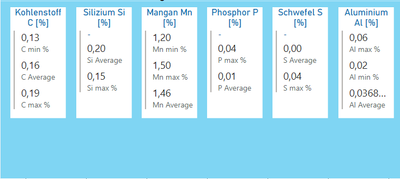
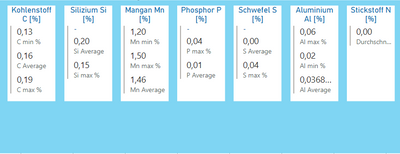
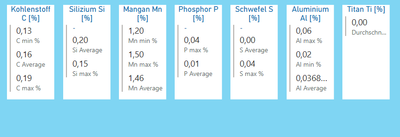
and when i select a material in a slicer that my page gets a dynamic filter and only the elements of my material wil show up:
For material: 123456
for material: 987654
for material: 456789
The visuals are just a blue rectangle to highlight the composition of the material and the values are maps.
Is it possible to set a something like a dynamic filter so only the elements which are part of the selected materials are shown.
Thanks in advance
Sincerely
Jonas
Solved! Go to Solution.
Hi @Anonymous ,
Do you need to have the values within this exact look?
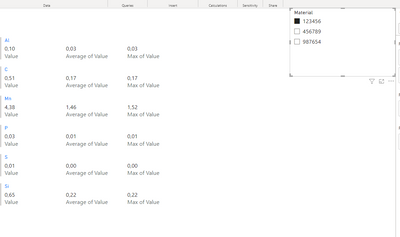
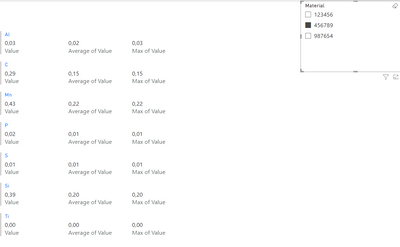
If you unpivot the values and then added to a multi row card you can have the values presenting or not:
Regards
Miguel Félix
Proud to be a Super User!
Check out my blog: Power BI em PortuguêsHi @Anonymous ,
Do you need to have the values within this exact look?
If you unpivot the values and then added to a multi row card you can have the values presenting or not:
Regards
Miguel Félix
Proud to be a Super User!
Check out my blog: Power BI em PortuguêsHi @MFelix,
The look isn't this important. I just took it over from a colleague, who is using it for only one material.
Thanks for your help, your solution is working fine for me.
| User | Count |
|---|---|
| 53 | |
| 40 | |
| 35 | |
| 24 | |
| 22 |
| User | Count |
|---|---|
| 135 | |
| 109 | |
| 57 | |
| 43 | |
| 38 |