cancel
Showing results for 
Search instead for 
Did you mean: 

Learn from the best! Meet the four finalists headed to the FINALS of the Power BI Dataviz World Championships! Register now

Reply
Anonymous
Not applicable

Dynamic Visual

Hey guys,


I'm creating a PowerBi report, where i want to show the different composition of different elements depending on a slicer.


i have a Table where my materials are listed with the material number and the different elements:

Dim Material:

MaterialCSiMnPSAlNTi
1234560,1680,2151,480,0130,00430,034  
9876540,0360,140,4220,0060,00440,0320,0041 
1234560,1690,2101,520,0060,00440,032  
9876540,0350,080,4250,010,0070,0410,0055 
9876540,0400,100,4260,0060,00440,0320,0027 
4567890,1450,2020,2150,0060,00440,032 0,002
1234560,1720,2201,380,0060,00440,032  
4567890,1450,1920,2180,0140,00560,001 0,002


and when i select a material in a slicer that my page gets a dynamic filter and only the elements of my material wil show up:

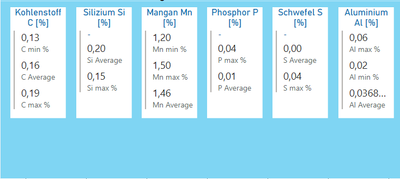
For material: 123456

Jonas_G_0-1647850651696.png

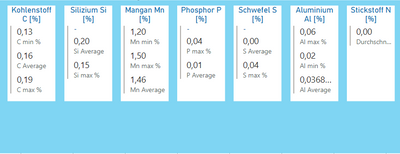
for material: 987654

Jonas_G_1-1647850741974.png

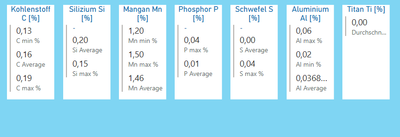
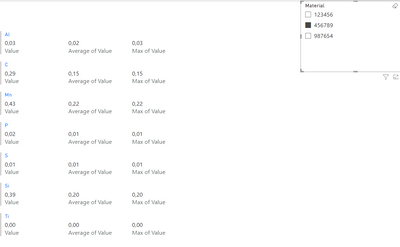
for material: 456789

Jonas_G_2-1647850780463.png


The visuals are just a blue rectangle to highlight the composition of the material and the values are maps.

Is it possible to set a something like a dynamic filter so only the elements which are part of the selected materials are shown.


Thanks in advance


Sincerely 

Jonas

1 ACCEPTED SOLUTION
MFelix
Super User
Super User

Hi @Anonymous ,


Do you need to have the values within this exact look?


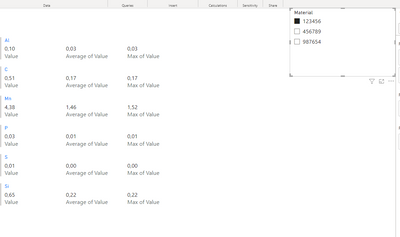
If you unpivot the values and then added to a multi row card you can have the values presenting or not:


MFelix_0-1648049414473.png


MFelix_1-1648049428340.png


Regards

Miguel Félix


Did I answer your question? Mark my post as a solution!

Proud to be a Super User!

Check out my blog: Power BI em Português


View solution in original post

2 REPLIES 2
MFelix
Super User
Super User

Hi @Anonymous ,


Do you need to have the values within this exact look?


If you unpivot the values and then added to a multi row card you can have the values presenting or not:


MFelix_0-1648049414473.png


MFelix_1-1648049428340.png


Regards

Miguel Félix


Did I answer your question? Mark my post as a solution!

Proud to be a Super User!

Check out my blog: Power BI em Português


Anonymous
Not applicable

Hi @MFelix,


The look isn't this important. I just took it over from a colleague, who is using it for only one material.


Thanks for your help, your solution is working fine for me. 

Helpful resources

Announcements
Join our Fabric User Panel

Join our Fabric User Panel

Share feedback directly with Fabric product managers, participate in targeted research studies and influence the Fabric roadmap.

March Power BI Update Carousel

Power BI Community Update - March 2026

Check out the March 2026 Power BI update to learn about new features.