
cancel
Showing results for 
Search instead for 
Did you mean: 

July 7 - July 17 | Round 2 of the Power BI Dataviz World Championships. Don't miss your chance! Learn more

Reply
JRyan
Frequent Visitor

Dynamic Visual Title - Cannot Select Measure

Hi,


I've created a very simple measure:


TestTitle = "test"


And am trying to use this as a dynamic title for a visual, however when I go to the Conditional Formatting options for the Title, I cannot select ANY measure I've created to use as the title.  I can select any column, but measures are all greyed out.


This should have been possible from April 2019, can anyone else do this?

5 REPLIES 5
Anonymous
Not applicable

Just came across this post in the search for a solution to the same challenge, and after figuring out a solution that does not involve having the measure in the shared dataset, I figured I would share that solution here for anyone else who comes across this.


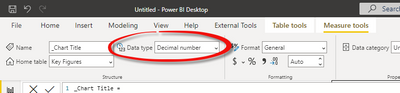
When creating the measure containing you dynamic title, it defaults to data type Decimal Number:

PSEJR_0-1657701387642.png

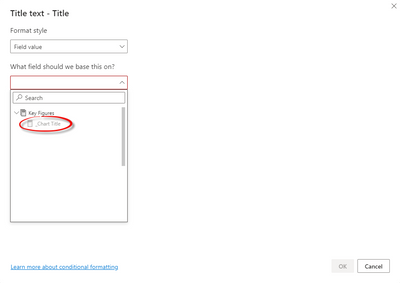
With that data type, the measure is greyed out:

PSEJR_1-1657701611732.png


However if the data type of the measure is changed to text, it is then possible to chose it:

PSEJR_2-1657701672870.png

PSEJR_3-1657701700264.png


I have tested it on both a live connection to AAS and PBI, and both works.

This works! It should be marked as the solution. Thanks @Anonymous !

amitchandak
Super User
Super User

@JRyan , You created a  test measure. So conditional formatting might have been disabled for that.


Create like

Measure =1 and check.

Any way not very clear what you want to achieve here

Share with Power BI Enthusiasts: Full Power BI Video (20 Hours) YouTube
Microsoft Fabric Series 60+ Videos YouTube
Microsoft Fabric Hindi End to End YouTube

Ok seems that I've sorted this out now (with the help of a colleague!)


Looks the Measure you create must be in the same pbix as the Dataset, i.e. you cannot create a Measure to use as a dynamic title in a Report that is linked to a Shared Dataset - it must be in the Shared Dataset itself.

Hi @JRyan


Correctly,glad that you have solved your issue,could you pls mark the reply as answered to close it?


Much appreciated.


Best Regards,
Kelly
Did I answer your question? Mark my post as a solution!

Helpful resources

Announcements
FabCon and SQLCon Barcelona 2026

FabCon & SQLCon – Barcelona 2026

Join us in Barcelona for FabCon and SQLCon, the Fabric, Power BI, SQL, and AI community event. Save €200 with code FABCMTY200.

60 days of Data Days Carousel

Data Days 2026

Join Fabric Data Days 2026: 60 days of free live/on-demand sessions, challenges, study groups, and certification opportunities.

Power BI DataViz World Championships carousel

Power BI DataViz World Championships - June 2026

A new Power BI DataViz World Championship is coming this June! Don't miss out on submitting your entry.

Top Solution Authors