cancel
Showing results for 
Search instead for 
Did you mean: 

Get Fabric Certified for FREE during Fabric Data Days. Don't miss your chance! Request now

Reply
Shreeram04
Resolver III
Resolver III

Dynamic Value

Hi All,


How to get dynamic value in a visual based on the slicer. If it is measured means I can easily achieve but when it comes to the date column means how can I achieve it.


For Example, I have four column-product, sales date, return date, and order date. If I select sales date in a slicer means its show only sale date value in a visual like wise same for the other two option all done based on product. It shows value dynamically in visual.


Please help to identify a solution for this one. Thanks in advance.

1 ACCEPTED SOLUTION
amitchandak
Super User
Super User

@Shreeram04 , You need explore Power bi Field parameter (May 2022 update)

https://medium.com/@amitchandak/power-bi-field-parameters-a-quick-way-for-dynamic-visuals-fc4095ae9a...

Share with Power BI Enthusiasts: Full Power BI Video (20 Hours) YouTube
Microsoft Fabric Series 60+ Videos YouTube
Microsoft Fabric Hindi End to End YouTube

View solution in original post

4 REPLIES 4
amitchandak
Super User
Super User

@Shreeram04 , You need explore Power bi Field parameter (May 2022 update)

https://medium.com/@amitchandak/power-bi-field-parameters-a-quick-way-for-dynamic-visuals-fc4095ae9a...

Share with Power BI Enthusiasts: Full Power BI Video (20 Hours) YouTube
Microsoft Fabric Series 60+ Videos YouTube
Microsoft Fabric Hindi End to End YouTube

Thanks for your reply it works perfectly. One More question supposes if sales data and orders date has come under group 1 and return date plus some more date columns come under group 2. 


When I select group1 in slicer means it will show sales and order dates columns and if I click group 2 means it shows the return date...


How can I achieve this one?. Thanks in advance.

Thanks for your reply.


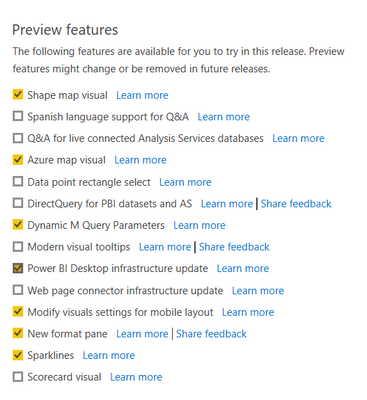
But on my power bi desktop, I am unable to find filed parameter checkbox. From where I can find it?

Shreeram04_0-1654585548405.png


Thanks.

@Shreeram04 ,Download latest version of Power BI Dekstop to see that option.


Don't forget to give thumbs up and accept this as a solution if it helped you!!!

Please take a quick glance at newly created dashboards : Restaurant Management Dashboard , HR Analytics Report , Hotel Management Report, Sales Analysis Report , Fortune 500 Companies Analysis , Revenue Tracking Dashboard

Helpful resources

Announcements
November Power BI Update Carousel

Power BI Monthly Update - November 2025

Check out the November 2025 Power BI update to learn about new features.

Fabric Data Days Carousel

Fabric Data Days

Advance your Data & AI career with 50 days of live learning, contests, hands-on challenges, study groups & certifications and more!

FabCon Atlanta 2026 carousel

FabCon Atlanta 2026

Join us at FabCon Atlanta, March 16-20, for the ultimate Fabric, Power BI, AI and SQL community-led event. Save $200 with code FABCOMM.

Top Solution Authors
Top Kudoed Authors