
Join us at FabCon Atlanta from March 16 - 20, 2026, for the ultimate Fabric, Power BI, AI and SQL community-led event. Save $200 with code FABCOMM.
Register now!The Power BI Data Visualization World Championships is back! Get ahead of the game and start preparing now! Learn more
Hello All,
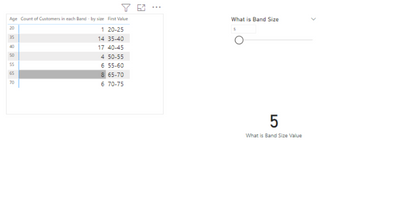
My requirement is to identify a group of age from an age column using a filter. While the filter value is 10 means, I want the x-axis value as the sum of 10 like 0-10,10-20......etc.depends upon data.
Actually, I did this one with static data by using the age group method in the table.
But I want to generate age difference(0-10,10-20......) dynamically based on slicer value, without static data how can I achieve this one.
Please help with this one. Thanks in advance.
Solved! Go to Solution.
Hi @Anonymous ,
Here are the steps you can follow:
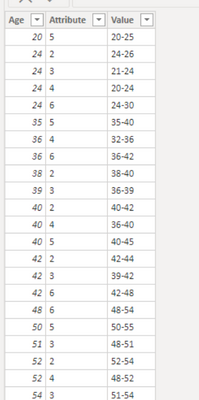
1. Use column [Attribute] as slicer.
2. Create measure.
measure_value =
var _select =SELECTEDVALUE('Table'[Attribute])
var _age1=SUMX(FILTER('Table','Table'[Attribute]=_select),[Age]
var _age2=_age1+_select
var _age3=_age1-_select
return
SWITCH(
TRUE(),
_select in {2,5,6},_age1 &"-"& _age2,
_select in {3,4} ,_age3 &"-"& _age1)
3. Result:
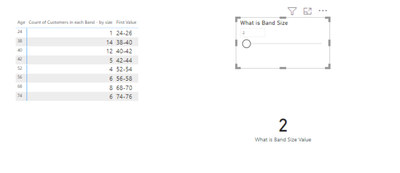
When Attribute=2 is selected, it is displayed as:
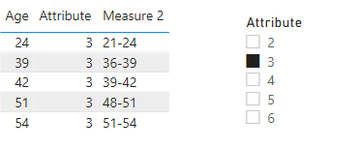
When Attribute= 3 is selected, it is displayed as:
Best Regards,
Liu Yang
If this post helps, then please consider Accept it as the solution to help the other members find it more quickly
Hi @Anonymous ,
Here are the steps you can follow:
1. Use column [Attribute] as slicer.
2. Create measure.
measure_value =
var _select =SELECTEDVALUE('Table'[Attribute])
var _age1=SUMX(FILTER('Table','Table'[Attribute]=_select),[Age]
var _age2=_age1+_select
var _age3=_age1-_select
return
SWITCH(
TRUE(),
_select in {2,5,6},_age1 &"-"& _age2,
_select in {3,4} ,_age3 &"-"& _age1)
3. Result:
When Attribute=2 is selected, it is displayed as:
When Attribute= 3 is selected, it is displayed as:
Best Regards,
Liu Yang
If this post helps, then please consider Accept it as the solution to help the other members find it more quickly
@Anonymous , Power Bi Axis has come from some static columns at the end. while you can create a measure with those values. I doubt you can use that on axis
The Power BI Data Visualization World Championships is back! Get ahead of the game and start preparing now!
| User | Count |
|---|---|
| 39 | |
| 37 | |
| 33 | |
| 32 | |
| 29 |
| User | Count |
|---|---|
| 133 | |
| 88 | |
| 85 | |
| 68 | |
| 64 |