This time we’re going bigger than ever. Fabric, Power BI, SQL, AI and more. We're covering it all. You won't want to miss it.
Learn moreDid you hear? There's a new SQL AI Developer certification (DP-800). Start preparing now and be one of the first to get certified. Register now
Hello All,
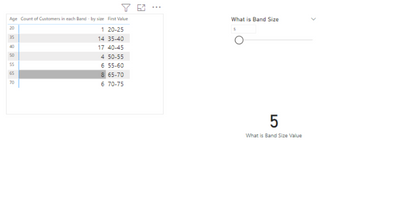
My requirement is to identify a group of age from an age column using a filter. While the filter value is 10 means, I want the x-axis value as the sum of 10 like 0-10,10-20......etc.depends upon data.
Actually, I did this one with static data by using the age group method in the table.
But I want to generate age difference(0-10,10-20......) dynamically based on slicer value, without static data how can I achieve this one.
Please help with this one. Thanks in advance.
Solved! Go to Solution.
Hi @Anonymous ,
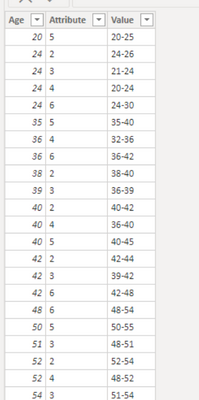
Here are the steps you can follow:
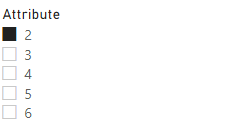
1. Use column [Attribute] as slicer.
2. Create measure.
measure_value =
var _select =SELECTEDVALUE('Table'[Attribute])
var _age1=SUMX(FILTER('Table','Table'[Attribute]=_select),[Age]
var _age2=_age1+_select
var _age3=_age1-_select
return
SWITCH(
TRUE(),
_select in {2,5,6},_age1 &"-"& _age2,
_select in {3,4} ,_age3 &"-"& _age1)
3. Result:
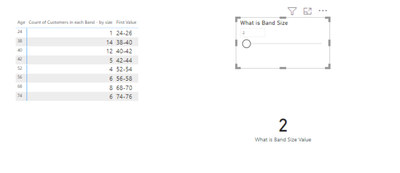
When Attribute=2 is selected, it is displayed as:
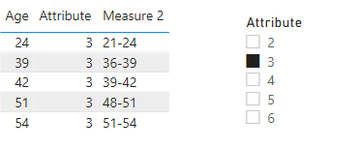
When Attribute= 3 is selected, it is displayed as:
Best Regards,
Liu Yang
If this post helps, then please consider Accept it as the solution to help the other members find it more quickly
Hi @Anonymous ,
Here are the steps you can follow:
1. Use column [Attribute] as slicer.
2. Create measure.
measure_value =
var _select =SELECTEDVALUE('Table'[Attribute])
var _age1=SUMX(FILTER('Table','Table'[Attribute]=_select),[Age]
var _age2=_age1+_select
var _age3=_age1-_select
return
SWITCH(
TRUE(),
_select in {2,5,6},_age1 &"-"& _age2,
_select in {3,4} ,_age3 &"-"& _age1)
3. Result:
When Attribute=2 is selected, it is displayed as:
When Attribute= 3 is selected, it is displayed as:
Best Regards,
Liu Yang
If this post helps, then please consider Accept it as the solution to help the other members find it more quickly
@Anonymous , Power Bi Axis has come from some static columns at the end. while you can create a measure with those values. I doubt you can use that on axis
Check out the April 2026 Power BI update to learn about new features.
Sign up to receive a private message when registration opens and key events begin.
If you have recently started exploring Fabric, we'd love to hear how it's going. Your feedback can help with product improvements.
| User | Count |
|---|---|
| 35 | |
| 32 | |
| 27 | |
| 23 | |
| 16 |
| User | Count |
|---|---|
| 65 | |
| 50 | |
| 30 | |
| 25 | |
| 24 |