cancel
Showing results for 
Search instead for 
Did you mean: 

Learn from the best! Meet the four finalists headed to the FINALS of the Power BI Dataviz World Championships! Register now

Reply

Dynamic URL filter based on value from Salesforce?

Hello,


I am having a heck of a time trying to embed Power BI into Salesforce.  I got it to work with the Salesforce desktop application and it filters to the account being viewed in Salesforce but this does not work on the Salesforce mobile app.


I am now trying to implement a formula field in Salesforce which is a link to view the Power BI report in the Power BI app.  I have got the link to redirect to the report in Power BI but it is not filtering to the account that the user was viewing in Salesforce.


I asked Salesforce for help but they basically said "buy Tableau."  My edited URL is below.  POS_CUSTOMER_DIMENSION_V/SALESFORCE_ID is my dimension and field in Power BI.  Record.ID is the account ID in Salesforce.


markjohnson952_0-1619813502244.png


1 ACCEPTED SOLUTION

I was able to figure this out.  Here is an example from my Hyperlink

?filter=POS_CUSTOMER_DIMENSION_V/PARTY_ID eq '" & Unique_Account_ID__c & "'"

View solution in original post

4 REPLIES 4
GlynMThomas
Resolver I
Resolver I

How did you manage to get salesforce to embed using the filter url? Were there any special settings you had to adjusy in salesforce? We can get one embedded without a filter but we want it to filter and it doesn't display at all when trying to set a filter.

I was able to figure this out.  Here is an example from my Hyperlink

?filter=POS_CUSTOMER_DIMENSION_V/PARTY_ID eq '" & Unique_Account_ID__c & "'"

amitchandak
Super User
Super User

@markjohnson952, Not very clear to me. Refer this doc can help you

https://docs.microsoft.com/en-us/power-bi/collaborate-share/service-url-filters

Share with Power BI Enthusiasts: Full Power BI Video (20 Hours) YouTube
Microsoft Fabric Series 60+ Videos YouTube
Microsoft Fabric Hindi End to End YouTube

I did reference that article and I am unsure how to make the filter "dynamic." To hopefully provide a better understanding of my problem, I have attached a few more screenshots.

The first picture is what the embedded Power BI report looks like in Salesforce Desktop. That report filters to the account being viewed and it works properly.
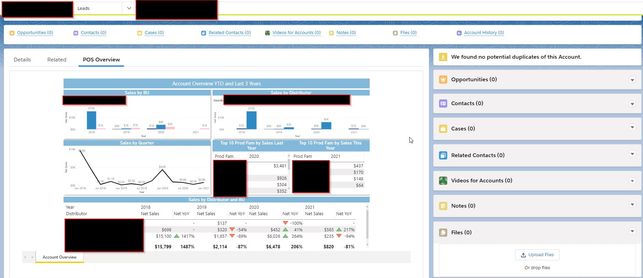
 

PBI Desktop.jpg


The second picture is a custom field I created in Salesforce to hopefully get this report to work on the Salesforce mobile app. The field creates a link in Salesforce where the user clicks it on the account page and it then opens the Power BI report in the Power BI mobile app. I cannot get it to filter to the account the user was viewing in Salesforce. I am attempting to get it to work with the Hyperlink with this filter in the URL "&?filter=POS_CUSTOMER_DIMENSION_V/SALESFORCE_ID eq 'Record.ID' "


That same filter works in the desktop app for Salesforce.
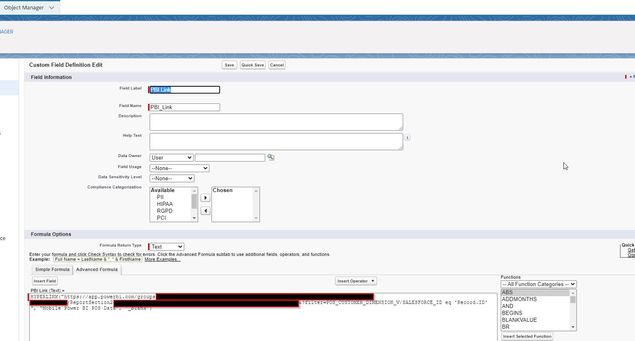
 

Mobile Link.jpg

Helpful resources

Announcements
Join our Fabric User Panel

Join our Fabric User Panel

Share feedback directly with Fabric product managers, participate in targeted research studies and influence the Fabric roadmap.

February Power BI Update Carousel

Power BI Monthly Update - February 2026

Check out the February 2026 Power BI update to learn about new features.

FabCon Atlanta 2026 carousel

FabCon Atlanta 2026

Join us at FabCon Atlanta, March 16-20, for the ultimate Fabric, Power BI, AI and SQL community-led event. Save $200 with code FABCOMM.
