Join us at FabCon Atlanta from March 16 - 20, 2026, for the ultimate Fabric, Power BI, AI and SQL community-led event. Save $200 with code FABCOMM.
Register now!Learn from the best! Meet the four finalists headed to the FINALS of the Power BI Dataviz World Championships! Register now
Hi all,
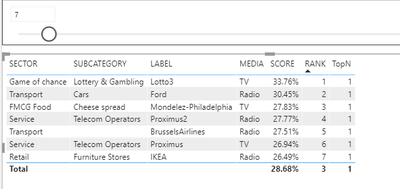
I have seen several examples with a dynamic top N but I just can't seem to get it working in my report.
Could someone have a look at my example mScore_topN.pbix at the following link ? mScore
Many thanks
David
Solved! Go to Solution.
change your TopN measure to
TopN = if([RANK] <= SELECTEDVALUE('Top N'[Top N]),1,0)
and then filter your visual by TopN = 1
change your TopN measure to
TopN = if([RANK] <= SELECTEDVALUE('Top N'[Top N]),1,0)
and then filter your visual by TopN = 1
Hi @lbendlin
This is great many thanks.
I'm not very good with DAX. Any idea how I could also add a Bottom N filter ?
Thanks
David
Run a MAXX over the RANKX and then subtract the rank from the result. That makes the BottomN behave like the TopN.
Watch out for performance issues with large lists.
Thanks @lbendlin
I'll keep that in mind. For the moment I have duplicated the table and added a top n and bootom n. This way they can compare the top and the bottom at a glance.
Thanks for your reply
@ADP007 ,
Use what if analysis with incremant of 1 for N filter.
Regards,
Manikumar
Proud to be a Super User!
Share feedback directly with Fabric product managers, participate in targeted research studies and influence the Fabric roadmap.
Check out the February 2026 Power BI update to learn about new features.
| User | Count |
|---|---|
| 52 | |
| 50 | |
| 34 | |
| 15 | |
| 14 |
| User | Count |
|---|---|
| 94 | |
| 77 | |
| 41 | |
| 27 | |
| 25 |