Don't miss your chance to take the Fabric Data Engineer (DP-600) exam for FREE! Find out how by attending the DP-600 session on April 23rd (pacific time), live or on-demand.
Learn moreNext up in the FabCon + SQLCon recap series: The roadmap for Microsoft SQL and Maximizing Developer experiences in Fabric. All sessions are available on-demand after the live show. Register now
Hi all,
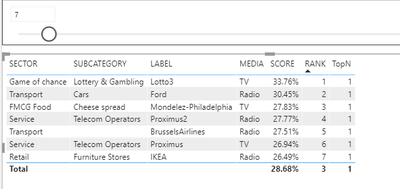
I have seen several examples with a dynamic top N but I just can't seem to get it working in my report.
Could someone have a look at my example mScore_topN.pbix at the following link ? mScore
Many thanks
David
Solved! Go to Solution.
change your TopN measure to
TopN = if([RANK] <= SELECTEDVALUE('Top N'[Top N]),1,0)
and then filter your visual by TopN = 1
change your TopN measure to
TopN = if([RANK] <= SELECTEDVALUE('Top N'[Top N]),1,0)
and then filter your visual by TopN = 1
Hi @lbendlin
This is great many thanks.
I'm not very good with DAX. Any idea how I could also add a Bottom N filter ?
Thanks
David
Run a MAXX over the RANKX and then subtract the rank from the result. That makes the BottomN behave like the TopN.
Watch out for performance issues with large lists.
Thanks @lbendlin
I'll keep that in mind. For the moment I have duplicated the table and added a top n and bootom n. This way they can compare the top and the bottom at a glance.
Thanks for your reply
@ADP007 ,
Use what if analysis with incremant of 1 for N filter.
Regards,
Manikumar
Proud to be a Super User!
If you have recently started exploring Fabric, we'd love to hear how it's going. Your feedback can help with product improvements.
A new Power BI DataViz World Championship is coming this June! Don't miss out on submitting your entry.
Experience the highlights from FabCon & SQLCon, available live and on-demand starting April 14th.
| User | Count |
|---|---|
| 48 | |
| 43 | |
| 40 | |
| 20 | |
| 15 |
| User | Count |
|---|---|
| 70 | |
| 67 | |
| 32 | |
| 27 | |
| 25 |