Don't miss your chance to take the Fabric Data Engineer (DP-600) exam for FREE! Find out how by watching the DP-600 session on-demand now through April 28th.
Learn moreJoin the FabCon + SQLCon recap series. Up next: Power BI, Real-Time Intelligence, IQ and AI, and Data Factory take center stage. All sessions are available on-demand after the live show. Register now
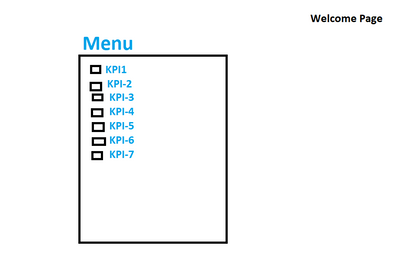
I am trying to implement following application-like experience in power bi – user opens a welcome page in power bi where he gets option to select few KPIs (out of the list of all KPIs) as below
Page-1
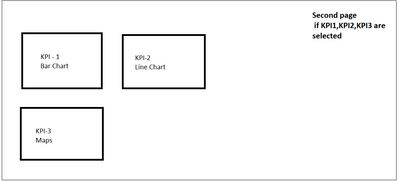
Now, based on the selection new page/report will be displayed where only selected KPIs/visuals are visible.
Suppose if three KPIs are selected then those are visible to the next page if six are selected then those six should be visible.
@kirti_agarwal28 , how they need to show if big question.
Calculation groups with sync slicer can do something similar. But you need to try.
https://www.sqlbi.com/articles/introducing-calculation-groups/
or
share what display you want on second page ?
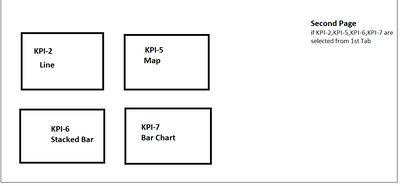
on Second Page different scenario are posible based on what is selected on 1st tab (Welcome Page)
Scenario-1
Scenario-2:
Likewise there could be multiple scenarios
Hi, @kirti_agarwal28
I don't seem to understand your thoughts very well. Are these kpi slicer or visual? What does page mean? The page in the report or multiple reports? If you are referring to the dashboard in the service, I think this is impossible.
If you are referring to other aspects, please describe clearly.
Best Regards
Janey Guo
If this post helps, then please consider Accept it as the solution to help the other members find it more quickly.
Check out the April 2026 Power BI update to learn about new features.
If you have recently started exploring Fabric, we'd love to hear how it's going. Your feedback can help with product improvements.
A new Power BI DataViz World Championship is coming this June! Don't miss out on submitting your entry.
| User | Count |
|---|---|
| 43 | |
| 38 | |
| 35 | |
| 21 | |
| 15 |
| User | Count |
|---|---|
| 65 | |
| 58 | |
| 28 | |
| 27 | |
| 25 |