Don't miss your chance to take exam DP-600 or DP-700 on us!
Request nowLearn from the best! Meet the four finalists headed to the FINALS of the Power BI Dataviz World Championships! Register now
Hi Folks,
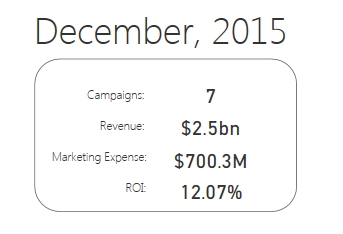
I need HELP. How can I create a dynamic textbox, I need to add variables (similar to the pic above)?
Thanks 🙂
Solved! Go to Solution.
Use a multi-row card visualization and measures like this:
Measure = IF(HASONEVALUE(DISTRICT[DISTRICT NAME]),VALUES(DISTRICT[DISTRICT NAME]),"")
This displays nothing if there is more than one value but otherwise displays the information. You would have multiple measurs like this and add them all to the multi-row card visualization. If you look up my Data Stories Gallery, Ohio Schools Report Card, you will find an example PBIX file that implements this.
Use a multi-row card visualization and measures like this:
Measure = IF(HASONEVALUE(DISTRICT[DISTRICT NAME]),VALUES(DISTRICT[DISTRICT NAME]),"")
This displays nothing if there is more than one value but otherwise displays the information. You would have multiple measurs like this and add them all to the multi-row card visualization. If you look up my Data Stories Gallery, Ohio Schools Report Card, you will find an example PBIX file that implements this.
Share feedback directly with Fabric product managers, participate in targeted research studies and influence the Fabric roadmap.
Check out the February 2026 Power BI update to learn about new features.
| User | Count |
|---|---|
| 50 | |
| 40 | |
| 37 | |
| 14 | |
| 14 |
| User | Count |
|---|---|
| 85 | |
| 69 | |
| 38 | |
| 29 | |
| 27 |