This is best Fabric, Power BI, SQL and AI community event. How do we know? The last event sold out! Save €200 with code FABCMTY200.
Register nowA new Data Days event is coming soon! This time we’re going bigger than ever. Fabric, Power BI, SQL, AI and more. Don't miss out.
Hi. I have a column with game names. I created a group to filter the TOP5, using a calculated column like below.
I m using the measure Houres Watched to achieve the TOP5.
Group =
VAR _A =
RANKX (
all(fTwitchData),
CALCULATE (
[Hours_Watched],
ALLEXCEPT ( fTwitchData, fTwitchData[Game] )
),
,
DESC,
DENSE
)
RETURN
IF ( _A < 6, [Game], "Other" )
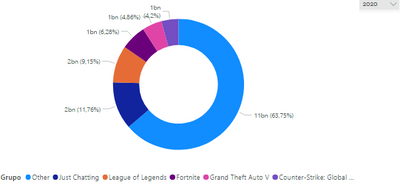
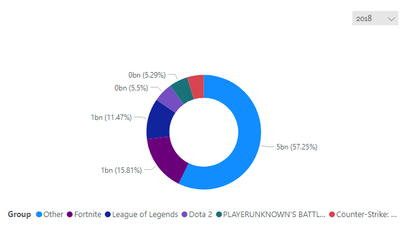
However the TOP 5 list that i created isn't dymamic and not changes when i change the year. It should change. I d like to use a chart per Group filtering per year. Every time i change the year, the TOP 5 list needs to change too.
I put below two chart with different filters. The TOP5 list is the same, but it should not to be.
PBIX File
https://drive.google.com/file/d/1EbmFs4YofT2VZpx2z9OfbKKVDR-B4gKx/view?usp=sharing
Solved! Go to Solution.
Hi @rodrigosrm2
Calculated tables and calculated columns are not able to be updated by slicers/filters in the report. So your Group column is not dynamic.
I create a new table in your model, which summarizes on Year and Game at the same time.
New Table = SUMMARIZE(fTwitchData,fTwitchData[Year],fTwitchData[Game],"Hours_watched",SUM(fTwitchData[Hours_watched]))
Then add Rank and Group columns in the new table. It ranks games within every year.
Rank = RANKX(FILTER('New Table','New Table'[Year]=EARLIER('New Table'[Year])),'New Table'[Hours_watched],,DESC,Dense)Group = IF ( 'New Table'[Rank] < 6, [Game], "Other" )
Link Calendar table to this new table on Year columns (many-to-many, single filter direction: calendar table filters New Table).
Then use Group and Hours_watched columns from this new table into the chart.
Best Regards,
Community Support Team _ Jing
If this post helps, please Accept it as Solution to help other members find it.
Hi @rodrigosrm2
Calculated tables and calculated columns are not able to be updated by slicers/filters in the report. So your Group column is not dynamic.
I create a new table in your model, which summarizes on Year and Game at the same time.
New Table = SUMMARIZE(fTwitchData,fTwitchData[Year],fTwitchData[Game],"Hours_watched",SUM(fTwitchData[Hours_watched]))
Then add Rank and Group columns in the new table. It ranks games within every year.
Rank = RANKX(FILTER('New Table','New Table'[Year]=EARLIER('New Table'[Year])),'New Table'[Hours_watched],,DESC,Dense)Group = IF ( 'New Table'[Rank] < 6, [Game], "Other" )
Link Calendar table to this new table on Year columns (many-to-many, single filter direction: calendar table filters New Table).
Then use Group and Hours_watched columns from this new table into the chart.
Best Regards,
Community Support Team _ Jing
If this post helps, please Accept it as Solution to help other members find it.
Thanks so much for your help. It worked perfectly.
@rodrigosrm2 , If you only need top 5
Top 5 =calculate([Hours_Watched], TOPN(5,all(fTwitchData[Game] ),[Hours_Watched],Asc), values(fTwitchData[Game] ))
If you need top 5 with others
https://community.powerbi.com/t5/Desktop/Top-5-and-others/td-p/165945
Hello. Thanks for answering. I've tried your suggestions, however it did not work. When i use the year filter, from Date Calendar, the game list dont change.
Could you do in my model (the pbix link is above), if is possible?
Check out the May 2026 Power BI update to learn about new features.
Sign up to receive a private message when registration opens and key events begin.
If you have recently started exploring Fabric, we'd love to hear how it's going. Your feedback can help with product improvements.
| User | Count |
|---|---|
| 31 | |
| 26 | |
| 23 | |
| 22 | |
| 15 |
| User | Count |
|---|---|
| 62 | |
| 47 | |
| 28 | |
| 24 | |
| 21 |