cancel
Showing results for 
Search instead for 
Did you mean: 

The Power BI Data Visualization World Championships is back! It's time to submit your entry. Live now!

Reply
rodrigosrm2
Frequent Visitor

Dynamic TOPN

Hi. I have a column with game names. I created a group to filter the TOP5, using a calculated column like below.

I m using the measure Houres Watched to achieve the TOP5.

Group = 
VAR _A =
    RANKX (
        all(fTwitchData),
        CALCULATE (
            [Hours_Watched],
            ALLEXCEPT ( fTwitchData, fTwitchData[Game] )
        ),
        ,
        DESC,
        DENSE
    )
RETURN
  IF ( _A < 6, [Game], "Other" )


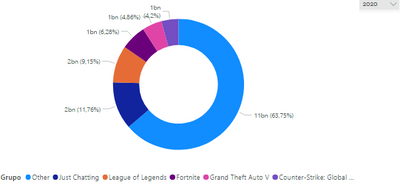
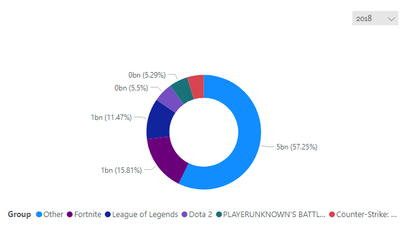
However the TOP 5 list that i created isn't dymamic and not changes when i change the year. It should change. I d like to use a chart per Group filtering per year. Every time i change the year, the TOP 5 list needs to change too.

I put below two chart with different filters. The TOP5 list is the same, but it should not to be.


rodrigosrm2_2-1648696789369.pngrodrigosrm2_3-1648696814397.png


PBIX File

https://drive.google.com/file/d/1EbmFs4YofT2VZpx2z9OfbKKVDR-B4gKx/view?usp=sharing 


1 ACCEPTED SOLUTION
v-jingzhang
Community Support
Community Support

Hi @rodrigosrm2 


Calculated tables and calculated columns are not able to be updated by slicers/filters in the report. So your Group column is not dynamic. 


I create a new table in your model, which summarizes on Year and Game at the same time. 

New Table = SUMMARIZE(fTwitchData,fTwitchData[Year],fTwitchData[Game],"Hours_watched",SUM(fTwitchData[Hours_watched]))


Then add Rank and Group columns in the new table. It ranks games within every year. 

Rank = RANKX(FILTER('New Table','New Table'[Year]=EARLIER('New Table'[Year])),'New Table'[Hours_watched],,DESC,Dense)
Group = IF ( 'New Table'[Rank] < 6, [Game], "Other" )


Link Calendar table to this new table on Year columns (many-to-many, single filter direction: calendar table filters New Table).


Then use Group and Hours_watched columns from this new table into the chart.

vjingzhang_0-1649224334430.png


Best Regards,
Community Support Team _ Jing
If this post helps, please Accept it as Solution to help other members find it.

View solution in original post

4 REPLIES 4
v-jingzhang
Community Support
Community Support

Hi @rodrigosrm2 


Calculated tables and calculated columns are not able to be updated by slicers/filters in the report. So your Group column is not dynamic. 


I create a new table in your model, which summarizes on Year and Game at the same time. 

New Table = SUMMARIZE(fTwitchData,fTwitchData[Year],fTwitchData[Game],"Hours_watched",SUM(fTwitchData[Hours_watched]))


Then add Rank and Group columns in the new table. It ranks games within every year. 

Rank = RANKX(FILTER('New Table','New Table'[Year]=EARLIER('New Table'[Year])),'New Table'[Hours_watched],,DESC,Dense)
Group = IF ( 'New Table'[Rank] < 6, [Game], "Other" )


Link Calendar table to this new table on Year columns (many-to-many, single filter direction: calendar table filters New Table).


Then use Group and Hours_watched columns from this new table into the chart.

vjingzhang_0-1649224334430.png


Best Regards,
Community Support Team _ Jing
If this post helps, please Accept it as Solution to help other members find it.

Thanks so much for your help. It worked perfectly.

amitchandak
Super User
Super User

@rodrigosrm2 , If you only need top 5

Top 5 =calculate([Hours_Watched], TOPN(5,all(fTwitchData[Game] ),[Hours_Watched],Asc), values(fTwitchData[Game] ))


If you need top 5 with others


https://community.powerbi.com/t5/Desktop/Top-5-and-others/td-p/165945

https://www.youtube.com/watch?v=UAnylK9bm1I

Share with Power BI Enthusiasts: Full Power BI Video (20 Hours) YouTube
Microsoft Fabric Series 60+ Videos YouTube
Microsoft Fabric Hindi End to End YouTube

Hello. Thanks for answering. I've tried your suggestions, however it did not work. When i use the year filter, from Date Calendar, the game list dont change. 

Could you do in my model (the pbix link is above), if is possible?

Helpful resources

Announcements
Power BI DataViz World Championships

Power BI Dataviz World Championships

The Power BI Data Visualization World Championships is back! It's time to submit your entry.

January Power BI Update Carousel

Power BI Monthly Update - January 2026

Check out the January 2026 Power BI update to learn about new features.

FabCon Atlanta 2026 carousel

FabCon Atlanta 2026

Join us at FabCon Atlanta, March 16-20, for the ultimate Fabric, Power BI, AI and SQL community-led event. Save $200 with code FABCOMM.