FabCon is coming to Atlanta
Join us at FabCon Atlanta from March 16 - 20, 2026, for the ultimate Fabric, Power BI, AI and SQL community-led event. Save $200 with code FABCOMM.
Register now!- Power BI forums
- Get Help with Power BI
- Desktop
- Service
- Report Server
- Power Query
- Mobile Apps
- Developer
- DAX Commands and Tips
- Custom Visuals Development Discussion
- Health and Life Sciences
- Power BI Spanish forums
- Translated Spanish Desktop
- Training and Consulting
- Instructor Led Training
- Dashboard in a Day for Women, by Women
- Galleries
- Data Stories Gallery
- Themes Gallery
- Contests Gallery
- QuickViz Gallery
- Quick Measures Gallery
- Visual Calculations Gallery
- Notebook Gallery
- Translytical Task Flow Gallery
- TMDL Gallery
- R Script Showcase
- Webinars and Video Gallery
- Ideas
- Custom Visuals Ideas (read-only)
- Issues
- Issues
- Events
- Upcoming Events
The Power BI Data Visualization World Championships is back! Get ahead of the game and start preparing now! Learn more
- Power BI forums
- Forums
- Get Help with Power BI
- Desktop
- Dynamic Status Aging
- Subscribe to RSS Feed
- Mark Topic as New
- Mark Topic as Read
- Float this Topic for Current User
- Bookmark
- Subscribe
- Printer Friendly Page


- Mark as New
- Bookmark
- Subscribe
- Mute
- Subscribe to RSS Feed
- Permalink
- Report Inappropriate Content
Dynamic Status Aging
Hello everyone,
I am working on a solution to identify Status Aging of cases dynamically. In the below table there are 2 serial numbers. I have the Latest_ML_EPV_Status and ML_Updated_date. I would like to calculate Status_Aging based on the Latest_ML_EPV_Status and when the category occured first.
For Serial Number=HDUMMYFR, Status has been changing but the latest is Moderate and it occured on 03/13/2023. Therefore Status_Aging is 2 days.
For Serial Number=ABCMMYFR, Status has been changing but the latest is Critical and it occured on 03/11/2023. Therefore Status_Aging is 4 days.
| machine_serial_number | ML_EPV_STATUS | Latest_ML_EPV_Status | ML_Updated_date | Status_Aging |
| HDUMMYFR | Moderate | Moderate | 3/15/2023 | 2 |
| HDUMMYFR | Moderate | Moderate | 3/14/2023 | 2 |
| HDUMMYFR | Moderate | Moderate | 3/13/2023 | 2 |
| HDUMMYFR | High | Moderate | 3/11/2023 | 2 |
| HDUMMYFR | Moderate | Moderate | 3/11/2023 | 2 |
| HDUMMYFR | Moderate | Moderate | 3/9/2023 | 2 |
| HDUMMYFR | Moderate | Moderate | 3/8/2023 | 2 |
| HDUMMYFR | High | Moderate | 3/7/2023 | 2 |
| HDUMMYFR | High | Moderate | 3/6/2023 | 2 |
| HDUMMYFR | High | Moderate | 3/5/2023 | 2 |
| ABCMMYFR | Critical | Critical | 3/15/2023 | 4 |
| ABCMMYFR | Critical | Critical | 3/14/2023 | 4 |
| ABCMMYFR | Critical | Critical | 3/13/2023 | 4 |
| ABCMMYFR | Critical | Critical | 3/11/2023 | 4 |
| ABCMMYFR | Critical | Critical | 3/11/2023 | 4 |
| ABCMMYFR | Moderate | Critical | 3/9/2023 | 4 |
| ABCMMYFR | Critical | Critical | 3/8/2023 | 4 |
| ABCMMYFR | High | Critical | 3/7/2023 | 4 |
| ABCMMYFR | High | Critical | 3/6/2023 | 4 |
| ABCMMYFR | High | Critical | 3/5/2023 | 4 |
Solved! Go to Solution.


- Mark as New
- Bookmark
- Subscribe
- Mute
- Subscribe to RSS Feed
- Permalink
- Report Inappropriate Content
1) you can do it as a calculated column
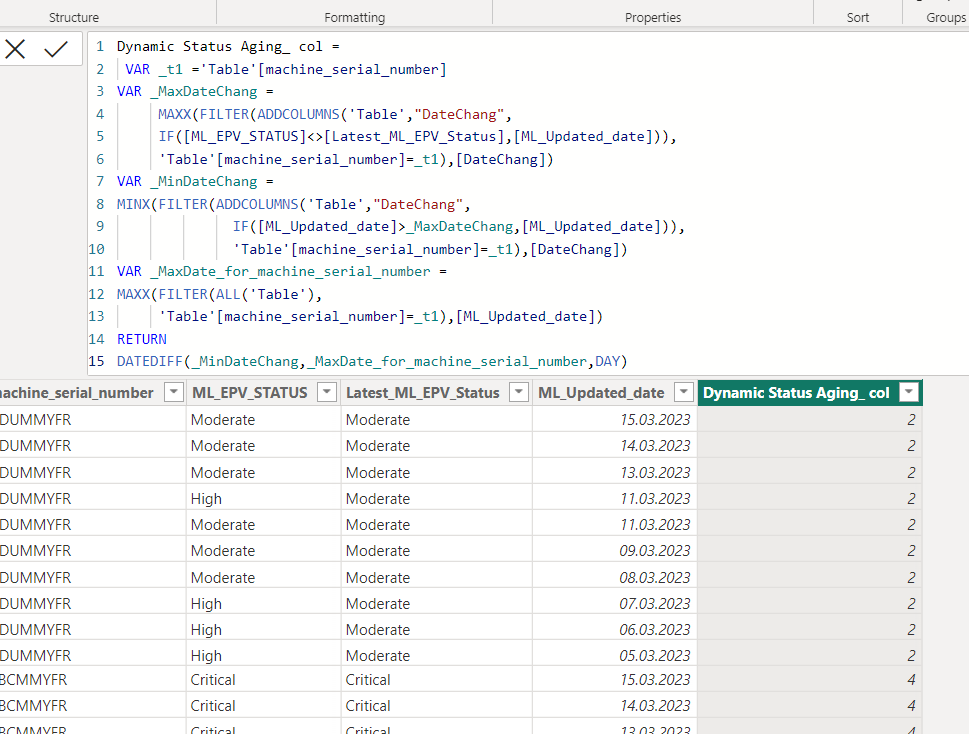
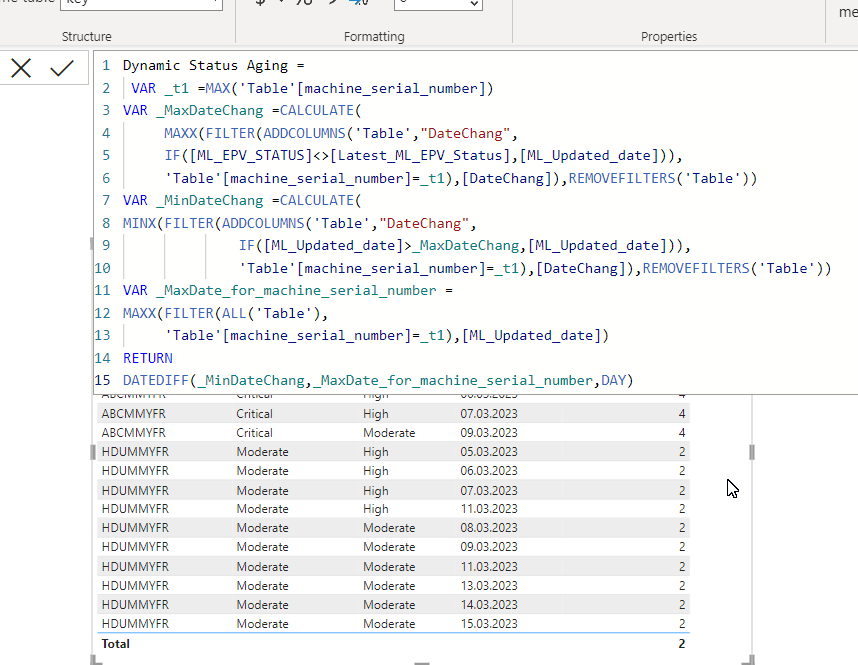
2)You can also do this with measure.
Sample PBIX file attached
https://1drv.ms/u/s!AiUZ0Ws7G26RhkEEF86jKOotUxxR?e=eDMGD4


- Mark as New
- Bookmark
- Subscribe
- Mute
- Subscribe to RSS Feed
- Permalink
- Report Inappropriate Content
Don't bother to keep [Latest_ML_EPV_Status] in the dataset for this calculation.

| Thanks to the great efforts by MS engineers to simplify syntax of DAX! Most beginners are SUCCESSFULLY MISLED to think that they could easily master DAX; but it turns out that the intricacy of the most frequently used RANKX() is still way beyond their comprehension! |
DAX is simple, but NOT EASY! |
- Mark as New
- Bookmark
- Subscribe
- Mute
- Subscribe to RSS Feed
- Permalink
- Report Inappropriate Content
- Mark as New
- Bookmark
- Subscribe
- Mute
- Subscribe to RSS Feed
- Permalink
- Report Inappropriate Content
Don't bother to keep [Latest_ML_EPV_Status] in the dataset for this calculation.
| Thanks to the great efforts by MS engineers to simplify syntax of DAX! Most beginners are SUCCESSFULLY MISLED to think that they could easily master DAX; but it turns out that the intricacy of the most frequently used RANKX() is still way beyond their comprehension! |
DAX is simple, but NOT EASY! |
- Mark as New
- Bookmark
- Subscribe
- Mute
- Subscribe to RSS Feed
- Permalink
- Report Inappropriate Content
- Mark as New
- Bookmark
- Subscribe
- Mute
- Subscribe to RSS Feed
- Permalink
- Report Inappropriate Content
1) you can do it as a calculated column
2)You can also do this with measure.
Sample PBIX file attached
https://1drv.ms/u/s!AiUZ0Ws7G26RhkEEF86jKOotUxxR?e=eDMGD4
- Mark as New
- Bookmark
- Subscribe
- Mute
- Subscribe to RSS Feed
- Permalink
- Report Inappropriate Content

Helpful resources

Power BI Dataviz World Championships
The Power BI Data Visualization World Championships is back! Get ahead of the game and start preparing now!

Power BI Monthly Update - December 2025
Check out the December 2025 Power BI Holiday Recap!

FabCon Atlanta 2026
Join us at FabCon Atlanta, March 16-20, for the ultimate Fabric, Power BI, AI and SQL community-led event. Save $200 with code FABCOMM.

| User | Count |
|---|---|
| 41 | |
| 38 | |
| 36 | |
| 31 | |
| 28 |


| User | Count |
|---|---|
| 129 | |
| 88 | |
| 79 | |
| 68 | |
| 63 |


