FabCon is coming to Atlanta
Join us at FabCon Atlanta from March 16 - 20, 2026, for the ultimate Fabric, Power BI, AI and SQL community-led event. Save $200 with code FABCOMM.
Register now!- Power BI forums
- Get Help with Power BI
- Desktop
- Service
- Report Server
- Power Query
- Mobile Apps
- Developer
- DAX Commands and Tips
- Custom Visuals Development Discussion
- Health and Life Sciences
- Power BI Spanish forums
- Translated Spanish Desktop
- Training and Consulting
- Instructor Led Training
- Dashboard in a Day for Women, by Women
- Galleries
- Data Stories Gallery
- Themes Gallery
- Contests Gallery
- QuickViz Gallery
- Quick Measures Gallery
- Visual Calculations Gallery
- Notebook Gallery
- Translytical Task Flow Gallery
- TMDL Gallery
- R Script Showcase
- Webinars and Video Gallery
- Ideas
- Custom Visuals Ideas (read-only)
- Issues
- Issues
- Events
- Upcoming Events
The Power BI Data Visualization World Championships is back! It's time to submit your entry. Live now!
- Power BI forums
- Forums
- Get Help with Power BI
- Desktop
- Re: Dynamic Status Aging
- Subscribe to RSS Feed
- Mark Topic as New
- Mark Topic as Read
- Float this Topic for Current User
- Bookmark
- Subscribe
- Printer Friendly Page


- Mark as New
- Bookmark
- Subscribe
- Mute
- Subscribe to RSS Feed
- Permalink
- Report Inappropriate Content
Dynamic Status Aging
Hello everyone,
I am working on a solution to identify Status Aging of cases dynamically. In the below table there are 2 serial numbers. I have the Latest_ML_EPV_Status and ML_Updated_date. I would like to calculate Status_Aging based on the Latest_ML_EPV_Status and when the category occured first.
For Serial Number=HDUMMYFR, Status has been changing but the latest is Moderate and it occured on 03/13/2023. Therefore Status_Aging is 2 days.
For Serial Number=ABCMMYFR, Status has been changing but the latest is Critical and it occured on 03/11/2023. Therefore Status_Aging is 4 days.
| machine_serial_number | ML_EPV_STATUS | Latest_ML_EPV_Status | ML_Updated_date | Status_Aging |
| HDUMMYFR | Moderate | Moderate | 3/15/2023 | 2 |
| HDUMMYFR | Moderate | Moderate | 3/14/2023 | 2 |
| HDUMMYFR | Moderate | Moderate | 3/13/2023 | 2 |
| HDUMMYFR | High | Moderate | 3/11/2023 | 2 |
| HDUMMYFR | Moderate | Moderate | 3/11/2023 | 2 |
| HDUMMYFR | Moderate | Moderate | 3/9/2023 | 2 |
| HDUMMYFR | Moderate | Moderate | 3/8/2023 | 2 |
| HDUMMYFR | High | Moderate | 3/7/2023 | 2 |
| HDUMMYFR | High | Moderate | 3/6/2023 | 2 |
| HDUMMYFR | High | Moderate | 3/5/2023 | 2 |
| ABCMMYFR | Critical | Critical | 3/15/2023 | 4 |
| ABCMMYFR | Critical | Critical | 3/14/2023 | 4 |
| ABCMMYFR | Critical | Critical | 3/13/2023 | 4 |
| ABCMMYFR | Critical | Critical | 3/11/2023 | 4 |
| ABCMMYFR | Critical | Critical | 3/11/2023 | 4 |
| ABCMMYFR | Moderate | Critical | 3/9/2023 | 4 |
| ABCMMYFR | Critical | Critical | 3/8/2023 | 4 |
| ABCMMYFR | High | Critical | 3/7/2023 | 4 |
| ABCMMYFR | High | Critical | 3/6/2023 | 4 |
| ABCMMYFR | High | Critical | 3/5/2023 | 4 |
Solved! Go to Solution.


- Mark as New
- Bookmark
- Subscribe
- Mute
- Subscribe to RSS Feed
- Permalink
- Report Inappropriate Content
1) you can do it as a calculated column
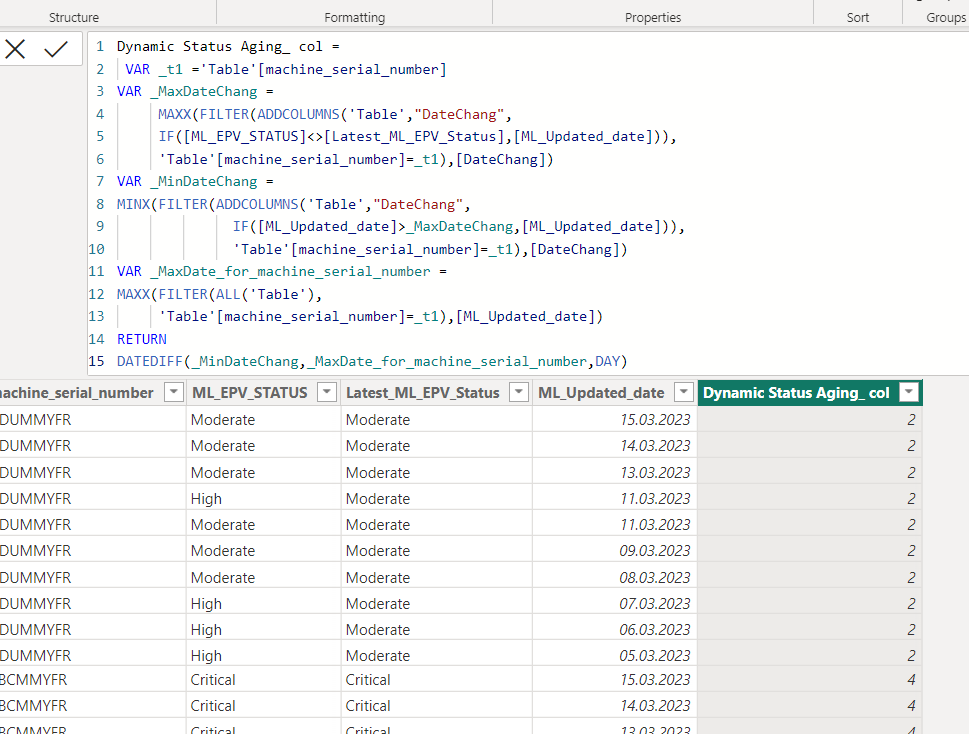
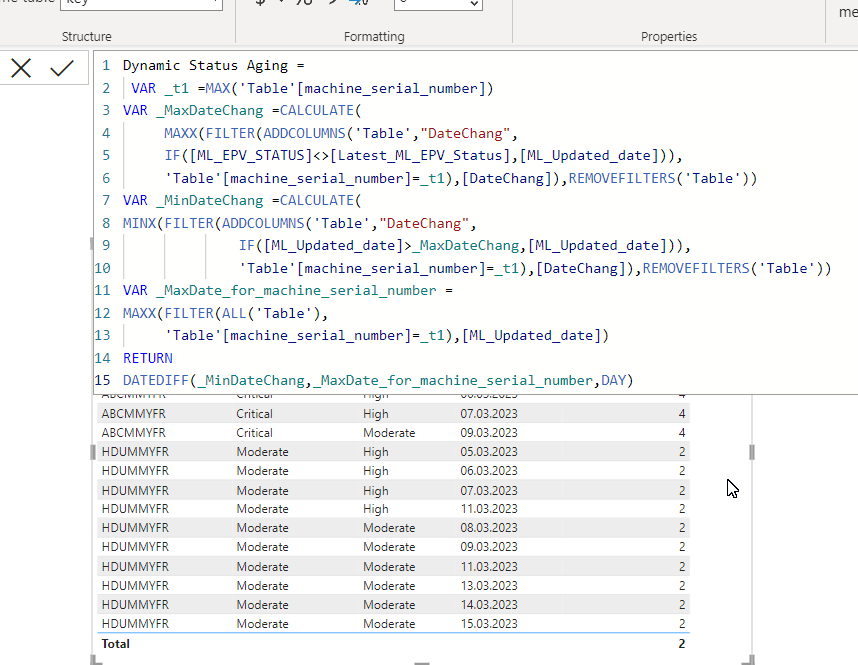
2)You can also do this with measure.
Sample PBIX file attached
https://1drv.ms/u/s!AiUZ0Ws7G26RhkEEF86jKOotUxxR?e=eDMGD4


- Mark as New
- Bookmark
- Subscribe
- Mute
- Subscribe to RSS Feed
- Permalink
- Report Inappropriate Content
Don't bother to keep [Latest_ML_EPV_Status] in the dataset for this calculation.

| Thanks to the great efforts by MS engineers to simplify syntax of DAX! Most beginners are SUCCESSFULLY MISLED to think that they could easily master DAX; but it turns out that the intricacy of the most frequently used RANKX() is still way beyond their comprehension! |
DAX is simple, but NOT EASY! |
- Mark as New
- Bookmark
- Subscribe
- Mute
- Subscribe to RSS Feed
- Permalink
- Report Inappropriate Content
- Mark as New
- Bookmark
- Subscribe
- Mute
- Subscribe to RSS Feed
- Permalink
- Report Inappropriate Content
Don't bother to keep [Latest_ML_EPV_Status] in the dataset for this calculation.
| Thanks to the great efforts by MS engineers to simplify syntax of DAX! Most beginners are SUCCESSFULLY MISLED to think that they could easily master DAX; but it turns out that the intricacy of the most frequently used RANKX() is still way beyond their comprehension! |
DAX is simple, but NOT EASY! |
- Mark as New
- Bookmark
- Subscribe
- Mute
- Subscribe to RSS Feed
- Permalink
- Report Inappropriate Content
- Mark as New
- Bookmark
- Subscribe
- Mute
- Subscribe to RSS Feed
- Permalink
- Report Inappropriate Content
1) you can do it as a calculated column
2)You can also do this with measure.
Sample PBIX file attached
https://1drv.ms/u/s!AiUZ0Ws7G26RhkEEF86jKOotUxxR?e=eDMGD4
- Mark as New
- Bookmark
- Subscribe
- Mute
- Subscribe to RSS Feed
- Permalink
- Report Inappropriate Content

Helpful resources


| User | Count |
|---|---|
| 51 | |
| 40 | |
| 35 | |
| 23 | |
| 22 |


| User | Count |
|---|---|
| 133 | |
| 99 | |
| 57 | |
| 38 | |
| 38 |


