Get Fabric or SQL Certified for Free.
Get certified for free when you join Fabric Data Days 2026 and dive into Fabric, Power BI, SQL, AI, and other essential data skills.
Join now- Power BI forums
- Get Help with Power BI
- Desktop
- Service
- Report Server
- Power Query
- Mobile Apps
- Developer
- DAX Commands and Tips
- Custom Visuals Development Discussion
- Health and Life Sciences
- Power BI Spanish forums
- Translated Spanish Desktop
- Training and Consulting
- Instructor Led Training
- Dashboard in a Day for Women, by Women
- Galleries
- Data Stories Gallery
- Themes Gallery
- Contests Gallery
- QuickViz Gallery
- Quick Measures Gallery
- Visual Calculations Gallery
- Fabric Apps Gallery
- Notebook Gallery
- Translytical Task Flow Gallery
- TMDL Gallery
- R Script Showcase
- Webinars and Video Gallery
- Ideas
- Custom Visuals Ideas (read-only)
- Issues
- Issues
- Events
- Upcoming Events
July 28 - August 9 | Final Round of the Power BI Dataviz World Championships. This is your chance. Learn more
- Power BI forums
- Forums
- Get Help with Power BI
- Desktop
- Re: Dynamic Row Numbers
- Subscribe to RSS Feed
- Mark Topic as New
- Mark Topic as Read
- Float this Topic for Current User
- Bookmark
- Subscribe
- Printer Friendly Page

- Mark as New
- Bookmark
- Subscribe
- Mute
- Subscribe to RSS Feed
- Permalink
- Report Inappropriate Content
Dynamic Row Numbers
Hello All,
Is there anyway to get Dynamic Row Numbers with a single column in every table.
For Ex: I have 2 Table viz with following data
every table has viz level filters so that i am showing the customer in different table viz's.
Tab1 Tab2
Customer Revenue Customer Revenue
A 100 M 300
B 200 X 250
N 50 Z 1050
I want to insert a column as 'SL NO' at start which will give '1' to 'N' like this
Tab1 Tab2
SL NO Customer Revenue SL NO Customer Revenue
1 A 100 1 M 300
2 B 200 2 X 250
3 N 50 3 Z 1050 dynamically.
Thanks in Advance.
Solved! Go to Solution.


- Mark as New
- Bookmark
- Subscribe
- Mute
- Subscribe to RSS Feed
- Permalink
- Report Inappropriate Content
@Anonymous
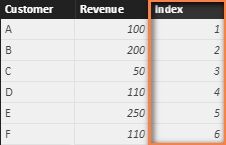
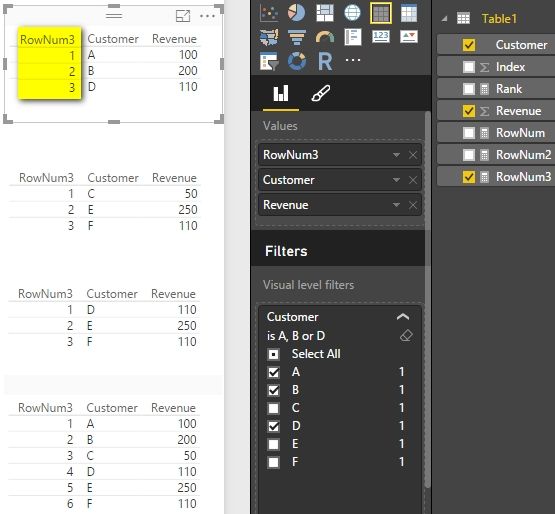
You can first add an index column and then create a measure with following formula to get the dynamic row numbers.
RowNum =
CALCULATE (
    COUNT ( Table1[Index] ),
    FILTER ( ALLSELECTED ( Table1 ), Table1[Index] <= MAX ( Table1[Index] ) )
)
Best Regards,
Herbert
- Mark as New
- Bookmark
- Subscribe
- Mute
- Subscribe to RSS Feed
- Permalink
- Report Inappropriate Content
@Anonymous
You can first add an index column and then create a measure with following formula to get the dynamic row numbers.
RowNum =
CALCULATE (
    COUNT ( Table1[Index] ),
    FILTER ( ALLSELECTED ( Table1 ), Table1[Index] <= MAX ( Table1[Index] ) )
)
Best Regards,
Herbert


- Mark as New
- Bookmark
- Subscribe
- Mute
- Subscribe to RSS Feed
- Permalink
- Report Inappropriate Content
Just found this solution while searching the forums. Works perfectly for me. Many thanks!
[Tip] Keep CALM and DAX on.
[Solved?] Hit “Accept as Solution” and leave a Kudos.
[About] Chiel | SuperUser (2023–2) |

- Mark as New
- Bookmark
- Subscribe
- Mute
- Subscribe to RSS Feed
- Permalink
- Report Inappropriate Content
Hi Herbert,
Is there a method to have this dynamic indexing calculate in columns as it is not supported to lookup values from the prior index of the column?
Thanks,
Anusha


- Mark as New
- Bookmark
- Subscribe
- Mute
- Subscribe to RSS Feed
- Permalink
- Report Inappropriate Content
Hi @Anonymous ,
I tried to use your formula, but unfortunately it doesn't work (See attached image)
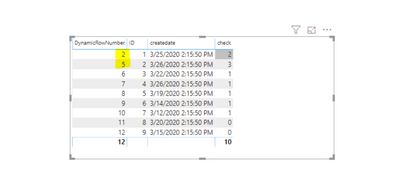
I am also attaching your formula, maybe I was wrong about something.
- Mark as New
- Bookmark
- Subscribe
- Mute
- Subscribe to RSS Feed
- Permalink
- Report Inappropriate Content
Hi,
Can you please explain the logic you wrote in this measure?
Thanks in advance
- Mark as New
- Bookmark
- Subscribe
- Mute
- Subscribe to RSS Feed
- Permalink
- Report Inappropriate Content
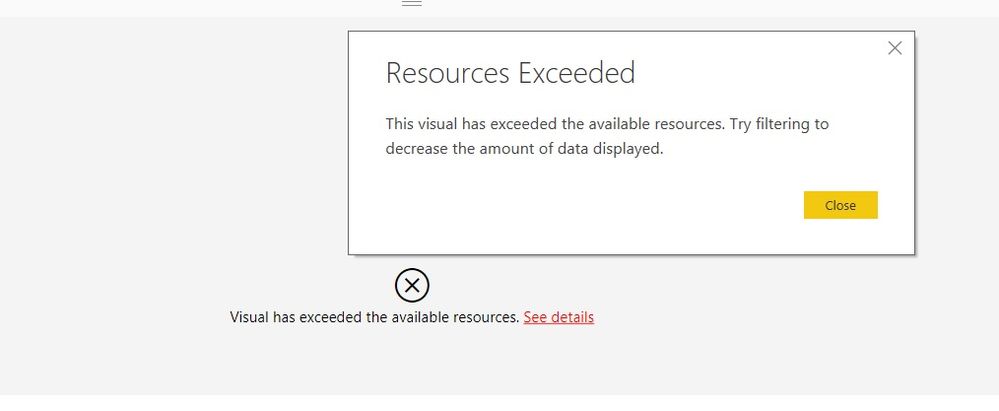
When i use this DAX to generate Current row number getting the error below when i added the measure to the table .please help me any ideas!


- Mark as New
- Bookmark
- Subscribe
- Mute
- Subscribe to RSS Feed
- Permalink
- Report Inappropriate Content
This doesn't work when sorting by a numeric measure (revenue, in your example). The formula does limit the numbers from 1 to number of displayed rows, but the Row numbers are not dynamic... Any ideas on how to fix?

- Mark as New
- Bookmark
- Subscribe
- Mute
- Subscribe to RSS Feed
- Permalink
- Report Inappropriate Content
I also want to apply same in my project. I have created Index column and then applied mentioned formula, but isn't work.


- Mark as New
- Bookmark
- Subscribe
- Mute
- Subscribe to RSS Feed
- Permalink
- Report Inappropriate Content
@Anonymous if i understood you correctly, go to power bi desktop query editor,
under Add Column tab click Add index column.
- Mark as New
- Bookmark
- Subscribe
- Mute
- Subscribe to RSS Feed
- Permalink
- Report Inappropriate Content
No @ankitpatira.
Thiz what i get when I try to use index Column which in fact is a static value for every row:

Vis Filters: ScenarioName = 'Budget' for Table1
ScenarioName = 'Actual and Forecast' for Table2 .
But I need Outpu like this:
ScenarioName Index1 ScenaroName Index1
Budget 1 Forecast 1
Actual 2
I want Index to be start from 1 in Every table for index column which in the sence must be a dynamic calculation which gives valuse from 1 to n every time we use it (like row number in (Cognos and SSRS).
Helpful resources

Fabric Community Sticker Challenge - Barcelona 2026
If you love stickers, then you will definitely want to check out our community sticker challenge, Barcelona edition!

Power BI Monthly Update - July 2026
Check out the July 2026 Power BI update to learn about new features.

Power BI DataViz World Championships - June 2026
A new Power BI DataViz World Championship is coming this June! Don't miss out on submitting your entry.

| User | Count |
|---|---|
| 28 | |
| 28 | |
| 19 | |
| 19 | |
| 19 |


| User | Count |
|---|---|
| 37 | |
| 28 | |
| 18 | |
| 17 | |
| 17 |


