Join us in Barcelona for FabCon and SQLCon, September 28 - October 1, 2026.
This is best Fabric, Power BI, SQL and AI community event. How do we know? The last event sold out! Save €200 with code FABCMTY200.
Register now- Power BI forums
- Get Help with Power BI
- Desktop
- Service
- Report Server
- Power Query
- Mobile Apps
- Developer
- DAX Commands and Tips
- Custom Visuals Development Discussion
- Health and Life Sciences
- Power BI Spanish forums
- Translated Spanish Desktop
- Training and Consulting
- Instructor Led Training
- Dashboard in a Day for Women, by Women
- Galleries
- Data Stories Gallery
- Themes Gallery
- Contests Gallery
- QuickViz Gallery
- Quick Measures Gallery
- Visual Calculations Gallery
- Fabric Apps Gallery
- Notebook Gallery
- Translytical Task Flow Gallery
- TMDL Gallery
- R Script Showcase
- Webinars and Video Gallery
- Ideas
- Custom Visuals Ideas (read-only)
- Issues
- Issues
- Events
- Upcoming Events
The Fabric community is upgrading! Read all of the details including the timeline and what you can expect. Learn more
- Power BI forums
- Forums
- Get Help with Power BI
- Desktop
- Re: Dynamic Row_Number
- Subscribe to RSS Feed
- Mark Topic as New
- Mark Topic as Read
- Float this Topic for Current User
- Bookmark
- Subscribe
- Printer Friendly Page

- Mark as New
- Bookmark
- Subscribe
- Mute
- Subscribe to RSS Feed
- Permalink
- Report Inappropriate Content
Dynamic Row_Number
Hi,
I have a requirement where I have employees and their marks by class and year as mentioned below. In the below example, Year is my slicer. Based on this slicers selection I have to rank the employees based on their marks also the row numbers.
Actual Data:
| EmployeeName | Year | Total Marks |
| Sofia | 2019 | 97 |
| Mohan | 2019 | 96 |
| Peter | 2019 | 90 |
| Abhishek | 2019 | 90 |
| Chris | 2018 | 90 |
| Mike | 2018 | 58 |
| Chaitanya | 2018 | 58 |
| Paul | 2018 | 47 |
| Raman | 2017 | 45 |
| Bliss | 2017 | 34 |
| Vinod | 2017 | 34 |
| Karthik | 2017 | 29 |
| Anand | 2016 | 23 |
| Raju | 2016 | 23 |
For example 1: If I select 2019 as Year, then my expected output should be
| EmployeeName | Total Marks | Rank | Row Number |
| Sofia | 97 | 1 | 1 |
| Mohan | 96 | 2 | 2 |
| Peter | 90 | 3 | 3 |
| Abhishek | 90 | 3 | 4 |
For example 2: If I select 2017 as Year, then my expected output should be
| EmployeeName | Total Marks | Rank | Row Number |
| Raman | 45 | 1 | 1 |
| Bliss | 34 | 2 | 2 |
| Vinod | 34 | 2 | 3 |
| Karthik | 29 | 3 | 4 |
For example 3: If I select all Years, then my expected output should be
| EmployeeName | Total Marks | Rank | Row Number |
| Sofia | 97 | 1 | 1 |
| Mohan | 96 | 2 | 2 |
| Peter | 90 | 3 | 3 |
| Abhishek | 90 | 3 | 4 |
| Chris | 90 | 3 | 5 |
| Mike | 58 | 4 | 6 |
| Chaitanya | 58 | 4 | 7 |
| Paul | 47 | 5 | 8 |
| Raman | 45 | 6 | 9 |
| Bliss | 34 | 7 | 10 |
| Vinod | 34 | 7 | 11 |
| Karthik | 29 | 8 | 12 |
| Anand | 23 | 9 | 13 |
| Raju | 23 | 9 | 14 |
I got the Rank covered as expected using the below Rank measure.
Rank =
RANKX (
    ALLSELECTED ( Employee[EmployeeName] ),
    CALCULATE ( SUM ( Employee[totalMarks] ) ),
    ,
    DESC,
    DENSE
)
Can someone help me with how to get this Row_Number in Power BI using DAX to work dynamically on Slicer selection?
Thanks in advance!
Solved! Go to Solution.


- Mark as New
- Bookmark
- Subscribe
- Mute
- Subscribe to RSS Feed
- Permalink
- Report Inappropriate Content
@Anonymous ,
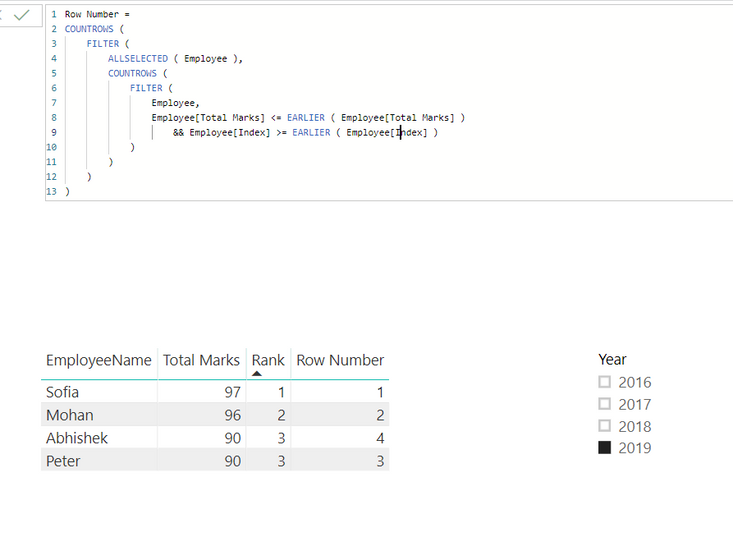
You need to create an addtional index and then create a measure using DAX below:
Row Number =
COUNTROWS (
    FILTER (
        ALLSELECTED ( Employee ),
        COUNTROWS (
            FILTER (
                Employee,
                Employee[Total Marks] <= EARLIER ( Employee[Total Marks] )
                    && Employee[Index] >= EARLIER ( Employee[Index] )
            )
        )
    )
)
Community Support Team _ Jimmy Tao
If this post helps, then please consider Accept it as the solution to help the other members find it more quickly.


- Mark as New
- Bookmark
- Subscribe
- Mute
- Subscribe to RSS Feed
- Permalink
- Report Inappropriate Content
It's exactly the same as your RANKX function, just find some way to break ties and incorporate that in it - maybe just add an index and use that
- Mark as New
- Bookmark
- Subscribe
- Mute
- Subscribe to RSS Feed
- Permalink
- Report Inappropriate Content
- Mark as New
- Bookmark
- Subscribe
- Mute
- Subscribe to RSS Feed
- Permalink
- Report Inappropriate Content
@Anonymous ,
You need to create an addtional index and then create a measure using DAX below:
Row Number =
COUNTROWS (
    FILTER (
        ALLSELECTED ( Employee ),
        COUNTROWS (
            FILTER (
                Employee,
                Employee[Total Marks] <= EARLIER ( Employee[Total Marks] )
                    && Employee[Index] >= EARLIER ( Employee[Index] )
            )
        )
    )
)
Community Support Team _ Jimmy Tao
If this post helps, then please consider Accept it as the solution to help the other members find it more quickly.
- Mark as New
- Bookmark
- Subscribe
- Mute
- Subscribe to RSS Feed
- Permalink
- Report Inappropriate Content
Hi @v-yuta-msft
Thanks for your solution. This is great! But the thing is it is working for the pre-calculated ranks. But as per your screenshots, you selected 2019 and we have 4 students listed with rank and row numbers which is correct. In my scenario, out of those 4 students, Mohan is in row 2 and rank 2. Mohan may also present in rank 1 and row 1 when we select 2018.
In this dynamic scenario, it is not working because the row number is calculating based on the predefined Index values.
- Mark as New
- Bookmark
- Subscribe
- Mute
- Subscribe to RSS Feed
- Permalink
- Report Inappropriate Content
@Anonymous ,
In my scenario, out of those 4 students, Mohan is in row 2 and rank 2. Mohan may also present in rank 1 and row 1 when we select 2018.
Could you explain more about this? From the data you have given, in year 2018, there's no "Mohan" in EmployeeName.
Regards,
Jimmy Tao
Helpful resources

FabCon & SQLCon – Barcelona 2026
Join us in Barcelona for FabCon and SQLCon, the Fabric, Power BI, SQL, and AI community event. Save €200 with code FABCMTY200.

Power BI DataViz World Championships - June 2026
A new Power BI DataViz World Championship is coming this June! Don't miss out on submitting your entry.

| User | Count |
|---|---|
| 24 | |
| 22 | |
| 20 | |
| 18 | |
| 14 |


| User | Count |
|---|---|
| 31 | |
| 26 | |
| 23 | |
| 20 | |
| 20 |


