
cancel
Showing results for 
Search instead for 
Did you mean: 

The Power BI Data Visualization World Championships is back! Get ahead of the game and start preparing now! Learn more

Reply
admin_xlsior
Post Prodigy
Post Prodigy

Dynamic Row Level Security

Hi guys,


Need some advice as I got strange behaviour while testing Row Level Security. 

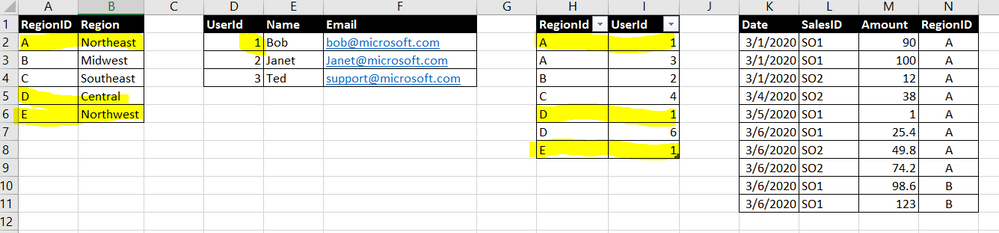
So I create these data :


image.png


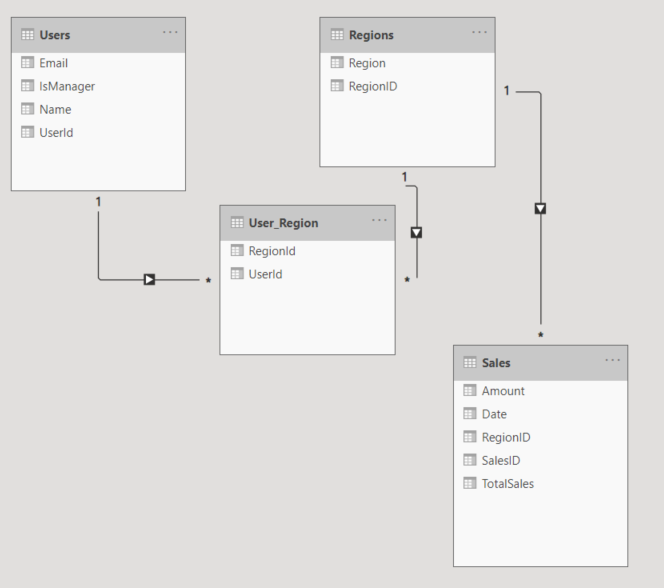
And my Relationship is like this :

image.png


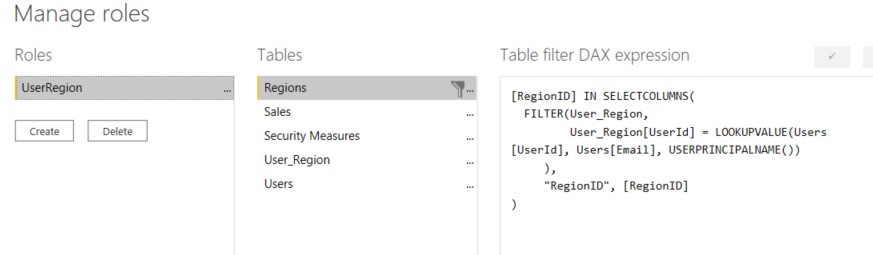
Then created Role, and put a criteria in Regions table :

image.png


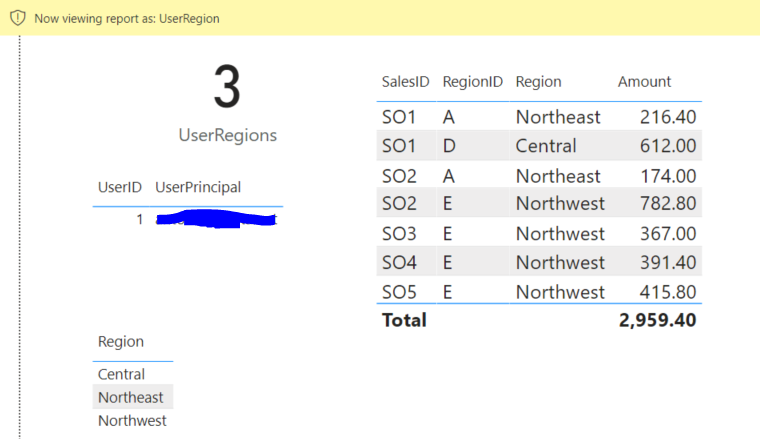
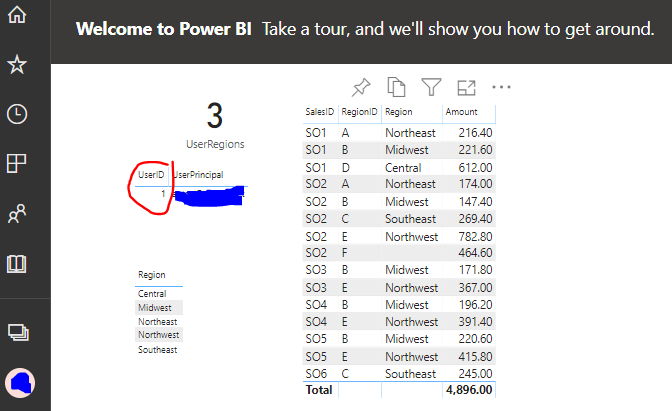
What weird is, in Power BI Desktop, while using feature "View as", it is given me the correct table in Sales data (also in Regions)

image.png

As we can see, my user id "detected" is correct, and also Region and Sales Table (both in table grid) is correct as per my setup in table User Region. Refer to my 1st picture, table 3 is the User Region table, and User Id = 1 is allowed only Region A,D,E.


But in Power BI Service, although the User ID detected is still correct, Regions is not filtered, so will effected in Sales data as well.

image.png


How is this happened ?


Thanks,


1 ACCEPTED SOLUTION
TomMartens
Super User
Super User

Hey @admin_xlsior ,


I assume that you are accessing the content via a workspace and that you have one of these 3 roles assigned contributor/member/admin.

This means that no RLS is applied.


only members that have the viewer role assigned will experience the RLS when accessing content from inside a workspace.


My recommendation, get a second user (assign a Pro license, if you are not working with Power BI Premium) and test RLS using this user by accessing content from inside an App.


Hopefully, this provides some ideas on how to tackle your challenge.


Regards,

Tom


Did I answer your question? Mark my post as a solution, this will help others!

Proud to be a Super User!
I accept Kudos 😉
Hamburg, Germany

View solution in original post

3 REPLIES 3
TomMartens
Super User
Super User

Hey @admin_xlsior ,


I assume that you are accessing the content via a workspace and that you have one of these 3 roles assigned contributor/member/admin.

This means that no RLS is applied.


only members that have the viewer role assigned will experience the RLS when accessing content from inside a workspace.


My recommendation, get a second user (assign a Pro license, if you are not working with Power BI Premium) and test RLS using this user by accessing content from inside an App.


Hopefully, this provides some ideas on how to tackle your challenge.


Regards,

Tom


Did I answer your question? Mark my post as a solution, this will help others!

Proud to be a Super User!
I accept Kudos 😉
Hamburg, Germany

Hi Tom,


How to check those roles ? contributor/member/admin.

But yes, I'm the only one in my domain, so it is admin.


Thanks

Hey @admin_xlsior ,


check the Access settings of your workspace (assuming it's not you "My workspace").

TomMartens_0-1602346898732.png

For more information about roles:

Regards,

Tom


Did I answer your question? Mark my post as a solution, this will help others!

Proud to be a Super User!
I accept Kudos 😉
Hamburg, Germany

Helpful resources

Announcements
Power BI DataViz World Championships

Power BI Dataviz World Championships

The Power BI Data Visualization World Championships is back! Get ahead of the game and start preparing now!

December 2025 Power BI Update Carousel

Power BI Monthly Update - December 2025

Check out the December 2025 Power BI Holiday Recap!

FabCon Atlanta 2026 carousel

FabCon Atlanta 2026

Join us at FabCon Atlanta, March 16-20, for the ultimate Fabric, Power BI, AI and SQL community-led event. Save $200 with code FABCOMM.

Top Solution Authors