
This time we’re going bigger than ever. Fabric, Power BI, SQL, AI and more. We're covering it all. You won't want to miss it.
Learn moreDid you hear? There's a new SQL AI Developer certification (DP-800). Start preparing now and be one of the first to get certified. Register now
Hi guys,
Need some advice as I got strange behaviour while testing Row Level Security.
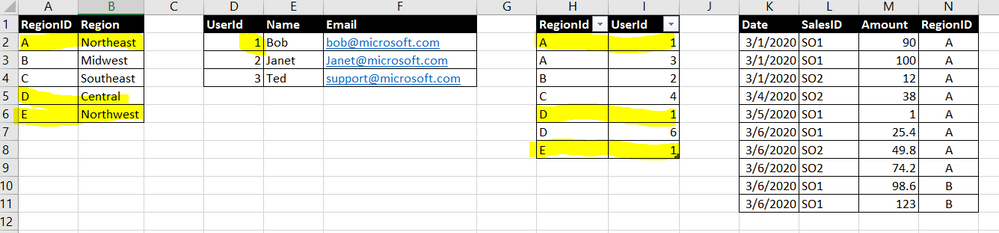
So I create these data :
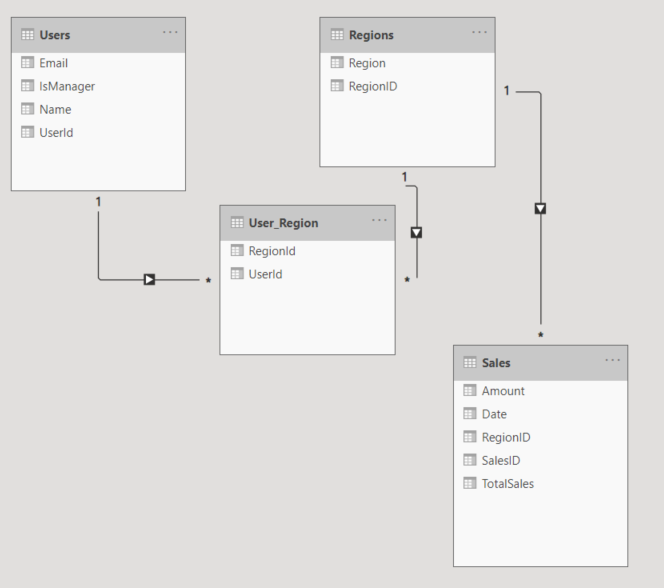
And my Relationship is like this :
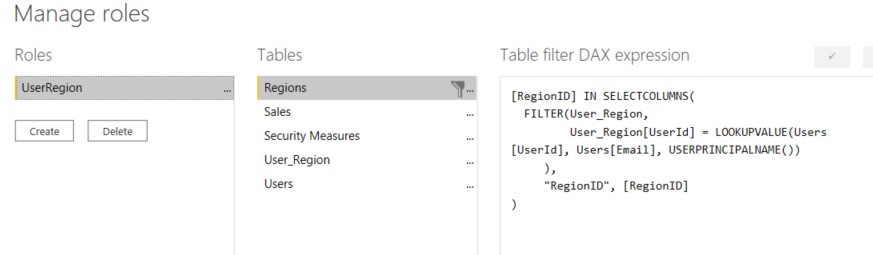
Then created Role, and put a criteria in Regions table :
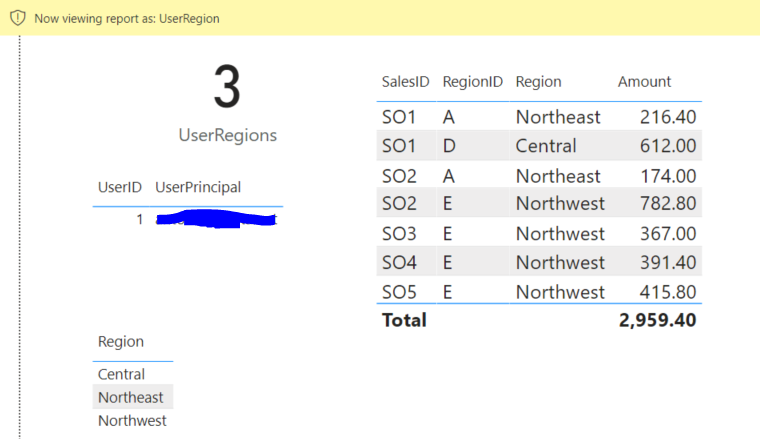
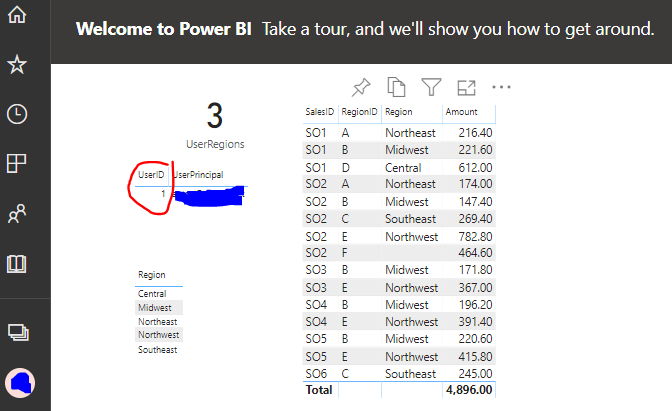
What weird is, in Power BI Desktop, while using feature "View as", it is given me the correct table in Sales data (also in Regions)
As we can see, my user id "detected" is correct, and also Region and Sales Table (both in table grid) is correct as per my setup in table User Region. Refer to my 1st picture, table 3 is the User Region table, and User Id = 1 is allowed only Region A,D,E.
But in Power BI Service, although the User ID detected is still correct, Regions is not filtered, so will effected in Sales data as well.
How is this happened ?
Thanks,
Solved! Go to Solution.
Hey @admin_xlsior ,
I assume that you are accessing the content via a workspace and that you have one of these 3 roles assigned contributor/member/admin.
This means that no RLS is applied.
only members that have the viewer role assigned will experience the RLS when accessing content from inside a workspace.
My recommendation, get a second user (assign a Pro license, if you are not working with Power BI Premium) and test RLS using this user by accessing content from inside an App.
Hopefully, this provides some ideas on how to tackle your challenge.
Regards,
Tom
Hey @admin_xlsior ,
I assume that you are accessing the content via a workspace and that you have one of these 3 roles assigned contributor/member/admin.
This means that no RLS is applied.
only members that have the viewer role assigned will experience the RLS when accessing content from inside a workspace.
My recommendation, get a second user (assign a Pro license, if you are not working with Power BI Premium) and test RLS using this user by accessing content from inside an App.
Hopefully, this provides some ideas on how to tackle your challenge.
Regards,
Tom
Hi Tom,
How to check those roles ? contributor/member/admin.
But yes, I'm the only one in my domain, so it is admin.
Thanks
Hey @admin_xlsior ,
check the Access settings of your workspace (assuming it's not you "My workspace").
For more information about roles:
Regards,
Tom
Check out the April 2026 Power BI update to learn about new features.
Sign up to receive a private message when registration opens and key events begin.
If you have recently started exploring Fabric, we'd love to hear how it's going. Your feedback can help with product improvements.
| User | Count |
|---|---|
| 35 | |
| 32 | |
| 27 | |
| 23 | |
| 16 |
| User | Count |
|---|---|
| 65 | |
| 50 | |
| 30 | |
| 25 | |
| 24 |