This time we’re going bigger than ever. Fabric, Power BI, SQL, AI and more. We're covering it all. You won't want to miss it.
Learn moreDid you hear? There's a new SQL AI Developer certification (DP-800). Start preparing now and be one of the first to get certified. Register now
Hello,
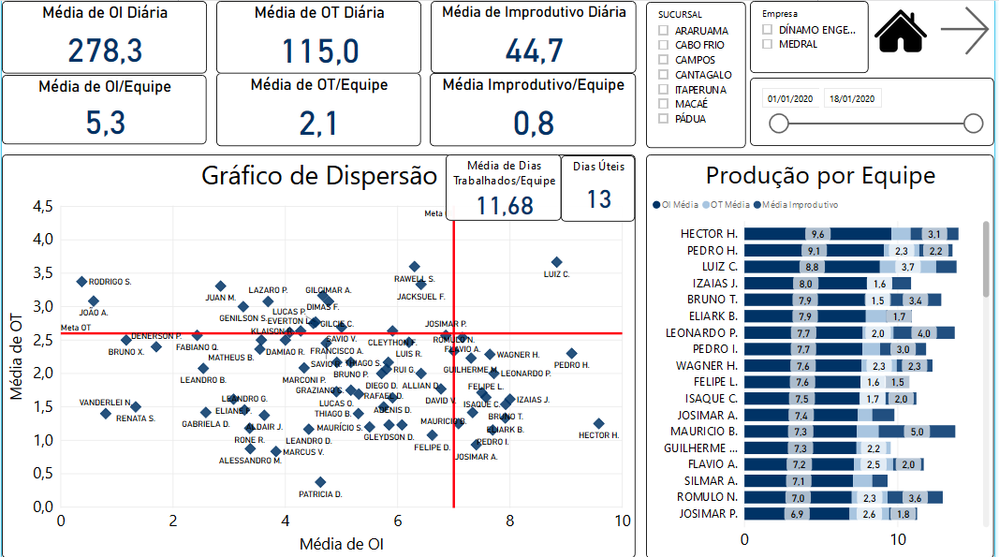
I have this dashboard below, and I would like the "reference line" in the scatter chart to be dynamical. For exemple, I have a filter on the screen called "Sucursal", and for each "Sucursal", I have a different value for the reference lines (in x-axis and y-axis), and It's not a calculated value, the values are pre-defined numbers (but different for each Sucursal), I just want to plot them on the chart when I filter it.
Is there a way to "move" the reference line when I select a different "Sucursal"?
Obs: the reference line is kind a "goal", dots "after" the line means they are good. But as said before, goals are different depending on the Sucursal selected.
Thanks!
Hi @Anonymous ,
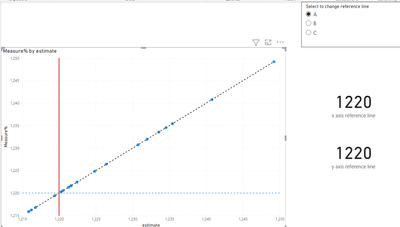
Although an old post, but since it has no accepted solution and I see the possible solution is available as standard feature in Power BI Desktop, I tested it and it is working fine.
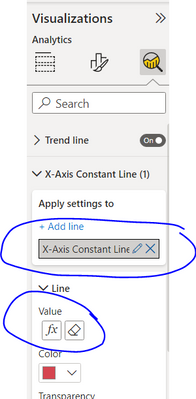
Now we can add dynamic reference lines for X and Y axis (as well as many other type of lines).
In the analytics pane, you can see above options. Select a reference table column value to use as a dynamic number for user to change values.
I also attach a sample file.
https://drive.google.com/file/d/18Vqo648GcsorF066vrw7yAQe9MIYjnvX/view?usp=sharing
Hi @Anonymous ,
You could find Quadrant Chart custom visual in Power BI.
The default Scatter chart doesn't support to add such feature. If the custom visual doesn't meet your requirement completely, you could vote the similar idea here.
Quadrant chart doesn't have that functionality.Any other option?
For Cabo Frio for example: I have x-axis (7) and y-axis (2,6). [7; 2,6]
But for Araruama, it is I have x-axis (5) and y-axis (3). [5; 3]
Check out the April 2026 Power BI update to learn about new features.
Sign up to receive a private message when registration opens and key events begin.
If you have recently started exploring Fabric, we'd love to hear how it's going. Your feedback can help with product improvements.
| User | Count |
|---|---|
| 34 | |
| 31 | |
| 25 | |
| 20 | |
| 16 |
| User | Count |
|---|---|
| 60 | |
| 48 | |
| 29 | |
| 23 | |
| 23 |