This time we’re going bigger than ever. Fabric, Power BI, SQL, AI and more. We're covering it all. You won't want to miss it.
Learn moreLevel up your Power BI skills this month - build one visual each week and tell better stories with data! Get started
I need to create a measure that will dynamiclly rank ID#'s whenever a filter on my page is selected.
There are two columns involved in this measure.
The [ID#] column and [TimeValue] column which is a date and time stamp column converted into a numeric value.
I need the measure to rank the [ID#] with the highest [TimeValue]. Each [ID#] can have multiple [TimeValue] so I would need to take the max rather than a sum.
Any ideas?
Solved! Go to Solution.
I've played around with this, I was intrigued by the question. Interesting behaviour I'm getting, but this did the trick.
Bottom line: you are going to need two measures. I created the following table. Note that ID 3 has the highest TimeValue, followed by ID 2 and at last ID 1.
Table2
Then I've created my first measure, that will calculate the maximum TimeValue. Measures are context aware, so it is really as simple as this:
MaxTimeValuePerID = MAX(Table2[TimeValue])This measure is used in the final measure, which calculates the ranking of the ID's based on the MAX(timevalue) per ID;
UltimateRank = RANKX(ALLSELECTED(Table2), [MaxTimeValuePerID], ,,Dense)Note that as input table, I chose ALLSELECTED(Table2) because I want this to be applied to the rows that are in the current context. This way, if I create a Table visual and put in the ID's, every row has a data context of that ID. So when I add the first Measure, it will calculate the max of TimeValue of that particular ID. Then, if I add the last measure, it will add a rank based on the current view:
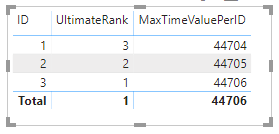
UltimateRank is the important bit here.
You don't really need to add both Measures, it still works if you just add ID's and UltimateRank to a table 🙂
Kind regards
Djerro123
-------------------------------
If this answered your question, please mark it as the Solution. This also helps others to find what they are looking for.
Kudo's are welcome 🙂
Proud to be a Super User!
I've played around with this, I was intrigued by the question. Interesting behaviour I'm getting, but this did the trick.
Bottom line: you are going to need two measures. I created the following table. Note that ID 3 has the highest TimeValue, followed by ID 2 and at last ID 1.
Table2
Then I've created my first measure, that will calculate the maximum TimeValue. Measures are context aware, so it is really as simple as this:
MaxTimeValuePerID = MAX(Table2[TimeValue])This measure is used in the final measure, which calculates the ranking of the ID's based on the MAX(timevalue) per ID;
UltimateRank = RANKX(ALLSELECTED(Table2), [MaxTimeValuePerID], ,,Dense)Note that as input table, I chose ALLSELECTED(Table2) because I want this to be applied to the rows that are in the current context. This way, if I create a Table visual and put in the ID's, every row has a data context of that ID. So when I add the first Measure, it will calculate the max of TimeValue of that particular ID. Then, if I add the last measure, it will add a rank based on the current view:
UltimateRank is the important bit here.
You don't really need to add both Measures, it still works if you just add ID's and UltimateRank to a table 🙂
Kind regards
Djerro123
-------------------------------
If this answered your question, please mark it as the Solution. This also helps others to find what they are looking for.
Kudo's are welcome 🙂
Proud to be a Super User!
Check out the April 2026 Power BI update to learn about new features.
Sign up to receive a private message when registration opens and key events begin.
If you have recently started exploring Fabric, we'd love to hear how it's going. Your feedback can help with product improvements.
| User | Count |
|---|---|
| 36 | |
| 33 | |
| 31 | |
| 24 | |
| 18 |
| User | Count |
|---|---|
| 70 | |
| 50 | |
| 33 | |
| 24 | |
| 24 |