Learn from the best! Meet the four finalists headed to the FINALS of the Power BI Dataviz World Championships! Register now
I need to create a measure that will dynamiclly rank ID#'s whenever a filter on my page is selected.
There are two columns involved in this measure.
The [ID#] column and [TimeValue] column which is a date and time stamp column converted into a numeric value.
I need the measure to rank the [ID#] with the highest [TimeValue]. Each [ID#] can have multiple [TimeValue] so I would need to take the max rather than a sum.
Any ideas?
Solved! Go to Solution.
I've played around with this, I was intrigued by the question. Interesting behaviour I'm getting, but this did the trick.
Bottom line: you are going to need two measures. I created the following table. Note that ID 3 has the highest TimeValue, followed by ID 2 and at last ID 1.
Table2
Then I've created my first measure, that will calculate the maximum TimeValue. Measures are context aware, so it is really as simple as this:
MaxTimeValuePerID = MAX(Table2[TimeValue])This measure is used in the final measure, which calculates the ranking of the ID's based on the MAX(timevalue) per ID;
UltimateRank = RANKX(ALLSELECTED(Table2), [MaxTimeValuePerID], ,,Dense)Note that as input table, I chose ALLSELECTED(Table2) because I want this to be applied to the rows that are in the current context. This way, if I create a Table visual and put in the ID's, every row has a data context of that ID. So when I add the first Measure, it will calculate the max of TimeValue of that particular ID. Then, if I add the last measure, it will add a rank based on the current view:
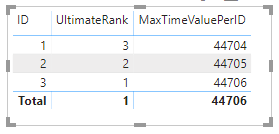
UltimateRank is the important bit here.
You don't really need to add both Measures, it still works if you just add ID's and UltimateRank to a table 🙂
Kind regards
Djerro123
-------------------------------
If this answered your question, please mark it as the Solution. This also helps others to find what they are looking for.
Kudo's are welcome 🙂
Proud to be a Super User!
I've played around with this, I was intrigued by the question. Interesting behaviour I'm getting, but this did the trick.
Bottom line: you are going to need two measures. I created the following table. Note that ID 3 has the highest TimeValue, followed by ID 2 and at last ID 1.
Table2
Then I've created my first measure, that will calculate the maximum TimeValue. Measures are context aware, so it is really as simple as this:
MaxTimeValuePerID = MAX(Table2[TimeValue])This measure is used in the final measure, which calculates the ranking of the ID's based on the MAX(timevalue) per ID;
UltimateRank = RANKX(ALLSELECTED(Table2), [MaxTimeValuePerID], ,,Dense)Note that as input table, I chose ALLSELECTED(Table2) because I want this to be applied to the rows that are in the current context. This way, if I create a Table visual and put in the ID's, every row has a data context of that ID. So when I add the first Measure, it will calculate the max of TimeValue of that particular ID. Then, if I add the last measure, it will add a rank based on the current view:
UltimateRank is the important bit here.
You don't really need to add both Measures, it still works if you just add ID's and UltimateRank to a table 🙂
Kind regards
Djerro123
-------------------------------
If this answered your question, please mark it as the Solution. This also helps others to find what they are looking for.
Kudo's are welcome 🙂
Proud to be a Super User!
| User | Count |
|---|---|
| 55 | |
| 37 | |
| 23 | |
| 17 | |
| 17 |
| User | Count |
|---|---|
| 69 | |
| 58 | |
| 39 | |
| 21 | |
| 21 |