cancel
Showing results for 
Search instead for 
Did you mean: 

The Power BI Data Visualization World Championships is back! It's time to submit your entry. Live now!

Reply
Anonymous
Not applicable

Dynamic RLS - use DAX to return multiple values IN

Hi all, 


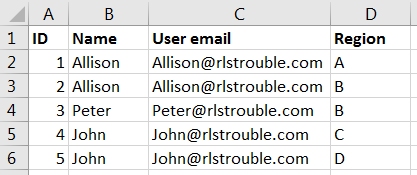
I have a 'Userlist' table where each user (email) be connected to one or more regions, like this: 

Role access.PNG


Next, I have a region dim table connected to all relevant fact tables. 

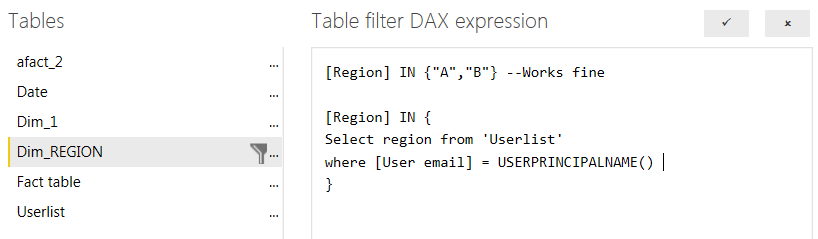
I would like to perform a lookup to limit each user to see only the regions they are connected to, but I don't know how to do this in DAX (after several failed attempts, I am only able to return one value using lookup - not a list of values). An example of what I am trying to do, with SQL syntax, below: 


RLS Dax example.PNG


Is it possible to write this lookup inside an 'IN' function using DAX? Am I going about this the wrong way? 

1 ACCEPTED SOLUTION
Anonymous
Not applicable

Hi @Anonymous,


You can try to use below formula as filter condition:

[Region]
    IN CALCULATETABLE (
        VALUES ( UserList[Region] ),
        FILTER (
            ALL ( UserList ),
            [User email] = USERNAME ()
                || [User email] = USERPRINCIPALNAME ()
        )
    )

BTW, I don't think you can directly use t-sql query in dax formula.


Regards,

Xiaoxin Sheng

View solution in original post

2 REPLIES 2
Anonymous
Not applicable

Hi @Anonymous,


You can try to use below formula as filter condition:

[Region]
    IN CALCULATETABLE (
        VALUES ( UserList[Region] ),
        FILTER (
            ALL ( UserList ),
            [User email] = USERNAME ()
                || [User email] = USERPRINCIPALNAME ()
        )
    )

BTW, I don't think you can directly use t-sql query in dax formula.


Regards,

Xiaoxin Sheng

Anonymous
Not applicable

Hi Xiaoxin, 


This worked perfectly! Thank you! 

A great solution to managing user roles using an external user-table managed by the business. 

And -- you are of course right, t-sql doesn't work - I wrote it to provide an example of what I was trying to attempt in DAX. 


Regards,

Oklande

Helpful resources

Announcements
Power BI DataViz World Championships

Power BI Dataviz World Championships

The Power BI Data Visualization World Championships is back! It's time to submit your entry.

January Power BI Update Carousel

Power BI Monthly Update - January 2026

Check out the January 2026 Power BI update to learn about new features.

FabCon Atlanta 2026 carousel

FabCon Atlanta 2026

Join us at FabCon Atlanta, March 16-20, for the ultimate Fabric, Power BI, AI and SQL community-led event. Save $200 with code FABCOMM.