cancel
Showing results for 
Search instead for 
Did you mean: 

The Power BI Data Visualization World Championships is back! It's time to submit your entry. Live now!

Reply
Anonymous
Not applicable

Dynamic RLS - use DAX to return multiple values IN

Hi all, 


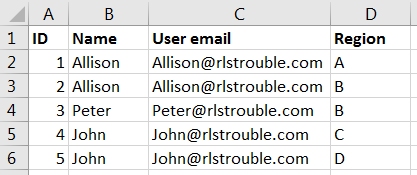
I have a 'Userlist' table where each user (email) be connected to one or more regions, like this: 

Role access.PNG


Next, I have a region dim table connected to all relevant fact tables. 

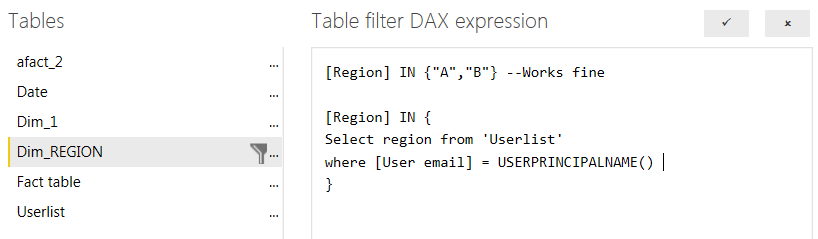
I would like to perform a lookup to limit each user to see only the regions they are connected to, but I don't know how to do this in DAX (after several failed attempts, I am only able to return one value using lookup - not a list of values). An example of what I am trying to do, with SQL syntax, below: 


RLS Dax example.PNG


Is it possible to write this lookup inside an 'IN' function using DAX? Am I going about this the wrong way? 

1 ACCEPTED SOLUTION
Anonymous
Not applicable

Hi @Anonymous,


You can try to use below formula as filter condition:

[Region]
    IN CALCULATETABLE (
        VALUES ( UserList[Region] ),
        FILTER (
            ALL ( UserList ),
            [User email] = USERNAME ()
                || [User email] = USERPRINCIPALNAME ()
        )
    )

BTW, I don't think you can directly use t-sql query in dax formula.


Regards,

Xiaoxin Sheng

View solution in original post

2 REPLIES 2
Anonymous
Not applicable

Hi @Anonymous,


You can try to use below formula as filter condition:

[Region]
    IN CALCULATETABLE (
        VALUES ( UserList[Region] ),
        FILTER (
            ALL ( UserList ),
            [User email] = USERNAME ()
                || [User email] = USERPRINCIPALNAME ()
        )
    )

BTW, I don't think you can directly use t-sql query in dax formula.


Regards,

Xiaoxin Sheng

Anonymous
Not applicable

Hi Xiaoxin, 


This worked perfectly! Thank you! 

A great solution to managing user roles using an external user-table managed by the business. 

And -- you are of course right, t-sql doesn't work - I wrote it to provide an example of what I was trying to attempt in DAX. 


Regards,

Oklande

Helpful resources

Announcements
December 2025 Power BI Update Carousel

Power BI Monthly Update - December 2025

Check out the December 2025 Power BI Holiday Recap!

FabCon Atlanta 2026 carousel

FabCon Atlanta 2026

Join us at FabCon Atlanta, March 16-20, for the ultimate Fabric, Power BI, AI and SQL community-led event. Save $200 with code FABCOMM.