cancel
Showing results for 
Search instead for 
Did you mean: 

July 28 - August 9 | Final Round of the Power BI Dataviz World Championships. This is your chance. Learn more

Reply
Evandam
Helper II
Helper II

Dynamic RLS not working

Hi there,


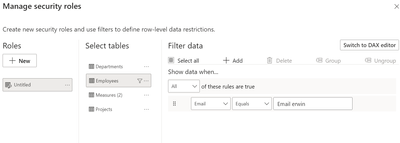
I would like to implement dynamic RLS based on USERPRINCIPALENAME().

I've tried setting it up, but didnt worked as i expected.


what am i doing wrong here?


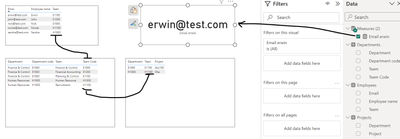
ofcourse the measure 'Erwin email' is just to dummy the principal name.


Link to PBIX file 

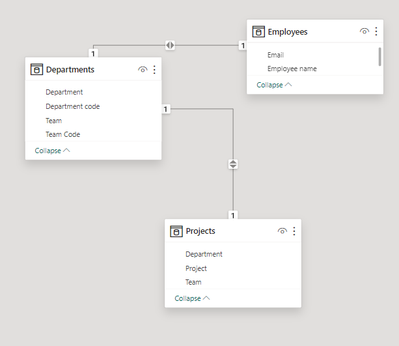
Evandam_0-1701896567559.pngEvandam_1-1701896604377.pngEvandam_2-1701896703700.pngEvandam_3-1701896727574.png

Evandam_1-1701896907770.pngEvandam_2-1701896927002.png


1 ACCEPTED SOLUTION
parry2k
Super User
Super User

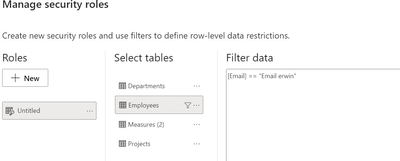
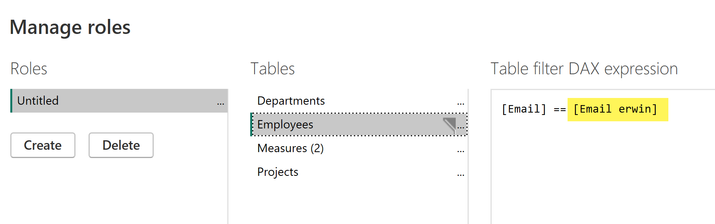
@Evandam few things, change RLS to this because your measure contains the UPN


parry2k_0-1701900251426.png


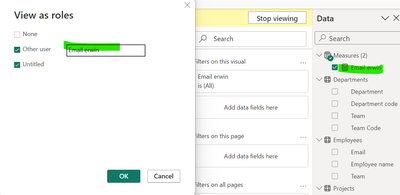
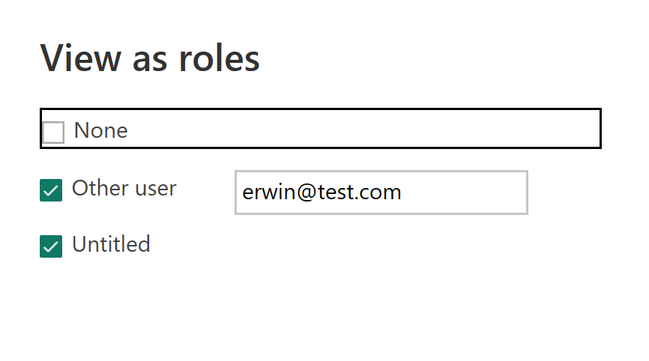
to test you need to do this:


parry2k_1-1701900290819.png


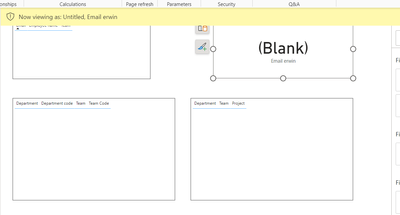
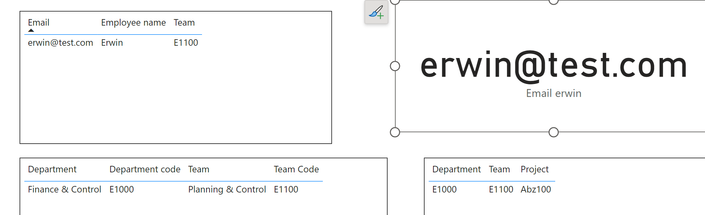
and here is the output:


parry2k_2-1701900318776.png


Subscribe to the @PowerBIHowTo YT channel for an upcoming video on List and Record functions in Power Query!!

Learn Power BI and Fabric - subscribe to our YT channel - Click here: @PowerBIHowTo

If my solution proved useful, I'd be delighted to receive Kudos. When you put effort into asking a question, it's equally thoughtful to acknowledge and give Kudos to the individual who helped you solve the problem. It's a small gesture that shows appreciation and encouragement! ❤


Did I answer your question? Mark my post as a solution. Proud to be a Super User! Appreciate your Kudos 🙂
Feel free to email me with any of your BI needs.

View solution in original post

3 REPLIES 3
parry2k
Super User
Super User

@Evandam hmmm, it is not random, it has a different meaning: anything in the quotes is treated as string, and if you want to refer to a measure or column, you have to wrap it in the square bracket. As a best practice, with columns, you will always use the table name and then the column name, for the measure you will never use the table name because it is global to the model.


Subscribe to the @PowerBIHowTo YT channel for an upcoming video on List and Record functions in Power Query!!

Learn Power BI and Fabric - subscribe to our YT channel - Click here: @PowerBIHowTo

If my solution proved useful, I'd be delighted to receive Kudos. When you put effort into asking a question, it's equally thoughtful to acknowledge and give Kudos to the individual who helped you solve the problem. It's a small gesture that shows appreciation and encouragement! ❤


Did I answer your question? Mark my post as a solution. Proud to be a Super User! Appreciate your Kudos 🙂
Feel free to email me with any of your BI needs.
Evandam
Helper II
Helper II

realy 😂 i didnt worked because i didnt used the square bracktes [].

parry2k
Super User
Super User

@Evandam few things, change RLS to this because your measure contains the UPN


parry2k_0-1701900251426.png


to test you need to do this:


parry2k_1-1701900290819.png


and here is the output:


parry2k_2-1701900318776.png


Subscribe to the @PowerBIHowTo YT channel for an upcoming video on List and Record functions in Power Query!!

Learn Power BI and Fabric - subscribe to our YT channel - Click here: @PowerBIHowTo

If my solution proved useful, I'd be delighted to receive Kudos. When you put effort into asking a question, it's equally thoughtful to acknowledge and give Kudos to the individual who helped you solve the problem. It's a small gesture that shows appreciation and encouragement! ❤


Did I answer your question? Mark my post as a solution. Proud to be a Super User! Appreciate your Kudos 🙂
Feel free to email me with any of your BI needs.
Helpful resources

Announcements
Fabric Community Sticker Design Challenge Barcelona Carousel

Fabric Community Sticker Challenge - Barcelona 2026

If you love stickers, then you will definitely want to check out our community sticker challenge, Barcelona edition!

July Power BI Update Carousel

Power BI Monthly Update - July 2026

Check out the July 2026 Power BI update to learn about new features.

Power BI DataViz World Championships carousel

Power BI DataViz World Championships - June 2026

A new Power BI DataViz World Championship is coming this June! Don't miss out on submitting your entry.

Top Solution Authors