Join us at FabCon Atlanta from March 16 - 20, 2026, for the ultimate Fabric, Power BI, AI and SQL community-led event. Save $200 with code FABCOMM.
Register now!The Power BI Data Visualization World Championships is back! Get ahead of the game and start preparing now! Learn more
Hello,
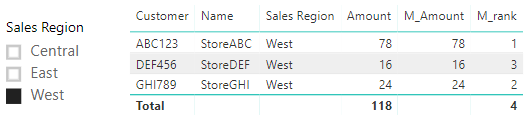
I have a RANKX measure that works on the entire list of customers in my table, but I need to be able to apply a slicer and have the RANKX measure adjust dynamically based on the applied slicer. I've been able to get it to work in each individual scenario (entire table-no slicer added or sliced table), but I can't find a scenario that lets me have it both ways - i.e. ranked for the entire table and then re-ranked when the slicer is used. Below is the version that is working for the entire table. When I use the slicer I want the amount that is being ranked to be reduced to only the Sales Region selected and then the rank applied to that new adjusted total. So if I slice by the West region, Customer ABC123 would go from ranked 2nd to ranked 1st.
Solved! Go to Solution.
Hi @ChuckChuck,
Please refer to below measure:
M_Amount =
CALCULATE (
SUM ( Table_2[Amount] ),
FILTER (
ALLSELECTED ( Table_2 ),
Table_2[Customer] = SELECTEDVALUE ( Table_2[Customer] )
)
)
M_rank = RANKX(ALLSELECTED(Table_2),[M_Amount],,DESC,Dense)
Best regards,
Yuliana Gu
Hi @ChuckChuck,
Please refer to below measure:
M_Amount =
CALCULATE (
SUM ( Table_2[Amount] ),
FILTER (
ALLSELECTED ( Table_2 ),
Table_2[Customer] = SELECTEDVALUE ( Table_2[Customer] )
)
)
M_rank = RANKX(ALLSELECTED(Table_2),[M_Amount],,DESC,Dense)
Best regards,
Yuliana Gu
@v-yulgu-msft That's exactly what I was trying to accomplish. Thank you so much!!
The Power BI Data Visualization World Championships is back! Get ahead of the game and start preparing now!
| User | Count |
|---|---|
| 37 | |
| 36 | |
| 32 | |
| 31 | |
| 29 |
| User | Count |
|---|---|
| 132 | |
| 86 | |
| 85 | |
| 68 | |
| 64 |