Don't miss your chance to take the Fabric Data Engineer (DP-600) exam for FREE! Find out how by attending the DP-600 session on April 23rd (pacific time), live or on-demand.
Learn moreJoin the FabCon + SQLCon recap series. Up next: Power BI, Real-Time Intelligence, IQ and AI, and Data Factory take center stage. All sessions are available on-demand after the live show. Register now
Hello,
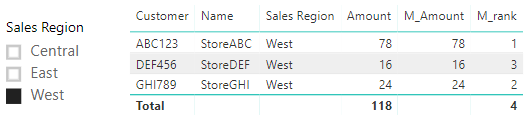
I have a RANKX measure that works on the entire list of customers in my table, but I need to be able to apply a slicer and have the RANKX measure adjust dynamically based on the applied slicer. I've been able to get it to work in each individual scenario (entire table-no slicer added or sliced table), but I can't find a scenario that lets me have it both ways - i.e. ranked for the entire table and then re-ranked when the slicer is used. Below is the version that is working for the entire table. When I use the slicer I want the amount that is being ranked to be reduced to only the Sales Region selected and then the rank applied to that new adjusted total. So if I slice by the West region, Customer ABC123 would go from ranked 2nd to ranked 1st.
Solved! Go to Solution.
Hi @ChuckChuck,
Please refer to below measure:
M_Amount =
CALCULATE (
SUM ( Table_2[Amount] ),
FILTER (
ALLSELECTED ( Table_2 ),
Table_2[Customer] = SELECTEDVALUE ( Table_2[Customer] )
)
)
M_rank = RANKX(ALLSELECTED(Table_2),[M_Amount],,DESC,Dense)
Best regards,
Yuliana Gu
Hi @ChuckChuck,
Please refer to below measure:
M_Amount =
CALCULATE (
SUM ( Table_2[Amount] ),
FILTER (
ALLSELECTED ( Table_2 ),
Table_2[Customer] = SELECTEDVALUE ( Table_2[Customer] )
)
)
M_rank = RANKX(ALLSELECTED(Table_2),[M_Amount],,DESC,Dense)
Best regards,
Yuliana Gu
@v-yulgu-msft That's exactly what I was trying to accomplish. Thank you so much!!
Check out the April 2026 Power BI update to learn about new features.
If you have recently started exploring Fabric, we'd love to hear how it's going. Your feedback can help with product improvements.
A new Power BI DataViz World Championship is coming this June! Don't miss out on submitting your entry.
| User | Count |
|---|---|
| 48 | |
| 46 | |
| 41 | |
| 20 | |
| 17 |
| User | Count |
|---|---|
| 69 | |
| 67 | |
| 32 | |
| 27 | |
| 26 |