cancel
Showing results for 
Search instead for 
Did you mean: 

Learn from the best! Meet the four finalists headed to the FINALS of the Power BI Dataviz World Championships! Register now

Reply
ChuckChuck
Helper I
Helper I

Dynamic RANKX


Hello,

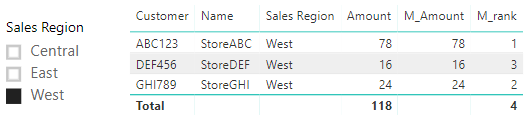
I have a RANKX measure that works on the entire list of customers in my table, but I need to be able to apply a slicer and have the RANKX measure adjust dynamically based on the applied slicer. I've been able to get it to work in each individual scenario (entire table-no slicer added or sliced table), but I can't find a scenario that lets me have it both ways - i.e. ranked for the entire table and then re-ranked when the slicer is used. Below is the version that is working for the entire table. When I use the slicer I want the amount that is being ranked to be reduced to only the Sales Region selected and then the rank applied to that new adjusted total. So if I slice by the West region, Customer ABC123 would go from ranked 2nd to ranked 1st. RANK Help.png


1 ACCEPTED SOLUTION
v-yulgu-msft
Microsoft Employee
Microsoft Employee

Hi @ChuckChuck,


Please refer to below measure:

M_Amount =
CALCULATE (
    SUM ( Table_2[Amount] ),
    FILTER (
        ALLSELECTED ( Table_2 ),
        Table_2[Customer] = SELECTEDVALUE ( Table_2[Customer] )
    )
)

M_rank = RANKX(ALLSELECTED(Table_2),[M_Amount],,DESC,Dense)

1.PNG2.PNG


Best regards,

Yuliana Gu

Community Support Team _ Yuliana Gu
If this post helps, then please consider Accept it as the solution to help the other members find it more quickly.

View solution in original post

2 REPLIES 2
v-yulgu-msft
Microsoft Employee
Microsoft Employee

Hi @ChuckChuck,


Please refer to below measure:

M_Amount =
CALCULATE (
    SUM ( Table_2[Amount] ),
    FILTER (
        ALLSELECTED ( Table_2 ),
        Table_2[Customer] = SELECTEDVALUE ( Table_2[Customer] )
    )
)

M_rank = RANKX(ALLSELECTED(Table_2),[M_Amount],,DESC,Dense)

1.PNG2.PNG


Best regards,

Yuliana Gu

Community Support Team _ Yuliana Gu
If this post helps, then please consider Accept it as the solution to help the other members find it more quickly.

@v-yulgu-msft That's exactly what I was trying to accomplish. Thank you so much!!

Helpful resources

Announcements
Join our Fabric User Panel

Join our Fabric User Panel

Share feedback directly with Fabric product managers, participate in targeted research studies and influence the Fabric roadmap.

February Power BI Update Carousel

Power BI Monthly Update - February 2026

Check out the February 2026 Power BI update to learn about new features.

FabCon Atlanta 2026 carousel

FabCon Atlanta 2026

Join us at FabCon Atlanta, March 16-20, for the ultimate Fabric, Power BI, AI and SQL community-led event. Save $200 with code FABCOMM.