Get certified for free when you join Fabric Data Days 2026 and dive into Fabric, Power BI, SQL, AI, and other essential data skills.
Join nowJuly 7 - July 17 | Round 2 of the Power BI Dataviz World Championships. Don't miss your chance! Learn more
I'm trying to dynamically calculate for pre/post sales based on an index slicer selection. My dataset looks as follows:
| Index | Timing | TY Sales | LY Sales |
| -4 | Pre | 473891 | 263538 |
| -3 | Pre | 543166 | 385628 |
| -2 | Pre | 764374 | 329274 |
| -1 | Pre | 876485 | 183658 |
| 0 | Post | 563836 | 954786 |
| 1 | Post | 292737 | 283464 |
| 2 | Post | 484640 | 234874 |
The formula would be (Post TY Sales - Pre TY Sales) / Pre TY Sales
The result would change based on your slicer selection ex: -3 to 2 or -1 to 1, etc. Thanks in advance!
Solved! Go to Solution.
Hi @mikayla ,
You could create a measure by the following formula:
value =
VAR _presum =
SUMX ( FILTER ( 'Table', [Timing] = "Pre" ), [TY Sales] )
RETURN
DIVIDE (
SUMX ( FILTER ( 'Table', [Timing] = "Post" ), [TY Sales] ) - _presum,
_presum
)
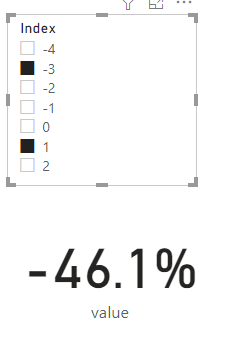
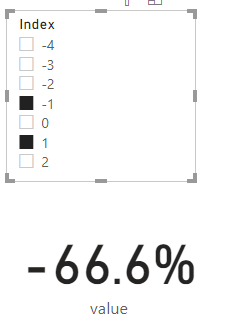
The final output is shown below: When the choice of slicer is different(Use Ctrl to select multiple options), the value is also different
Best Regards,
Yalan Wu
If this post helps, then please consider Accept it as the solution to help the other members find it more quickly.
Hi @mikayla ,
You could create a measure by the following formula:
value =
VAR _presum =
SUMX ( FILTER ( 'Table', [Timing] = "Pre" ), [TY Sales] )
RETURN
DIVIDE (
SUMX ( FILTER ( 'Table', [Timing] = "Post" ), [TY Sales] ) - _presum,
_presum
)
The final output is shown below: When the choice of slicer is different(Use Ctrl to select multiple options), the value is also different
Best Regards,
Yalan Wu
If this post helps, then please consider Accept it as the solution to help the other members find it more quickly.
@mikaylaYour problem is not clear. Can you elaborate?
Do you want help in writing this measure/calculated column or creating a slicer with ranges?
Of course, let me elaborate. I've already created the slicer with the index range but I am struggling with writing the measure/calculated column as I am fairly new to DAX. Any help is so appreciated! Let me know if I am still not being clear.
Join us in Barcelona for FabCon and SQLCon, the Fabric, Power BI, SQL, and AI community event. Save €200 with code FABCMTY200.
Join Fabric Data Days 2026: 60 days of free live/on-demand sessions, challenges, study groups, and certification opportunities.
| User | Count |
|---|---|
| 22 | |
| 18 | |
| 18 | |
| 17 | |
| 13 |
| User | Count |
|---|---|
| 61 | |
| 53 | |
| 47 | |
| 40 | |
| 38 |