Join us at FabCon Atlanta from March 16 - 20, 2026, for the ultimate Fabric, Power BI, AI and SQL community-led event. Save $200 with code FABCOMM.
Register now!The Power BI Data Visualization World Championships is back! Get ahead of the game and start preparing now! Learn more
Hello,
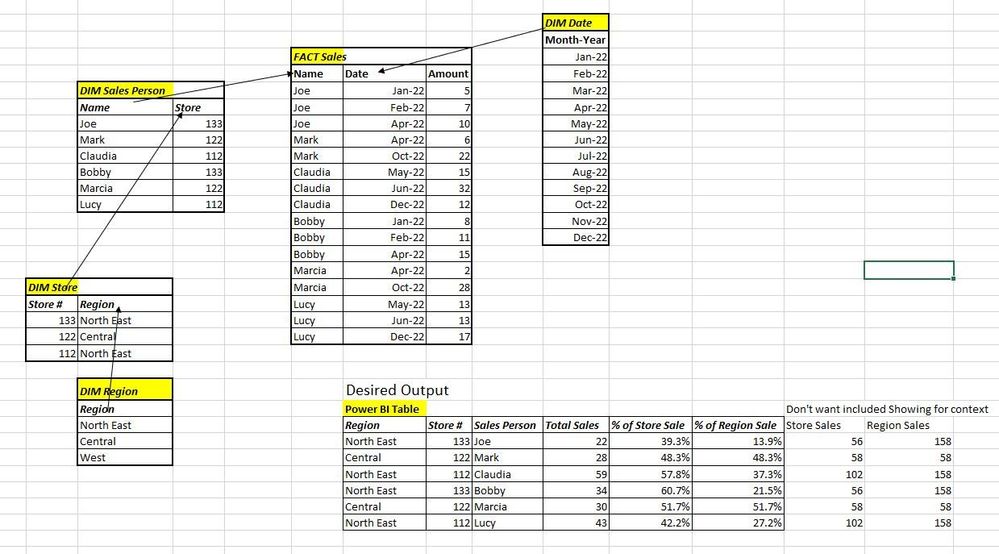
I want to calculate a dynamic measure that shows an idividual's sales as a % of her Store's Sales and a separate measure that shows her Sales as a % of her Region's sales.
Total Sales=Sum('FACT Sales'[Amount])
Everytime i try to use ALL or AllExcept on the Store # or Region, i get 100% instead of the desired %.
Thanks!
Thanks!
Solved! Go to Solution.
Hi, @JimSales81
You can try the following methods.
Measure:
Store Sales =
VAR _N1 =
CALCULATE ([Total Sales],
FILTER ( ALL ( 'FACT Sales' ),
RELATED ( 'DIM Sales Person'[Store] ) = MAX ( 'DIM Store'[Store#] ) ) )
RETURN
IF ( NOT ( ISBLANK ( [Total Sales] ) ), _N1 )Region Sales =
VAR _N1 =
CALCULATE ([Total Sales],
FILTER ( ALL ( 'FACT Sales' ),
RELATED ( 'DIM Store'[Region] ) = MAX ( 'DIM Store'[Region] ) ) )
RETURN
IF ( NOT ( ISBLANK ( [Total Sales] ) ), _N1 )% of Store Sales = DIVIDE([Total Sales],[Store Sales])% of Region Sales = DIVIDE([Total Sales],[Region Sales])
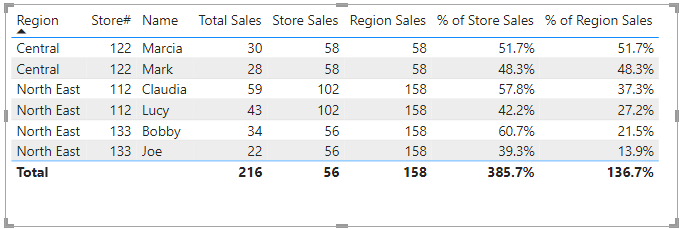
Is this the result you expect?
Best Regards,
Community Support Team _Charlotte
If this post helps, then please consider Accept it as the solution to help the other members find it more quickly.
Hi, @JimSales81
You can try the following methods.
Measure:
Store Sales =
VAR _N1 =
CALCULATE ([Total Sales],
FILTER ( ALL ( 'FACT Sales' ),
RELATED ( 'DIM Sales Person'[Store] ) = MAX ( 'DIM Store'[Store#] ) ) )
RETURN
IF ( NOT ( ISBLANK ( [Total Sales] ) ), _N1 )Region Sales =
VAR _N1 =
CALCULATE ([Total Sales],
FILTER ( ALL ( 'FACT Sales' ),
RELATED ( 'DIM Store'[Region] ) = MAX ( 'DIM Store'[Region] ) ) )
RETURN
IF ( NOT ( ISBLANK ( [Total Sales] ) ), _N1 )% of Store Sales = DIVIDE([Total Sales],[Store Sales])% of Region Sales = DIVIDE([Total Sales],[Region Sales])
Is this the result you expect?
Best Regards,
Community Support Team _Charlotte
If this post helps, then please consider Accept it as the solution to help the other members find it more quickly.
@JimSales81 , try like
% Sales=divide(Sum('FACT Sales'[Amount]), calculate(Sum('FACT Sales'[Amount]), allexcept(Sales, 'Dim Region'[Region]) ) )
% Sales=divide(Sum('FACT Sales'[Amount]), calculate(Sum('FACT Sales'[Amount]), allexcept(Sales, 'Dim Store'[Store]) ) )
Amit,
Thank you but both are still coming up with 100% for everyone. how does the filter context know which region/store to tie to any individual in your measures?
THanks,
Jim
The Power BI Data Visualization World Championships is back! Get ahead of the game and start preparing now!
Check out the November 2025 Power BI update to learn about new features.
| User | Count |
|---|---|
| 59 | |
| 43 | |
| 42 | |
| 23 | |
| 17 |
| User | Count |
|---|---|
| 190 | |
| 122 | |
| 96 | |
| 66 | |
| 47 |