Join us at FabCon Atlanta from March 16 - 20, 2026, for the ultimate Fabric, Power BI, AI and SQL community-led event. Save $200 with code FABCOMM.
Register now!View all the Fabric Data Days sessions on demand. View schedule
Hello,
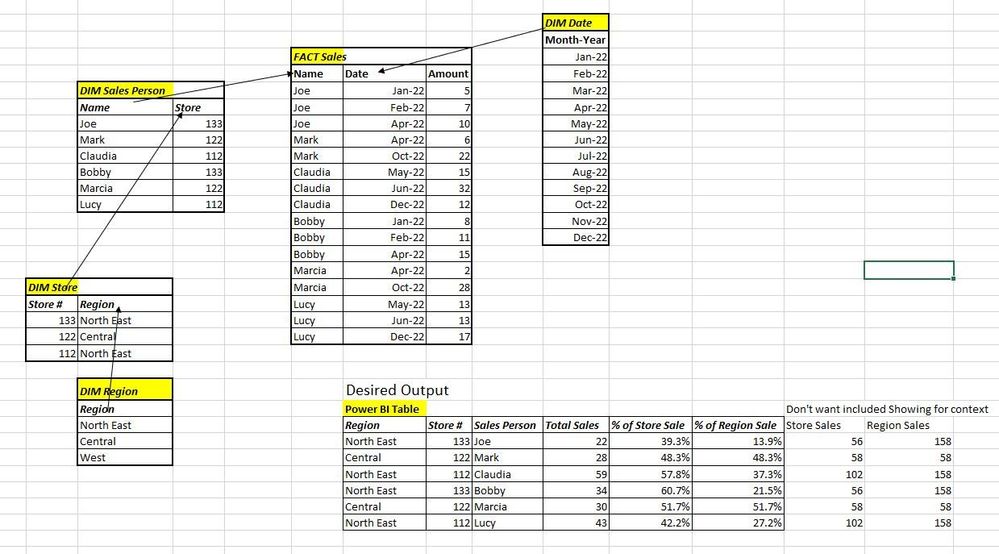
I want to calculate a dynamic measure that shows an idividual's sales as a % of her Store's Sales and a separate measure that shows her Sales as a % of her Region's sales.
Total Sales=Sum('FACT Sales'[Amount])
Everytime i try to use ALL or AllExcept on the Store # or Region, i get 100% instead of the desired %.
Thanks!
Thanks!
Solved! Go to Solution.
Hi, @JimSales81
You can try the following methods.
Measure:
Store Sales =
VAR _N1 =
CALCULATE ([Total Sales],
FILTER ( ALL ( 'FACT Sales' ),
RELATED ( 'DIM Sales Person'[Store] ) = MAX ( 'DIM Store'[Store#] ) ) )
RETURN
IF ( NOT ( ISBLANK ( [Total Sales] ) ), _N1 )Region Sales =
VAR _N1 =
CALCULATE ([Total Sales],
FILTER ( ALL ( 'FACT Sales' ),
RELATED ( 'DIM Store'[Region] ) = MAX ( 'DIM Store'[Region] ) ) )
RETURN
IF ( NOT ( ISBLANK ( [Total Sales] ) ), _N1 )% of Store Sales = DIVIDE([Total Sales],[Store Sales])% of Region Sales = DIVIDE([Total Sales],[Region Sales])
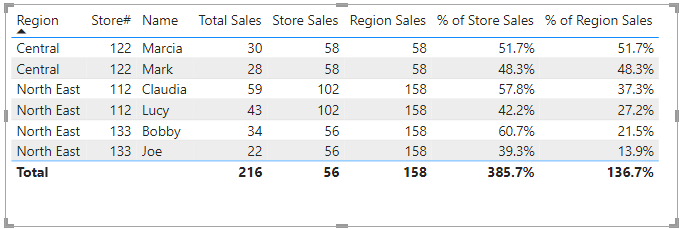
Is this the result you expect?
Best Regards,
Community Support Team _Charlotte
If this post helps, then please consider Accept it as the solution to help the other members find it more quickly.
Hi, @JimSales81
You can try the following methods.
Measure:
Store Sales =
VAR _N1 =
CALCULATE ([Total Sales],
FILTER ( ALL ( 'FACT Sales' ),
RELATED ( 'DIM Sales Person'[Store] ) = MAX ( 'DIM Store'[Store#] ) ) )
RETURN
IF ( NOT ( ISBLANK ( [Total Sales] ) ), _N1 )Region Sales =
VAR _N1 =
CALCULATE ([Total Sales],
FILTER ( ALL ( 'FACT Sales' ),
RELATED ( 'DIM Store'[Region] ) = MAX ( 'DIM Store'[Region] ) ) )
RETURN
IF ( NOT ( ISBLANK ( [Total Sales] ) ), _N1 )% of Store Sales = DIVIDE([Total Sales],[Store Sales])% of Region Sales = DIVIDE([Total Sales],[Region Sales])
Is this the result you expect?
Best Regards,
Community Support Team _Charlotte
If this post helps, then please consider Accept it as the solution to help the other members find it more quickly.
@JimSales81 , try like
% Sales=divide(Sum('FACT Sales'[Amount]), calculate(Sum('FACT Sales'[Amount]), allexcept(Sales, 'Dim Region'[Region]) ) )
% Sales=divide(Sum('FACT Sales'[Amount]), calculate(Sum('FACT Sales'[Amount]), allexcept(Sales, 'Dim Store'[Store]) ) )
Amit,
Thank you but both are still coming up with 100% for everyone. how does the filter context know which region/store to tie to any individual in your measures?
THanks,
Jim
Check out the November 2025 Power BI update to learn about new features.
Advance your Data & AI career with 50 days of live learning, contests, hands-on challenges, study groups & certifications and more!