Join us at FabCon Atlanta from March 16 - 20, 2026, for the ultimate Fabric, Power BI, AI and SQL community-led event. Save $200 with code FABCOMM.
Register now!The Power BI Data Visualization World Championships is back! It's time to submit your entry. Live now!
I have several measures that have corresponding current year, last year, and two years ago measure counterparts.
Example: Sales, Sales CY, Sales LY, Sales LY-1
I have these in a matrix, but I the column headers in the matrix need to read: Sales 2022, Sales 2021, Sales 2020
Right now, I have them manually named, but I would like this to be dynamic so we see a seamless switch when the year changes instead of someone needing to go in and manually update. Any suggestions?
Solved! Go to Solution.
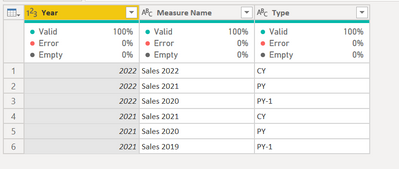
@Anonymous create a table as below.
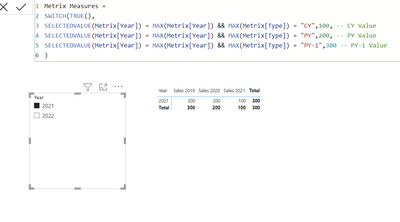
Use the measure as
Metrix Measures =
SWITCH(TRUE(),
SELECTEDVALUE(Metrix[Year]) = MAX(Metrix[Year]) && MAX(Metrix[Type]) = "CY",100, -- CY Value
SELECTEDVALUE(Metrix[Year]) = MAX(Metrix[Year]) && MAX(Metrix[Type]) = "PY",200, -- PY Value
SELECTEDVALUE(Metrix[Year]) = MAX(Metrix[Year]) && MAX(Metrix[Type]) = "PY-1",300 -- PY-1 Value
)Let me know if that helps.
Accept the solution if that works for you.
@Anonymous create a table as below.
Use the measure as
Metrix Measures =
SWITCH(TRUE(),
SELECTEDVALUE(Metrix[Year]) = MAX(Metrix[Year]) && MAX(Metrix[Type]) = "CY",100, -- CY Value
SELECTEDVALUE(Metrix[Year]) = MAX(Metrix[Year]) && MAX(Metrix[Type]) = "PY",200, -- PY Value
SELECTEDVALUE(Metrix[Year]) = MAX(Metrix[Year]) && MAX(Metrix[Type]) = "PY-1",300 -- PY-1 Value
)Let me know if that helps.
So this worked perfectly for the situation, but I do have a follow-up. I have several measures I have added to this table, but a couple of them are percentages. Is there a way to control the data types for specific columns instead of simply all of them?
Hi, have you found solution for this problem? I have the same issue
The Power BI Data Visualization World Championships is back! It's time to submit your entry.
Check out the January 2026 Power BI update to learn about new features.
| User | Count |
|---|---|
| 71 | |
| 45 | |
| 34 | |
| 28 | |
| 23 |
| User | Count |
|---|---|
| 143 | |
| 121 | |
| 59 | |
| 40 | |
| 33 |