Share feedback directly with Fabric product managers, participate in targeted research studies and influence the Fabric roadmap.
Sign up nowGet Fabric certified for FREE! Don't miss your chance! Learn more
I have several measures that have corresponding current year, last year, and two years ago measure counterparts.
Example: Sales, Sales CY, Sales LY, Sales LY-1
I have these in a matrix, but I the column headers in the matrix need to read: Sales 2022, Sales 2021, Sales 2020
Right now, I have them manually named, but I would like this to be dynamic so we see a seamless switch when the year changes instead of someone needing to go in and manually update. Any suggestions?
Solved! Go to Solution.
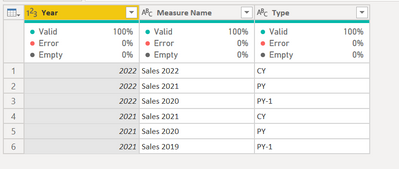
@Anonymous create a table as below.
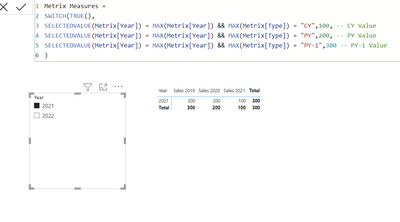
Use the measure as
Metrix Measures =
SWITCH(TRUE(),
SELECTEDVALUE(Metrix[Year]) = MAX(Metrix[Year]) && MAX(Metrix[Type]) = "CY",100, -- CY Value
SELECTEDVALUE(Metrix[Year]) = MAX(Metrix[Year]) && MAX(Metrix[Type]) = "PY",200, -- PY Value
SELECTEDVALUE(Metrix[Year]) = MAX(Metrix[Year]) && MAX(Metrix[Type]) = "PY-1",300 -- PY-1 Value
)Let me know if that helps.
Accept the solution if that works for you.
@Anonymous create a table as below.
Use the measure as
Metrix Measures =
SWITCH(TRUE(),
SELECTEDVALUE(Metrix[Year]) = MAX(Metrix[Year]) && MAX(Metrix[Type]) = "CY",100, -- CY Value
SELECTEDVALUE(Metrix[Year]) = MAX(Metrix[Year]) && MAX(Metrix[Type]) = "PY",200, -- PY Value
SELECTEDVALUE(Metrix[Year]) = MAX(Metrix[Year]) && MAX(Metrix[Type]) = "PY-1",300 -- PY-1 Value
)Let me know if that helps.
So this worked perfectly for the situation, but I do have a follow-up. I have several measures I have added to this table, but a couple of them are percentages. Is there a way to control the data types for specific columns instead of simply all of them?
Hi, have you found solution for this problem? I have the same issue
Share feedback directly with Fabric product managers, participate in targeted research studies and influence the Fabric roadmap.
| User | Count |
|---|---|
| 63 | |
| 62 | |
| 42 | |
| 19 | |
| 16 |
| User | Count |
|---|---|
| 111 | |
| 105 | |
| 36 | |
| 28 | |
| 27 |