Join us at FabCon Atlanta from March 16 - 20, 2026, for the ultimate Fabric, Power BI, AI and SQL community-led event. Save $200 with code FABCOMM.
Register now!Learn from the best! Meet the four finalists headed to the FINALS of the Power BI Dataviz World Championships! Register now
Hello :),
I have 2 questions for my Matrix table. I need to do a matrix table which includes the Actual values until the current Date and for the rest of the Year the Forecast Values. For Example: Today is the 20.06.2021, so until June I want to show the actuals and for the rest of the Year the forecast (BP2021). I wanted to know what the best approach is. My thirst thoght was to da an if-statement combined with Date(). But I am not sure, if that is the best approach.
My other Question is, is it possible to show in the column header, if it is an Actual or an Forecast? Otherwise the User will not know, which values are actaul or forecast.
I am very thankful, for every help and tip.
Here is how my Datatable looks like:
| Period | Month | Value |
| Actual 2021 | 31.01 | 10 |
| Actual 2021 | 28.02 | 20 |
| Actual 2021 | 31.03 | 30 |
| Actual 2021 | 30.04 | 40 |
| Actual 2021 | 31.05 | 20 |
| BP 2021 | 30.06 | 300 |
| BP 2021 | 30.07 | 100 |
| BP 2021 | 28.02 | 200 |
Solved! Go to Solution.
Hi @Anonymous ,
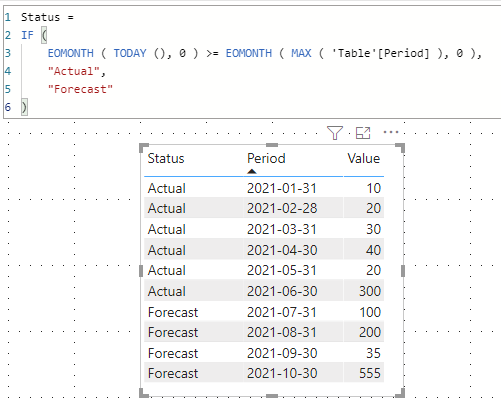
You could use Conditional Formatting. Use 1 and 0 instead of Actual and Forecast. Then use the measure as rule.
https://docs.microsoft.com/en-us/power-bi/create-reports/desktop-conditional-table-formatting
Best Regards,
Jay
| Thanks to the great efforts by MS engineers to simplify syntax of DAX! Most beginners are SUCCESSFULLY MISLED to think that they could easily master DAX; but it turns out that the intricacy of the most frequently used RANKX() is still way beyond their comprehension! |
DAX is simple, but NOT EASY! |
Hi @CNENFRNL ,
thank you for quick help. I would like to do matrix table where each month is a separte column. I think I can adopt the code for the measure.
The final Matrix table should look like this:
| Cost type | Jan | Feb | Mar | May | June | July | Aug | Sept | Oct |
| US100 | xxx | xxx | xxx | xxx | xxx | xxx | xxx | xxx | xxx |
So now I would add calculated columns for each month and post your code.
Now the question is, how can I highlight in the column header, which month is an actual or a forecast?
Thank you and best regards,
Albert
Hi @Anonymous ,
You could use Conditional Formatting. Use 1 and 0 instead of Actual and Forecast. Then use the measure as rule.
https://docs.microsoft.com/en-us/power-bi/create-reports/desktop-conditional-table-formatting
Best Regards,
Jay
Share feedback directly with Fabric product managers, participate in targeted research studies and influence the Fabric roadmap.
Check out the February 2026 Power BI update to learn about new features.
| User | Count |
|---|---|
| 61 | |
| 54 | |
| 38 | |
| 16 | |
| 15 |
| User | Count |
|---|---|
| 94 | |
| 85 | |
| 32 | |
| 31 | |
| 25 |