Don't miss your chance to take the Fabric Data Engineer (DP-700) exam on us!
Learn moreWe've captured the moments from FabCon & SQLCon that everyone is talking about, and we are bringing them to the community, live and on-demand. Starts on April 14th. Register now
Hi all,
I have a question about creating dynamic logos.
I followed the below tutorial to allow me to add in dynamic logos:
https://www.youtube.com/watch?v=dzJvTcCedm8&ab_channel=BIElite
I have a slicer, when I select a certain value, it will display a specific value.
My issue occurs when I select all values, I was a specific logo to show up which is not happening.
Can anyone help?
Background:
Company One has two logos - One for UK and one for US. If I click on the One company filter, I want the UK logo to be shown and if I select both, company One and Two, I want the UK logo to be shown.
Filter:
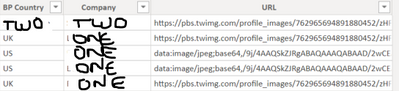
Data:
Solved! Go to Solution.
Hi, @MissBI_21 ;
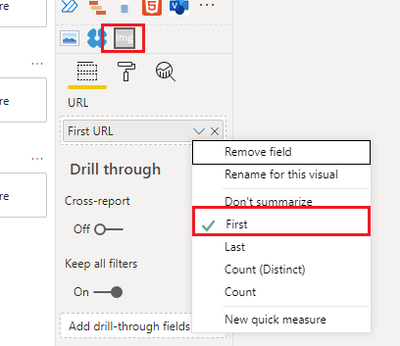
Such as video's method ,you should change the URL to the first.
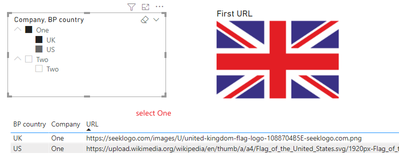
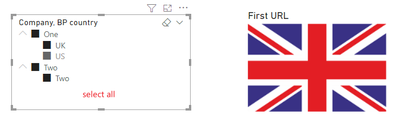
The final output is shown below:
If I understand error , could you share more detail ?
Best Regards,
Community Support Team_ Yalan Wu
If this post helps, then please consider Accept it as the solution to help the other members find it more quickly.
Hi, @MissBI_21 ;
Such as video's method ,you should change the URL to the first.
The final output is shown below:
If I understand error , could you share more detail ?
Best Regards,
Community Support Team_ Yalan Wu
If this post helps, then please consider Accept it as the solution to help the other members find it more quickly.
Hi,
Thank you for the above.
Just had a look at your Power BI file, where do you download Image VIewer from? I can't find it on the Marketplace.
Regards,
Hi, @MissBI_21 ;
In your video, i find the link :
https://blog.pragmaticworks.com/power-bi-custom-visuals-image-viewer
https://file.ac/QIDJnL6igK0/ImgViewerVisual.0.1.0.pbiviz
Best Regards,
Community Support Team_ Yalan Wu
If this post helps, then please consider Accept it as the solution to help the other members find it more quickly.
Thank you so much! It worked!
@MissBI_21 , Use min for country
example
Measure =
var _max =minx(allselected(Table), Table[Country])
var _min = minx(allselected(Table), Table[division])
return
calculate(max(Table[url]) , filter(Table, Table[Country] = _max && Table[division] =_min))
If you have recently started exploring Fabric, we'd love to hear how it's going. Your feedback can help with product improvements.
A new Power BI DataViz World Championship is coming this June! Don't miss out on submitting your entry.
Share feedback directly with Fabric product managers, participate in targeted research studies and influence the Fabric roadmap.
| User | Count |
|---|---|
| 53 | |
| 37 | |
| 35 | |
| 19 | |
| 17 |
| User | Count |
|---|---|
| 74 | |
| 69 | |
| 39 | |
| 35 | |
| 23 |