
Join us at FabCon Atlanta from March 16 - 20, 2026, for the ultimate Fabric, Power BI, AI and SQL community-led event. Save $200 with code FABCOMM.
Register now!Get Fabric Certified for FREE during Fabric Data Days. Don't miss your chance! Request now
Hello,
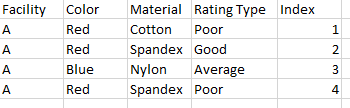
I am struggling with the idea of making a dynamic index measure using DAX in Power BI that would depend on multiple filters. For example, I have data that looks like this:
If I filtered this data to show Facility C, with Color = Green and Material = Cotton, I would like to have an index that looked like this:
Similarly, if I filtered the data to show Facility A and Color = Blue and Red, I would like to have an index that looked like this:
Is this possible? Thanks in advance
Solved! Go to Solution.
Hi,
I am not sure if I understood your question correctly.
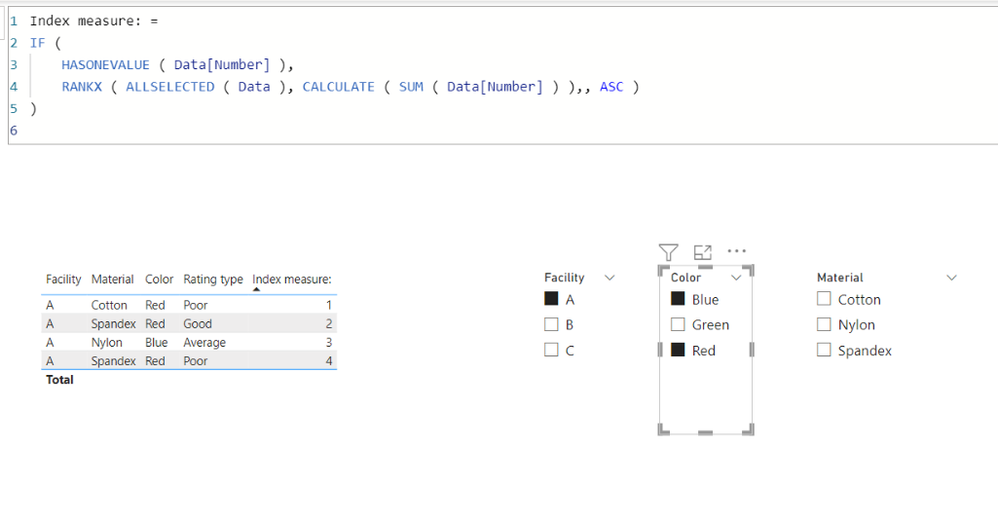
I think it is better to know the sort order of each column, otherwise I suggest having a number column like the attached pbix file, and use RANKX function and ALLSELECTED function to create a index measure like below.
Index measure: =
IF (
HASONEVALUE ( Data[Number] ),
RANKX ( ALLSELECTED ( Data ), CALCULATE ( SUM ( Data[Number] ) ),, ASC )
)
Hi,
I am not sure if I understood your question correctly.
I think it is better to know the sort order of each column, otherwise I suggest having a number column like the attached pbix file, and use RANKX function and ALLSELECTED function to create a index measure like below.
Index measure: =
IF (
HASONEVALUE ( Data[Number] ),
RANKX ( ALLSELECTED ( Data ), CALCULATE ( SUM ( Data[Number] ) ),, ASC )
)
Thank you, this is what I needed!
Check out the November 2025 Power BI update to learn about new features.
Advance your Data & AI career with 50 days of live learning, contests, hands-on challenges, study groups & certifications and more!