
cancel
Showing results for 
Search instead for 
Did you mean: 

The Power BI Data Visualization World Championships is back! Get ahead of the game and start preparing now! Learn more

Reply
masmith004
Regular Visitor

Dynamic Index Measure

Hello,


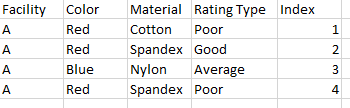
I am struggling with the idea of making a dynamic index measure using DAX in Power BI that would depend on multiple filters. For example, I have data that looks like this:

masmith004_1-1656435249619.png


If I filtered this data to show Facility C, with Color = Green and Material = Cotton, I would like to have an index that looked like this:

masmith004_2-1656435280087.png

Similarly, if I filtered the data to show Facility A and Color = Blue and Red, I would like to have an index that looked like this:

masmith004_3-1656435370894.png

Is this possible? Thanks in advance


1 ACCEPTED SOLUTION
Jihwan_Kim
Super User
Super User

Hi,

I am not sure if I understood your question correctly.

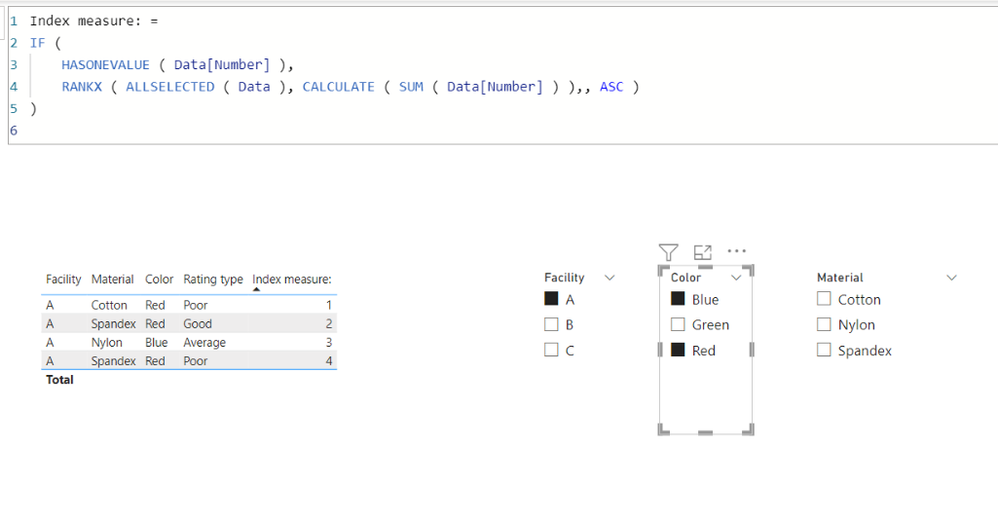
I think it is better to know the sort order of each column, otherwise I suggest having a number column like the attached pbix file, and use RANKX function and ALLSELECTED function to create a index measure like below.


Untitled.png


Index measure: = 
IF (
    HASONEVALUE ( Data[Number] ),
    RANKX ( ALLSELECTED ( Data ), CALCULATE ( SUM ( Data[Number] ) ),, ASC )
)

If this post helps, then please consider accepting it as the solution to help other members find it faster, and give a big thumbs up.


Click here to visit my LinkedIn page

Click here to schedule a short Teams meeting to discuss your question.

View solution in original post

2 REPLIES 2
Jihwan_Kim
Super User
Super User

Hi,

I am not sure if I understood your question correctly.

I think it is better to know the sort order of each column, otherwise I suggest having a number column like the attached pbix file, and use RANKX function and ALLSELECTED function to create a index measure like below.


Untitled.png


Index measure: = 
IF (
    HASONEVALUE ( Data[Number] ),
    RANKX ( ALLSELECTED ( Data ), CALCULATE ( SUM ( Data[Number] ) ),, ASC )
)

If this post helps, then please consider accepting it as the solution to help other members find it faster, and give a big thumbs up.


Click here to visit my LinkedIn page

Click here to schedule a short Teams meeting to discuss your question.

Thank you, this is what I needed!

Helpful resources

Announcements
Power BI DataViz World Championships

Power BI Dataviz World Championships

The Power BI Data Visualization World Championships is back! Get ahead of the game and start preparing now!

December 2025 Power BI Update Carousel

Power BI Monthly Update - December 2025

Check out the December 2025 Power BI Holiday Recap!

FabCon Atlanta 2026 carousel

FabCon Atlanta 2026

Join us at FabCon Atlanta, March 16-20, for the ultimate Fabric, Power BI, AI and SQL community-led event. Save $200 with code FABCOMM.