
Share feedback directly with Fabric product managers, participate in targeted research studies and influence the Fabric roadmap.
Sign up nowGet Fabric certified for FREE! Don't miss your chance! Learn more
Hello,
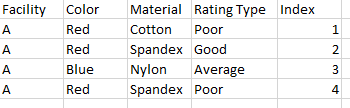
I am struggling with the idea of making a dynamic index measure using DAX in Power BI that would depend on multiple filters. For example, I have data that looks like this:
If I filtered this data to show Facility C, with Color = Green and Material = Cotton, I would like to have an index that looked like this:
Similarly, if I filtered the data to show Facility A and Color = Blue and Red, I would like to have an index that looked like this:
Is this possible? Thanks in advance
Solved! Go to Solution.
Hi,
I am not sure if I understood your question correctly.
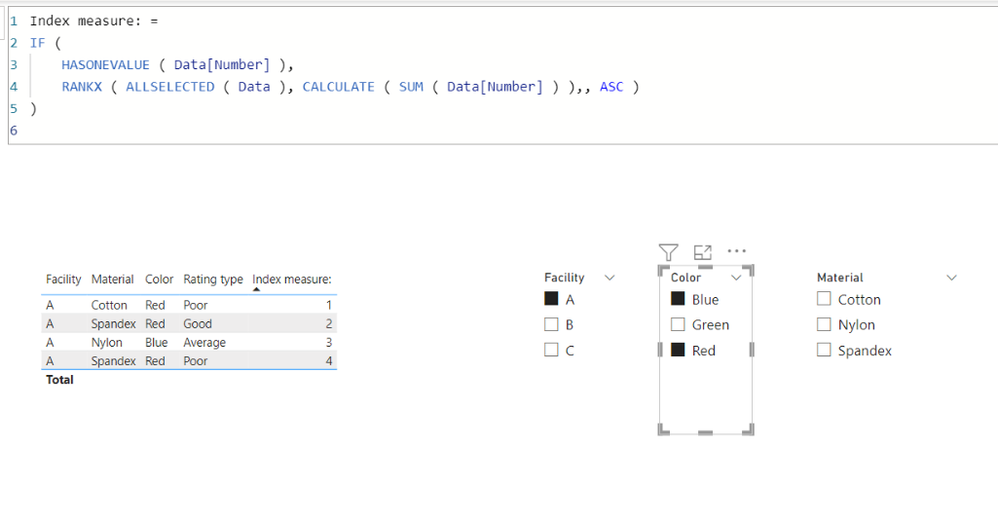
I think it is better to know the sort order of each column, otherwise I suggest having a number column like the attached pbix file, and use RANKX function and ALLSELECTED function to create a index measure like below.
Index measure: =
IF (
HASONEVALUE ( Data[Number] ),
RANKX ( ALLSELECTED ( Data ), CALCULATE ( SUM ( Data[Number] ) ),, ASC )
)
Hi,
I am not sure if I understood your question correctly.
I think it is better to know the sort order of each column, otherwise I suggest having a number column like the attached pbix file, and use RANKX function and ALLSELECTED function to create a index measure like below.
Index measure: =
IF (
HASONEVALUE ( Data[Number] ),
RANKX ( ALLSELECTED ( Data ), CALCULATE ( SUM ( Data[Number] ) ),, ASC )
)
Thank you, this is what I needed!
Share feedback directly with Fabric product managers, participate in targeted research studies and influence the Fabric roadmap.
| User | Count |
|---|---|
| 57 | |
| 53 | |
| 42 | |
| 18 | |
| 14 |
| User | Count |
|---|---|
| 111 | |
| 104 | |
| 36 | |
| 28 | |
| 27 |