cancel
Showing results for 
Search instead for 
Did you mean: 

The Power BI Data Visualization World Championships is back! Get ahead of the game and start preparing now! Learn more

Reply
Anonymous
Not applicable

Dynamic Histogram with Measures

Hi everybody ! How are you?


I need to do a dynamic histogram where the value is a measure. It is a possible?


Basically, I need a histogram that is based on a measurement and that changes according to the selected date slicer changes.

The example would be as follows:
I have a measurement ranging from -100% to 100% and I need to group stores with values from -100% to 100% in 10% intervals.


Thanks !

Regards!

1 ACCEPTED SOLUTION
v-lid-msft
Community Support
Community Support

Hi @Anonymous ,


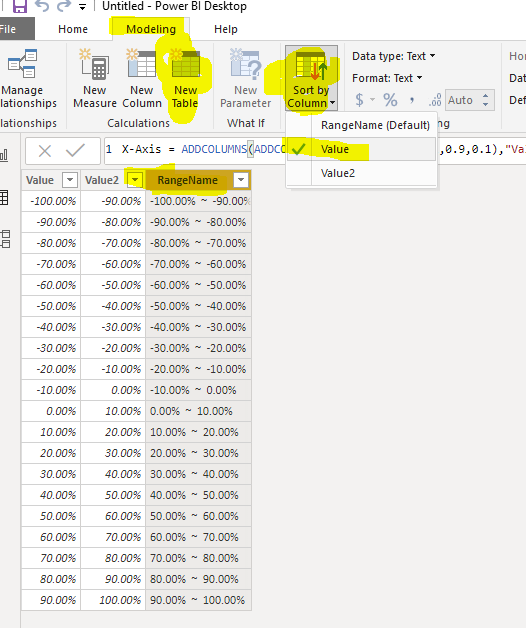
First of all, We can create a calculated table as the Axis:


X-Axis =
ADDCOLUMNS (
    ADDCOLUMNS ( GENERATESERIES ( -1, 0.9, 0.1 ), "Value2", [Value] + 0.1 ),
    "RangeName", FORMAT ( [Value], "Percent" ) & "  ~  "
        & FORMAT ( [Value2], "Percent" )
)
 

9.PNG


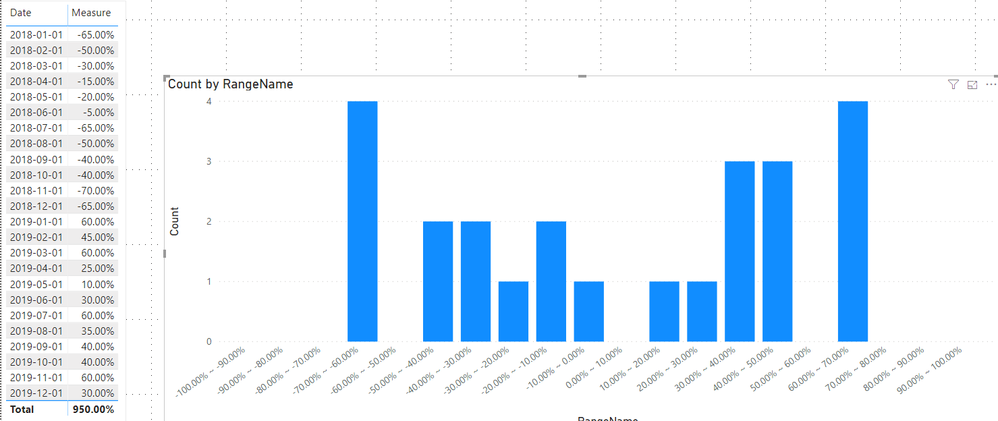
Then we can create a measure to count the value dynamicly


Count =
COUNTROWS (
    FILTER (
        'Table',
        [Measure] >= MIN ( 'X-Axis'[Value] )
            && [Measure] <= MAX ( 'X-Axis'[Value2] )
    )
)
 

10.PNG


If it doesn't meet your requirement, kindly share your sample data and expected result to me if you don't have any Confidential Information. Please upload your files to One Drive and share the link here.


Best regards,


Community Support Team _ Dong Li
If this post helps, then please consider Accept it as the solution to help the other members find it more quickly.

View solution in original post

4 REPLIES 4
Anonymous
Not applicable

Hi guys,

great and clear example. I have an additional question: I have build a distribution measure as suggested, however it seems to be ignoring any date filters I am applying. Any thoughts how I can make it reactive to changes in the date filter? Good to know the measure draws it's data from a different table than the one the COUNTROWS is applied to.

v-lid-msft
Community Support
Community Support

Hi @Anonymous ,


First of all, We can create a calculated table as the Axis:


X-Axis =
ADDCOLUMNS (
    ADDCOLUMNS ( GENERATESERIES ( -1, 0.9, 0.1 ), "Value2", [Value] + 0.1 ),
    "RangeName", FORMAT ( [Value], "Percent" ) & "  ~  "
        & FORMAT ( [Value2], "Percent" )
)


9.PNG


Then we can create a measure to count the value dynamicly


Count =
COUNTROWS (
    FILTER (
        'Table',
        [Measure] >= MIN ( 'X-Axis'[Value] )
            && [Measure] <= MAX ( 'X-Axis'[Value2] )
    )
)


10.PNG


If it doesn't meet your requirement, kindly share your sample data and expected result to me if you don't have any Confidential Information. Please upload your files to One Drive and share the link here.


Best regards,


Community Support Team _ Dong Li
If this post helps, then please consider Accept it as the solution to help the other members find it more quickly.
Anonymous
Not applicable

to avoid a value that lies on the edge of a category being counted in both the the lower and higher categories, I recommend changing the count measure from


Count =
COUNTROWS (
    FILTER (
        'Table',
        [Measure] >= MIN ( 'X-Axis'[Value] )
            && [Measure] <= MAX ( 'X-Axis'[Value2] )
    )
)


to


Count =
COUNTROWS(
    FILTER(
        'Table',
        [Measure]
            MIN( 'X-Axis'[Value] )
            && [Measure]
                <= MAX( 'X-Axis'[Value2] )
    )
)


Anonymous
Not applicable

@v-lid-msft  Excellent !! Works perfect !

Thanks !!

Helpful resources

Announcements
Power BI DataViz World Championships

Power BI Dataviz World Championships

The Power BI Data Visualization World Championships is back! Get ahead of the game and start preparing now!

December 2025 Power BI Update Carousel

Power BI Monthly Update - December 2025

Check out the December 2025 Power BI Holiday Recap!

FabCon Atlanta 2026 carousel

FabCon Atlanta 2026

Join us at FabCon Atlanta, March 16-20, for the ultimate Fabric, Power BI, AI and SQL community-led event. Save $200 with code FABCOMM.