Join us at FabCon Atlanta from March 16 - 20, 2026, for the ultimate Fabric, Power BI, AI and SQL community-led event. Save $200 with code FABCOMM.
Register now!Learn from the best! Meet the four finalists headed to the FINALS of the Power BI Dataviz World Championships! Register now
Hello,
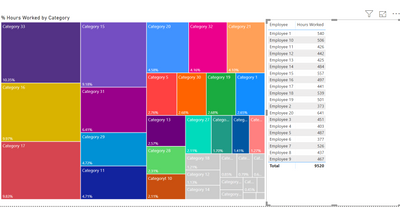
I am trying to create a tree map that has dynamic grouping. The measurement is sum of total hours spent on certain categorys. Some categorys would be customer service, auditing, etc. The top 90% of total hours spent will all be default colors set by microsoft. But I would like to block the bottom 10% into a gray color. The issue is when I filter on one of the employees the conditoinal formatting doesn't change color based on the employee I filter on. It doesn't adjust the conditional formatting to the employee I select.
Here is how the map is unfiltered. Which is what I want.
This is what happens when the dashboard is filtered by employee. You can see those original grey boxes are still grey. I want the conditional formating (lower 10% grey color) to adjust when the table is filtered.
Want it to look like this when filtered by employee.
I'm not sure if this is possible or not. Thank you!
@Anonymous - it appears that the calculation on which the conditional formatting is based could be tweaked to provide the correct results - could you provide that information, or even better a sample pbix?
Of course, here is the calculation I am using is
@Anonymous -
You actually don't need to use a measure for this - the TreeMap % will do the calculation for you on the straight Hours Worked.
However, as you said, the Treemap locks in the colors and does not update dynamically.
A Hack Work-Around: You can switch a Column Chart, apply your rules and then switch back to a TreeMap.
Please let us know whether that works.
Share feedback directly with Fabric product managers, participate in targeted research studies and influence the Fabric roadmap.
Check out the February 2026 Power BI update to learn about new features.
| User | Count |
|---|---|
| 52 | |
| 48 | |
| 38 | |
| 15 | |
| 14 |
| User | Count |
|---|---|
| 93 | |
| 77 | |
| 35 | |
| 28 | |
| 25 |