Don't miss your chance to take the Fabric Data Engineer (DP-600) exam for FREE! Find out how by attending the DP-600 session on April 23rd (pacific time), live or on-demand.
Learn moreNext up in the FabCon + SQLCon recap series: The roadmap for Microsoft SQL and Maximizing Developer experiences in Fabric. All sessions are available on-demand after the live show. Register now
Hello,
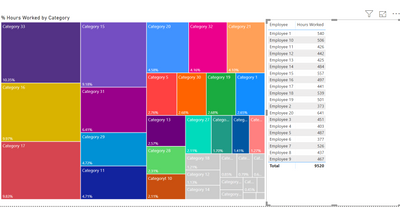
I am trying to create a tree map that has dynamic grouping. The measurement is sum of total hours spent on certain categorys. Some categorys would be customer service, auditing, etc. The top 90% of total hours spent will all be default colors set by microsoft. But I would like to block the bottom 10% into a gray color. The issue is when I filter on one of the employees the conditoinal formatting doesn't change color based on the employee I filter on. It doesn't adjust the conditional formatting to the employee I select.
Here is how the map is unfiltered. Which is what I want.
This is what happens when the dashboard is filtered by employee. You can see those original grey boxes are still grey. I want the conditional formating (lower 10% grey color) to adjust when the table is filtered.
Want it to look like this when filtered by employee.
I'm not sure if this is possible or not. Thank you!
@Anonymous - it appears that the calculation on which the conditional formatting is based could be tweaked to provide the correct results - could you provide that information, or even better a sample pbix?
Of course, here is the calculation I am using is
@Anonymous -
You actually don't need to use a measure for this - the TreeMap % will do the calculation for you on the straight Hours Worked.
However, as you said, the Treemap locks in the colors and does not update dynamically.
A Hack Work-Around: You can switch a Column Chart, apply your rules and then switch back to a TreeMap.
Please let us know whether that works.
If you have recently started exploring Fabric, we'd love to hear how it's going. Your feedback can help with product improvements.
A new Power BI DataViz World Championship is coming this June! Don't miss out on submitting your entry.
| User | Count |
|---|---|
| 46 | |
| 43 | |
| 39 | |
| 19 | |
| 15 |
| User | Count |
|---|---|
| 68 | |
| 67 | |
| 31 | |
| 27 | |
| 24 |