cancel
Showing results for 
Search instead for 
Did you mean: 

Learn from the best! Meet the four finalists headed to the FINALS of the Power BI Dataviz World Championships! Register now

Reply
Anonymous
Not applicable

Dynamic Grouping based on Rank

Hi Everyone,


I want to create group on top of States based up on count of coustomers.

where the rank of customers greater than 5 then it has to group together as 'Others' , rest diaply as it is.

The grouping should be dynamic based on Customers count.


Please find example below:

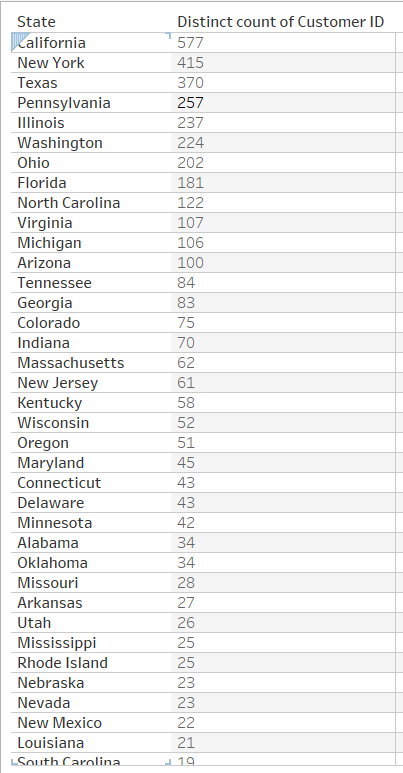
I have data like below Screen shot 1

Screen Shot1.PNG


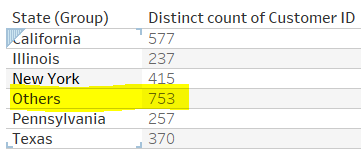
And I have to create a group as below screen shot2 

Screen Shot2.PNG

Need your help,  Thanks,


1 ACCEPTED SOLUTION
Anonymous
Not applicable

Hi @Anonymous,


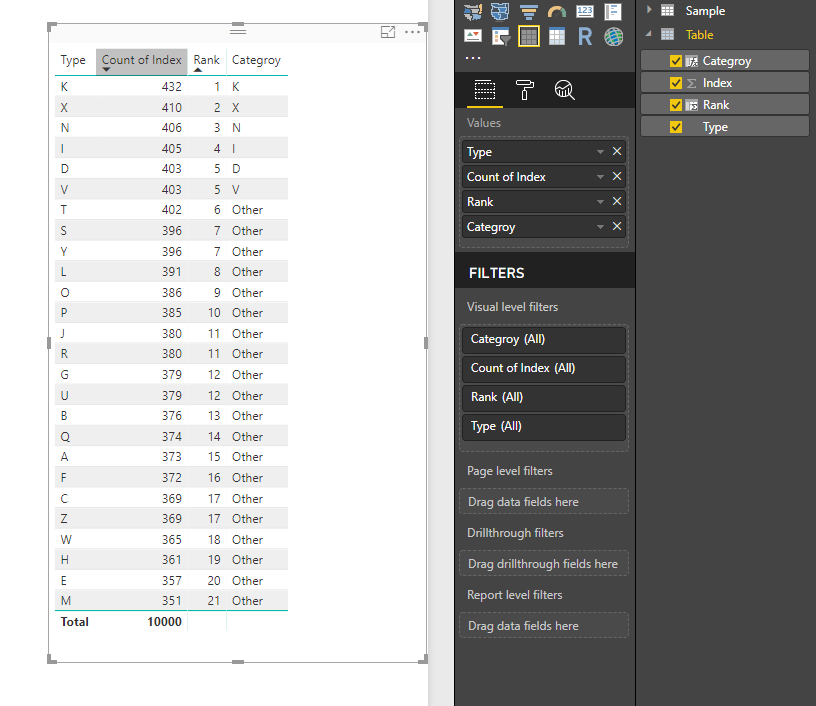
You can try to use below calculated column formula to achieve your requirement.


Logic:

1. Calculate current rank.

2, Add if statement to replace column name to other when rank greater than 5.


Categroy =
VAR summary =
    SUMMARIZE ( 'Table', [Type], "Count", COUNT ( [Index] ) )
VAR _rank =
    MAXX (
        FILTER (
            ADDCOLUMNS (
                summary,
                "Rank", RANKX ( summary, [Count], MAX ( [Count] ), DESC, DENSE )
            ),
            [Type] = EARLIER ( 'Table'[Type] )
        ),
        [Rank]
    )
RETURN
    IF ( _rank <= 5, [Type], "Other" )

11.PNG


Regards,
Xiaoxin Sheng

View solution in original post

3 REPLIES 3
Anonymous
Not applicable

Hi @Anonymous,


You can try to use below calculated column formula to achieve your requirement.


Logic:

1. Calculate current rank.

2, Add if statement to replace column name to other when rank greater than 5.


Categroy =
VAR summary =
    SUMMARIZE ( 'Table', [Type], "Count", COUNT ( [Index] ) )
VAR _rank =
    MAXX (
        FILTER (
            ADDCOLUMNS (
                summary,
                "Rank", RANKX ( summary, [Count], MAX ( [Count] ), DESC, DENSE )
            ),
            [Type] = EARLIER ( 'Table'[Type] )
        ),
        [Rank]
    )
RETURN
    IF ( _rank <= 5, [Type], "Other" )

11.PNG


Regards,
Xiaoxin Sheng

Hi Xiaoxin,


I have a similar problem and your solution looks pretty neat.


Would you help me adapt your script to group [Type] by the share %?


In this example, if COUNT( [Index] ) as % of Total < 4% then "Other".


Many thanks!


Fiorenzo

Anonymous
Not applicable

It is working perfect as expected. Thanks much Xiaoxin Sheng...!

Helpful resources

Announcements
Join our Fabric User Panel

Join our Fabric User Panel

Share feedback directly with Fabric product managers, participate in targeted research studies and influence the Fabric roadmap.

March Power BI Update Carousel

Power BI Community Update - March 2026

Check out the March 2026 Power BI update to learn about new features.