cancel
Showing results for 
Search instead for 
Did you mean: 

The Power BI Data Visualization World Championships is back! Get ahead of the game and start preparing now! Learn more

Reply
Anonymous
Not applicable

Dynamic Filter using TopN or Rank/RankX

Hi, I created a TopN filter and an Rank on a field in a table. I also created a filter with a slider.

My qustion is how could I use that slider as a filter, so that if a user wants to 5 records, the slide it to 5, or 6, 7, etc.

I have a default setting of showing 5 records but would love to give a user the ability to choose as many as they'd like. 

thank you.

1 ACCEPTED SOLUTION
v-angzheng-msft
Community Support
Community Support

Hi, @Anonymous 

Step 1: Create a ranking measure

_Rank = 
RANKX(ALLEXCEPT(financials,'financials'[Country],financials[Product]),CALCULATE(SUM(financials[Profit])),,DESC,Dense)

Step 2: Create a What If parameter (GENERATESERIES(1, 100, 1))

Step 3: Create a measure that controls whether records are displayed

_Show = 
IF([_Rank]<='_Selected Records'[_Selected Records Value],1,0)

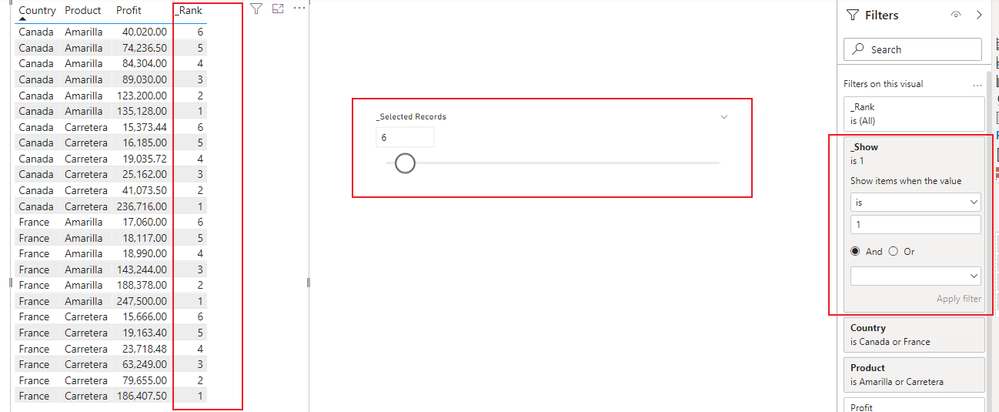
Step 4: In the filter pane, filter for items where the measure of Step 3 is equal to 1

vangzhengmsft_0-1646100345135.png

Please refer to the attachment below for details.

Hope this helps.


Best Regards,
Community Support Team _ Zeon Zheng


If this post helps, then please consider Accept it as the solution to help the other members find it more quickly.

View solution in original post

2 REPLIES 2
v-angzheng-msft
Community Support
Community Support

Hi, @Anonymous 

Step 1: Create a ranking measure

_Rank = 
RANKX(ALLEXCEPT(financials,'financials'[Country],financials[Product]),CALCULATE(SUM(financials[Profit])),,DESC,Dense)

Step 2: Create a What If parameter (GENERATESERIES(1, 100, 1))

Step 3: Create a measure that controls whether records are displayed

_Show = 
IF([_Rank]<='_Selected Records'[_Selected Records Value],1,0)

Step 4: In the filter pane, filter for items where the measure of Step 3 is equal to 1

vangzhengmsft_0-1646100345135.png

Please refer to the attachment below for details.

Hope this helps.


Best Regards,
Community Support Team _ Zeon Zheng


If this post helps, then please consider Accept it as the solution to help the other members find it more quickly.

mh2587
Super User
Super User

You can get it from topN filter on filter pane


Did I answer your question? If so, please mark my post as a solution!


Proud to be a Super User!


LinkedIn Icon
Muhammad Hasnain


Helpful resources

Announcements
Power BI DataViz World Championships

Power BI Dataviz World Championships

The Power BI Data Visualization World Championships is back! Get ahead of the game and start preparing now!

December 2025 Power BI Update Carousel

Power BI Monthly Update - December 2025

Check out the December 2025 Power BI Holiday Recap!

FabCon Atlanta 2026 carousel

FabCon Atlanta 2026

Join us at FabCon Atlanta, March 16-20, for the ultimate Fabric, Power BI, AI and SQL community-led event. Save $200 with code FABCOMM.