Join us at FabCon Atlanta from March 16 - 20, 2026, for the ultimate Fabric, Power BI, AI and SQL community-led event. Save $200 with code FABCOMM.
Register now!Learn from the best! Meet the four finalists headed to the FINALS of the Power BI Dataviz World Championships! Register now
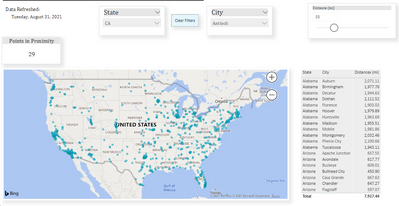
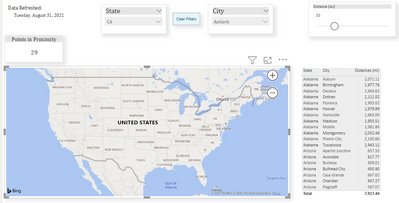
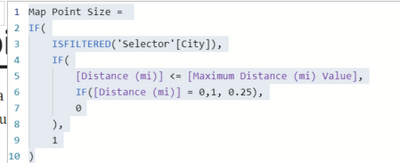
I'm following the https://dataveld.com/2019/03/20/display-points-within-a-distance-radius-on-a-power-bi-map/ to create points within a distance radius on a simple pbi map. I have everything working except the Map Point Size is not working which then doesn't display any points on the map. Below is the map point size measure. Do I need to change something to get my points to show up on the map. According to David Eldersveld, the map point size is a parameter for a variable distance threshold. With this parameter factoring into a size measure, it shows only points that fall within the user-selected maximum distance. All points the don’t meet the IF condition do not display on the map. When I take off the map point size under size the dots show up but then the distance slider won't work.
With map point size under size
Solved! Go to Solution.
Hi @dwel0120 ,
Try:
Map Point Size =
IF (
ISFILTERED ( 'Selector'[City] ),
IF (
[Distance (mi)] <= [Maximum Distance (mi) Value],
IF ( [Distance (mi)] = 0, 1, 0.25 ),
0
),
1
)
Best Regards,
Kelly
Did I answer your question? Mark my reply as a solution!
Hi @dwel0120 ,
Try:
Map Point Size =
IF (
ISFILTERED ( 'Selector'[City] ),
IF (
[Distance (mi)] <= [Maximum Distance (mi) Value],
IF ( [Distance (mi)] = 0, 1, 0.25 ),
0
),
1
)
Best Regards,
Kelly
Did I answer your question? Mark my reply as a solution!
Hi @dwel0120 ,
Can you share me your .pbix file with some dummy data for test?
Remember to remove the confidential information.
Best Regards,
Kelly
Did I answer your question? Mark my reply as a solution!
Your original code change worked!! I had switched the data source in one of the values I was tyring and forgot to switch back. Thank you so much!! I have been trying to figure this out for days. I really appreciate it!
Hi @dwel0120 ,
Glad to help.🙂
Best Regards,
Kelly
Did I answer your question? Mark my reply as a solution!
Share feedback directly with Fabric product managers, participate in targeted research studies and influence the Fabric roadmap.
Check out the February 2026 Power BI update to learn about new features.
| User | Count |
|---|---|
| 50 | |
| 49 | |
| 35 | |
| 15 | |
| 14 |
| User | Count |
|---|---|
| 91 | |
| 75 | |
| 41 | |
| 26 | |
| 25 |