Don't miss your chance to take the Fabric Data Engineer (DP-700) exam on us!
Learn moreWe've captured the moments from FabCon & SQLCon that everyone is talking about, and we are bringing them to the community, live and on-demand. Starts on April 14th. Register now
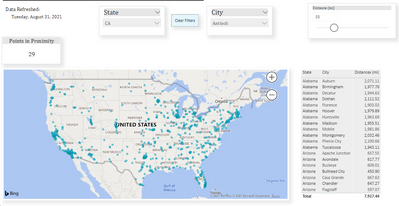
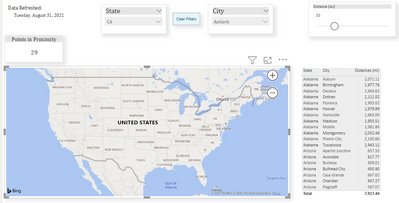
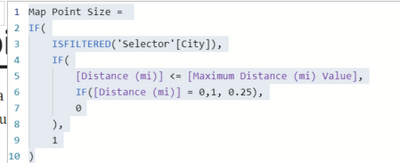
I'm following the https://dataveld.com/2019/03/20/display-points-within-a-distance-radius-on-a-power-bi-map/ to create points within a distance radius on a simple pbi map. I have everything working except the Map Point Size is not working which then doesn't display any points on the map. Below is the map point size measure. Do I need to change something to get my points to show up on the map. According to David Eldersveld, the map point size is a parameter for a variable distance threshold. With this parameter factoring into a size measure, it shows only points that fall within the user-selected maximum distance. All points the don’t meet the IF condition do not display on the map. When I take off the map point size under size the dots show up but then the distance slider won't work.
With map point size under size
Solved! Go to Solution.
Hi @dwel0120 ,
Try:
Map Point Size =
IF (
ISFILTERED ( 'Selector'[City] ),
IF (
[Distance (mi)] <= [Maximum Distance (mi) Value],
IF ( [Distance (mi)] = 0, 1, 0.25 ),
0
),
1
)
Best Regards,
Kelly
Did I answer your question? Mark my reply as a solution!
Hi @dwel0120 ,
Try:
Map Point Size =
IF (
ISFILTERED ( 'Selector'[City] ),
IF (
[Distance (mi)] <= [Maximum Distance (mi) Value],
IF ( [Distance (mi)] = 0, 1, 0.25 ),
0
),
1
)
Best Regards,
Kelly
Did I answer your question? Mark my reply as a solution!
Hi @dwel0120 ,
Can you share me your .pbix file with some dummy data for test?
Remember to remove the confidential information.
Best Regards,
Kelly
Did I answer your question? Mark my reply as a solution!
Your original code change worked!! I had switched the data source in one of the values I was tyring and forgot to switch back. Thank you so much!! I have been trying to figure this out for days. I really appreciate it!
Hi @dwel0120 ,
Glad to help.🙂
Best Regards,
Kelly
Did I answer your question? Mark my reply as a solution!
If you have recently started exploring Fabric, we'd love to hear how it's going. Your feedback can help with product improvements.
A new Power BI DataViz World Championship is coming this June! Don't miss out on submitting your entry.
Share feedback directly with Fabric product managers, participate in targeted research studies and influence the Fabric roadmap.
| User | Count |
|---|---|
| 55 | |
| 34 | |
| 32 | |
| 19 | |
| 17 |
| User | Count |
|---|---|
| 75 | |
| 72 | |
| 38 | |
| 35 | |
| 25 |