Hello,
I'm working on a report on profitability, and one of the requests was to separate line-items into decile groups (i.e. separate into 10 relatively equal groups with statistics on each group). For the entire population this is relatively simple using a calculated column with RANKX(). However they also want to be able to filter data (such as selecting a single region), and have the Decile grouping for only that filtered data. Unfortunately the number of filters that could potentially be applied is significant, so I'm trying to find a way to create a dynamic decile grouping.
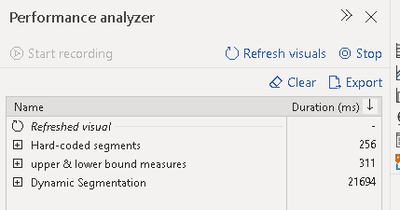
Based on other posts my understanding is that binning and RANKX() won't work since they only calculate at data-refresh. I was able to use a measure with a disconnected "Deciles" table to achieve the result; however it has extremely poor performance in visuals. Up until about 10K rows it works (although can take 40 seconds), but when testing with 100K+ rows I've never gotten it to finalize.
In order to diagnose, I've only been trying to count the number of rows in each Decile.
My example dataset is just a large list of numbers from 0 to 10,000 with 0.1 increments (0.0, 0.1, 0.2, ... , 9999.98, 9999.99) using the following M Query, which creates the table "Dataset" with a single column "Values"
let
Source = List.Generate(() => 0, each _ <10000, each _ + 0.1),
#"Converted to Table" = Table.FromList(Source, Splitter.SplitByNothing(), null, null, ExtraValues.Error),
#"Renamed Columns" = Table.RenameColumns(#"Converted to Table",{{"Column1", "Values"}})
in
#"Renamed Columns"
I'm then creating a Deciles table that is just numbers 1-10, increment of 1 (1, 2, ... , 9, 10). Then creating a measure in the Deciles table to count the number of rows in each decile. Of note, I'm actually reversing the order so that Decile 1 = 10th decile and Decile 10 = 1st decile (as requested by the business).
Decile size =
VAR UpperBound = PERCENTILE.INC('Dataset'[Values],1.1 - MIN(Deciles[Decile])/10)
VAR LowerBound = PERCENTILE.INC('Dataset'[Values],1 - MIN(Deciles[Decile])/10)
Return
CALCULATE(
COUNTROWS('Dataset')
,'Dataset'[Values] <= UpperBound && 'Dataset'[Values] > LowerBound
)
Finally I'm trying to show the Decile and Decile Size fields (both from the Deciles table) in a table visual, with no summarization on the Decile field. If I limit the data to 10K rows it will work; however when I expand to 100K it the Visual won't finish updating. This presents an issue because my true data has substantially more data (280K rows with potential to increase).
Below is what I would expect to see in the visual if it finalized.
| Decile | Decile size |
| 1 | 10000 |
| 2 | 10000 |
| 3 | 10000 |
| 4 | 10000 |
Any help would be appreciated. I feel like this may be beyond the capabilities of Power BI at the moment, but I want to explore all options.